Page 79 of 109
Re: RegExp Find & Replace 4.3 w/ 253 presets (2011-07-06) [M
Posted: Thu May 05, 2016 3:25 pm
by MMFrLife
husker wrote:but the MediaMonkey search feature does not seem to be case sensitive.
That is a Windows issue not MM's.
I don't have MM in front of me right now, will look into an idea later unless someone else comes around.
Re: RegExp Find & Replace 4.3 w/ 253 presets (2011-07-06) [M
Posted: Thu May 05, 2016 5:03 pm
by MMFrLife
I just tested the Preset I gave you and it seems to work.
In what way is it not working? Does it mess with other words in the title/filename to your disliking?
Can you copy and paste the exact wording of a title(s) that you want changed here?
Re: RegExp Find & Replace 4.3 w/ 253 presets (2011-07-06) [M
Posted: Thu May 05, 2016 7:11 pm
by husker
Sure -
02 - Symphony No. 33 In B flat major, KV319 - Ii. Andante moderato
I have 22,000 files or so that would need to be checked. I would actually be more interested in just finding them to begin with.
Re: RegExp Find & Replace 4.3 w/ 253 presets (2011-07-06) [M
Posted: Thu May 05, 2016 7:53 pm
by MMFrLife
Finding them won't be easy but you can try:
1. Go to Tools > Options > Library > search > uncheck everything but title and path > check "match whole words" at bottom.
2. Go over to the tree > Select > classical
3. Go to search scope drop-down arrow next to simple search field > choose classical.
This is the tedious part,
4. start by typing into simple search wherever you want to start in the sequence of roman numerals, for example, type [path:"i."] (with quotes, but not brackets.
be careful not to put a space after colon)
5. if you find a select group you want, try the other Capitalize preset that doesn't say exceptions.
If it is a big I or a little i, it should bring back results for both which could get tedious, but is better than going in without any particular strategy.
You might have to alternate between the two presets to get a desired result depending on the variation in roman numeral format.
Re: RegExp Find & Replace 4.3 w/ 253 presets (2011-07-06) [M
Posted: Thu May 05, 2016 8:55 pm
by husker
Thank you. I had been working in a similar manual function over the past few weeks. I was just hoping there would be an automated way.
Thank you for taking the time.
Re: RegExp Find & Replace 4.3 w/ 253 presets (2011-07-06) [M
Posted: Sat May 07, 2016 6:23 am
by ZvezdanD
This preset could find any roman numerals from 1 to 89 followed by dot, uppercase or lowercase:
Find what: \b[ivxl]+\.
Regular expression (F.): checked
Match case: unchecked
Re: RegExp Find & Replace 4.3 w/ 253 presets (2011-07-06) [M
Posted: Sat May 07, 2016 4:59 pm
by Camus II
I have 22,000 files or so that would need to be checked. I would actually be more interested in just finding them to begin with.
The following Magic Node should isolate the tracks if genre is tagged as Classical. You'll find it as the first node under Magic Nodes in the tree:
Code: Select all
Tracks with Roman Numerals in Classical Title|Icon:3|Filter:<Genre> = 'Classical' AND (InStr(<Title>, 'I. ') > 0 OR InStr(<Title>, 'V. ') > 0 OR InStr(<Title>, 'X. ') > 0 OR InStr(<Title>, 'i. ') > 0 OR InStr(<Title>, 'v. ') > 0 OR InStr(<Title>, 'x. ') > 0)|Position:First child\<Genre>\<Album>
And following on from ZvezdanD's lead, the following regexp should convert the numerals as wanted. Make sure to test and use gradually for safety:
==============
Title: Roman Numerals (1 - 39) as Mvt. No. in Classical Title field - Ucase 1st, Lcase rest.
Description: Capitalise first Roman Numeral only eg XIV. => Xiv.
Find What: \b([IVX])([IVX]+)?(\.)
Into: Title
Regular expression 1: checked
Replace with: UCase("$1") & LCase("$2") & "$3"
<<: Title
VBScript expression: checked
==============
Re: RegExp Find & Replace 4.3 w/ 253 presets (2011-07-06) [M
Posted: Mon May 09, 2016 2:35 pm
by sordup
Hiya,
Forgive the possibly newbie-ish question. I am a longtime user of MM and occasional user of Find and Replace but not often enough to know my regular expression syntax well. I want to modify the " Copy <From Field> to <Into Field>... ", or another more suitable one.
I am looking to copy a specific portion of a field, of only X characters in length, into another field, replacing whatever, if any, string was there before.
Specifically, I have many folders categorizing albums/tracks by Date. The date, in its 4-character year form, is conveniently at the beginning of every folder name. I wish to copy these first 4 characters into the Date or Original Date field of each of their respective tracks.
Thanks
Re: RegExp Find & Replace 4.3 w/ 253 presets (2011-07-06) [M
Posted: Sat May 14, 2016 3:53 am
by quietroom
Hi, Can anyone help me I have a field in properties called "Encoded By" which I need to clean / clear any help I would be gratefull
Re: RegExp Find & Replace 4.3 w/ 253 presets (2011-07-06) [M
Posted: Sat May 14, 2016 6:28 am
by MMFrLife
quietroom wrote:Hi, Can anyone help me I have a field in properties called "Encoded By" which I need to clean / clear any help I would be gratefull
If you are using RFR, use "Clear <Into Field>" preset
Go to
into field drop down menu and choose the field that has that string in it.
Otherwise, if you are just doing a
simple clear, it's easier to use properties.
Re: RegExp Find & Replace 4.3 w/ 253 presets (2011-07-06) [M
Posted: Sat May 14, 2016 8:37 am
by quietroom
Thank you for the quick reply MMFrLife but there is no field in RFR called "Encoded By" or is there a field in properties showing this. So I still need help to cure this problem. Once again MMFrLife thanks for your help.
Re: RegExp Find & Replace 4.3 w/ 253 presets (2011-07-06) [M
Posted: Sat May 14, 2016 9:06 am
by MMFrLife
quietroom wrote:but there is no field in RFR called "Encoded By" or is there a field in properties showing this.
There is no field that is natively named "Encoded by". The only way this would occur is if you name a custom field by that name.
Otherwise, you would just have the words "Encoded by" contained in a field by another name, like
Encoder,
Grouping or any other.
That string is often filled into the
Encoder field by programs used to rip discs.
Can you you describe in greater detail what you are seeing, please?
I need the name of the field and what's in it.
Re: RegExp Find & Replace 4.3 w/ 253 presets (2011-07-06) [M
Posted: Sat May 14, 2016 2:20 pm
by quietroom
Hi MMFrLife thanks for your time the field is called Encoded By and contains Flac or similar ripping information or itunes stuff I will try to show you an image of it.
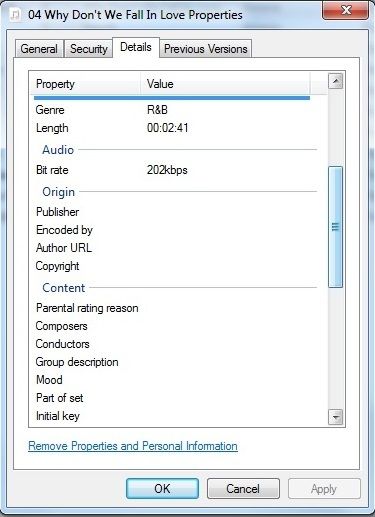
I hope this gives you some idea and once again thanks Regards Quietroom
Re: RegExp Find & Replace 4.3 w/ 253 presets (2011-07-06) [M
Posted: Sat May 14, 2016 2:27 pm
by MMFrLife
What file format (DRM?)?
Does the info in the field show up in any of the fields in MM (check through all the tabs in MM properties)?
Re: RegExp Find & Replace 4.3 w/ 253 presets (2011-07-06) [M
Posted: Sat May 14, 2016 6:25 pm
by sordup
No ideas on how to achieve this??...
sordup wrote:Hiya,
Forgive the possibly newbie-ish question. I am a longtime user of MM and occasional user of Find and Replace but not often enough to know my regular expression syntax well. I want to modify the " Copy <From Field> to <Into Field>... ", or another more suitable one.
I am looking to copy a specific portion of a field, of only X characters in length, into another field, replacing whatever, if any, string was there before.
Specifically, I have many folders categorizing albums/tracks by Date. The date, in its 4-character year form, is conveniently at the beginning of every folder name. I wish to copy these first 4 characters into the Date or Original Date field of each of their respective tracks.
Thanks
