Page 2 of 5
Re: 1242 - Autosync - Playlist Names Truncated
Posted: Tue May 05, 2009 8:12 am
by nynaevelan
rusty wrote:Nyn,
The existence of the USB MS and iPod plugins shouldn't impact performance of the MTP plugin, but the fact that you're observing general performance problems (e.g. the playback/focus issue) makes me think that a more general problem is occuring (either general to MediaMonkey or to your machine).
-Were both builds that you tested non-debug builds?
No, I only use the debug builds.
rusty wrote:-Are the stats you've given re sync times for the same machine/same OS?
-Rusty
Yes, these are for the same machine, which is a Vista Ultimate machine. This is the only machine which I use to sync any of my players. I will try to test this weekend with a build that does not have any scripts installed but because I use my player on a daily basis, I cannot test it during the week.
Nyn
Re: 1242 - Autosync - Playlist Names Truncated
Posted: Tue May 05, 2009 3:02 pm
by rusty
Anyone else seeing a performance regression in build 1242?
-Rusty
Re: 1242 - Autosync - Playlist Names Truncated
Posted: Tue May 05, 2009 4:43 pm
by nynaevelan
Rusty:
I created a debug log, you can download from
here.
Nyn
Re: 1242 - Autosync - Playlist Names Truncated
Posted: Tue May 05, 2009 6:53 pm
by nynaevelan
Here's another example of performance degradation. I selected Maintain Library - Full Optimization a few seconds before a track was about to end. When the track ended, MM did not transition to the next track until the optimization was done, which was a minute or two.
Nyn
Re: 1242 - Autosync - Playlist Names Truncated
Posted: Thu May 07, 2009 10:15 am
by Lowlander
nynaevelan wrote:Here's another example of performance degradation. I selected Maintain Library - Full Optimization a few seconds before a track was about to end. When the track ended, MM did not transition to the next track until the optimization was done, which was a minute or two.
Nyn
This probably due to a database lock being applied as previously the optimization would fail when tracks were playing while optimizing the database.
Possible, and this behavior I can deal with. However, I am still working to get my Zens to sync correctly.
Re: 1242 - Autosync - Playlist Names Truncated
Posted: Thu May 07, 2009 10:24 am
by nynaevelan
Possibly and I can handle and accept this behavior. In the meantime I am still trying to get my Zens to sync correctly, this is getting very frustrating, I've had to clear them twice. It appears 1242 does not like to sync correctly when another build had been used to previously sync with. I am testing 1244 now to see if they will sync right. But as Chrissjj pointed out in another thread MM is syncing fine for an initial sync but as soon as you start incremental syncs, things start to go haywire. This is the first time I've had so much trouble with MM and it is really starting to get frustrating.
Nyn
Re: 1242 - Autosync - Playlist Names Truncated
Posted: Sat May 16, 2009 10:35 pm
by nynaevelan
While it is good news that the testing cycle is close to an end and 3.1 will be released soon, it is very disconcerting to know that this will go into production with the syncing for Zen devices in such disarray. I am constantly plagued with incorrect syncing for my playlists with the latest builds. I cannot successfully sync all my tracks and playlists with these builds unless the sync is an initial sync. Any incremental syncs leads to missing tracks and/or incorrect playlists. I have spent the last several hours just trying to get 1 playlist with 10 tracks to sync correctly, for some reason there was 1 track that was not syncing to the playlist on the player. And the only way I was able to get it done was to delete the playlist and the "missing" track. And each time I ran the sync, I got the box stating it was removing X tracks from the device because they were not on the autosync list, none of my autosync playlists are autoplaylists and since I had made no changes between each syncing cycle there should be no changes in the tracks which are on the device. Is this going to be addressed at all or do I indeed need to use Winamp or some other program to sync my device? I have not been able to sync my device anywhere near it's capacity because it is getting too cumbersome to try to determine if I am missing tracks and playlists. I should not have to go through 78 playlists manually just to ensure they have synced correctly. Am I ever going to be able to be confident that MM is syncing my device correctly?
Rant over.

Nyn
Re: 1242 - Autosync - Playlist Names Truncated
Posted: Sat May 16, 2009 11:27 pm
by nynaevelan
Here is an example of a sync box of tracks which needs to be removed because the previous sync put them in the wrong folder:
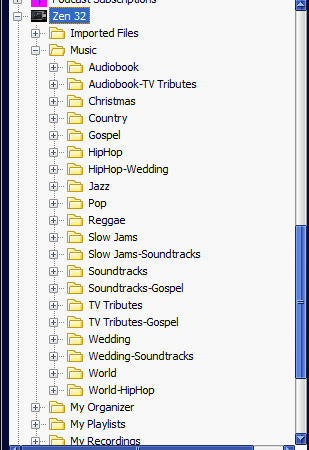
And before you ask these tracks have not been changed or moved since the previous sync 5 minutes prior. All of these tracks have a single genre and my tracks are set up to sync to
\Music\$First(<Genre>)\$First(<Artist>) - <Title>.
Nyn
Re: 1242 - Autosync - Playlist Names Truncated
Posted: Mon May 18, 2009 8:19 am
by Ludek
Nyn,
I am not glad to hear this.
Unfortunatelly I don't have Zen to test, but the only change between 1240 and 1242 that could influence this was
http://www.ventismedia.com/mantis/view.php?id=5499
but only in case you have the root '[x] Playlists' node ticked in order to sync all your playlists, do you have the checkbox ticked?
Re: 1242 - Autosync - Playlist Names Truncated
Posted: Mon May 18, 2009 8:35 am
by nynaevelan
Ludek wrote:Nyn,
I am not glad to hear this.
Unfortunatelly I don't have Zen to test, but the only change between 1240 and 1242 that could influence this was
http://www.ventismedia.com/mantis/view.php?id=5499
but only in case you have the root '[x] Playlists' node ticked in order to sync all your playlists, do you have the checkbox ticked?
Ludek:
No, the playlist node or any of the parent playlists are ticked, the only ones ticked are the actual playlists that should be syncing.
Nyn
Re: 1242 - Autosync - Playlist Names Truncated
Posted: Tue May 19, 2009 1:47 pm
by nynaevelan
It seems I am not the only one having problems syncing my Zen as disscussed
here.
Nyn
Re: 1242 - Autosync - Playlist Names Truncated
Posted: Wed May 20, 2009 10:19 pm
by nynaevelan
Am I talking to myself here???
Re: 1242 - Autosync - Playlist Names Truncated
Posted: Thu May 21, 2009 5:28 am
by jiri
Unfortunatelly, we haven't found any possible problem in MM. There hasn't been any related change in synchronization for quite some time, so I'm not really sure why do you see the changes you are describing. Have you tried to go back several builds and make sure that pre-1240 builds really work differently for you than the newer ones?
Jiri
Re: 1242 - Autosync - Playlist Names Truncated
Posted: Thu May 21, 2009 6:54 am
by nynaevelan
jiri wrote:Unfortunatelly, we haven't found any possible problem in MM. There hasn't been any related change in synchronization for quite some time, so I'm not really sure why do you see the changes you are describing. Have you tried to go back several builds and make sure that pre-1240 builds really work differently for you than the newer ones?
Jiri
I will give this a try to see if it works.
Nyn
Re: 1242 - Autosync - Playlist Names Truncated
Posted: Thu May 21, 2009 3:02 pm
by nynaevelan
Ok:
I used an SQL statement in Bex's SQL Viewer script to remove the player from the devices table, and to fully clean things up I deleted all references to the tracks linked to that device in the DeviceTracks table. While I was in there I noticed there were ALOT of tracks linked to devices that I have not had in MM in a long time, some more than a year ago (back to this topic in a minute). I re-created the profile for my device and completed some syncs. So far, I have completed three syncs and they are syncing as they should be. I will test some more this weekend before I am confident that MM is performing syncs as it should be.
Now back to the DeviceTracks table. I have several questions:
1. Can a developer tell me why this table is not being cleared out if the device is no longer in the Devices table?
2. What other tables within the DB has junk in it that is no longer relevant or correctly linked?
3. What is the purpose of the Maintain DB option if it is not cleaning out this useless junk? And yes I run this process on a weekly basis but I still end up with phenomenon's that no one else seems to encounter. Is it something I am doing or is MM incapable of handling a db in a way that I need it?
And I would appreciate some answers to my questions because I am really starting to get concerned about the degradation of my db, is MM capable of maintaining a library for a significant amount of time? This db is less than 2 years old but I seem to always have problems with my db and junk messing things up. To say I am getting frustrated is an understatement.
Nyn