Page 30 of 78
Re: Monkey Rok 5.3 - Updated 27/06/2010
Posted: Fri Jul 09, 2010 6:30 pm
by Bex
I didn't know that the Song Information Panel script could display the Auto-playlists a song was included in, so I had to check the code to see how Mr Eriksson had done it. Here's the code. Pretty smart and probably the only way to do it, but horribly slow. It would have been nice to be able to get the SQL from an auto-playlist, just as we can with Filters, that would make this task much, much faster. I think I'll add a wish for it in Mantis.
Here's Eriksson's code:
Code: Select all
Function AutoPlaylists(intID)
  AutoPlaylists = ""
  If Not intID = "-1" Then
    Dim sql  : sql = "SELECT PlaylistName FROM Playlists WHERE IsAutoPlaylist = 1 ORDER BY PlaylistName"
    Dim dbit : Set dbit = SDB.Database.OpenSQL(sql)
      If Not dbit.EOF Then
        While Not dbit.EOF
          Set PList = SDB.PlaylistByTitle(dbit.StringByIndex(0))
          Set List = Plist.Tracks
          For i = 0 To List.Count - 1
            If List.Item(i).ID = intID Then
              AutoPlaylists = AutoPlaylists & "<span class=""autoplaylists"">" & PList.Title & "</span><br />"
            End If
          Next
          dbit.Next
        Wend
      End If

    Set dbit = Nothing
  End If
End Function
EDIT, Added this to Mantis:
http://www.ventismedia.com/mantis/view.php?id=6412
Re: Monkey Rok 5.3 - Updated 27/06/2010
Posted: Fri Jul 09, 2010 7:09 pm
by Saiyavenger
trixmoto wrote:There's no way to include autoplaylists as the link does go from track to autoplaylists but only from autoplaylists to track. If there was a way to get the SQL command for an autoplaylist (which there isn't) then it would be possible to build a list of track IDs and then loop through to see if the current ID is in there, but this would be very inefficient.
Ah, ok. Just checking!
Re: Monkey Rok 5.3 - Updated 27/06/2010
Posted: Sat Jul 10, 2010 4:40 am
by trixmoto
The problem autoplaylists is exactly the fact that they are automatic. If they are limited in some way (like ordered randomly and then limited to top 50) then sometimes the track will be in the autoplaylist and sometimes it won't. But I think this code could be improved with some caching possibly, I'll take a look in the next version, but no promises.
Re: Monkey Rok 5.3 - Updated 27/06/2010
Posted: Sat Jul 10, 2010 8:22 am
by Bex
Yes, you're right regarding Top X Random order in AutoPlaylists, good thinking! I wonder if they could be identified and excluded?
Re: Monkey Rok 5.3 - Updated 27/06/2010
Posted: Sat Jul 10, 2010 10:59 am
by trixmoto
Not currently, as far as I'm aware. The autoplaylist conditions are stored within the database in a way that I can't distinguish them and there seems to be no helpful properties in the API. I'm not sure what would be useful, but certainly access to the SQL like with filters would be a good start.
Re: Monkey Rok 5.3 - Updated 27/06/2010
Posted: Sun Jul 11, 2010 10:03 pm
by theta_wave
Sasquatch wrote:I must really be dense. What am I doing wrong? I get the "...cannot display the webpage" message in the Monkey Rok panel. Odd, since I have no problems connecting to webpages otherwise. I was able to solve the "installation error" message by running MM as administrator, but now the no-webpage problem has me stymied. Suggestions?
Even though all versions of monkeyrok worked for me prior to using 5.x (5.3 being my first), I am getting this error message too (see screen capture). Before, I had to go into my registry and add a few values to get monkeyrok up and running after encountering activex errors (version 4.x). I uninstalled a working version of 4.1 (okay, clicking on the album art didn't bring up the artwork anymore) and installed 5.3. Now I get a "This program cannot display the webpage" error. I adjusted the internet and local intranet zones to low and restarted mediamonkey. I get the same blank page. I am using windows7's generic firewall, so I do not think this should be a problem since 4.1 was working a few moments ago. I use mediamonkey from my nonadmin account btw.
http://i26.tinypic.com/2lo3ndi.jpg
Re: Monkey Rok 5.3 - Updated 27/06/2010
Posted: Mon Jul 12, 2010 11:20 am
by trixmoto
Which skin are you using?
Re: Monkey Rok 5.3 - Updated 27/06/2010
Posted: Mon Jul 12, 2010 2:47 pm
by theta_wave
trixmoto wrote:Which skin are you using?
wmp11, which I also customized here and there. When I uninstalled monkeyrok 4.1, I made sure to remove the directory associated with it, including the wmp11 skin I had for it. I do not think it should be an issue with the skin I used since it seems that cannot display the css code used for your script.
here it is with monkeyrok 4.1 working:
http://i31.tinypic.com/3465frq.jpg
Actually I figured out why the album art was not showing when clicked (v4.1): I had to change the regional zone back to English (US). I had it set something else for a moment when trying something out.
Re: Monkey Rok 5.3 - Updated 27/06/2010
Posted: Mon Jul 12, 2010 4:57 pm
by trixmoto
The "wmp11" skin won't work on 5.3 as far as I'm aware - have you tried one of the "classic" skins?
Re: Monkey Rok 5.3 - Updated 27/06/2010
Posted: Mon Jul 12, 2010 6:47 pm
by theta_wave
trixmoto wrote:The "wmp11" skin won't work on 5.3 as far as I'm aware - have you tried one of the "classic" skins?
Yeah, when I first installed monkeyrok 5.3 in my admin account (stupid mediamonkey for having to use admin access for script installation), the mediamonkey there is barebones with everything at default. That is when I first saw the error.
Re: Monkey Rok 5.3 - Updated 27/06/2010
Posted: Sat Jul 17, 2010 9:32 am
by EonDel
Every since version 5 I get the blank "This progrma cannot display the webpage screen. Is there a setting I need to tweak?
Re: Monkey Rok 5.3 - Updated 27/06/2010
Posted: Sat Jul 17, 2010 9:49 am
by nohitter151
EonDel wrote:Every since version 5 I get the blank "This progrma cannot display the webpage screen. Is there a setting I need to tweak?
Try one of the classic skins in the MonkeyRok options.
Re: Monkey Rok 5.3 - Updated 27/06/2010
Posted: Sat Jul 17, 2010 10:03 am
by EonDel
that did it, thanks
Re: Monkey Rok 5.3 - Updated 27/06/2010
Posted: Sun Jul 18, 2010 10:12 pm
by rrfpacker
I've got questions regarding MR now that I've looked at it closer.
Statistics
I like most of them, but one is driving me crazy "Top 10 Rated Albums" and here's why. I have hundreds of single songs from an individual albums and some of them are rated 4 stars and higher. Therefore, my top 10 rated albums are actually single songs. I've looked through the settings and can't see any way to either get rid of the category or set it correctly...correctly meaning the album should have at least 8 (IMO) songs in order to be included. What am I missing?
What about being able to choose which statistics are visible? I don't really use the "Tracks per Album" or "Tracks per Genre" or "Tracks per Year". Are there other statistics that might be better?
Tabs
I can't keep the tabs visible. If I change albums, artists, or almost anything else the tabs disappear. I have to make MR reset itself in order to get tabs back. Also, Artist Comment and Album Comment do not show up as external panels (I know how to enter the info, it doesn't show up) but Lyrics and Playlists do.
Attached is screen shot. The two little tabs between Biography and Albums By are Lyrics and Played (not sure why Played is showing up). I don't know why the tabs aren't labeled...sometimes they are sometimes they aren't. Also, when the song changes, the lyrics in MR don't change.
Album Art
In "More Settings" we can hide volume bar, position bar, and player controls. Would it be possible to hide Album Art?
This is all for now. I love this script and want to use it to its fullest.
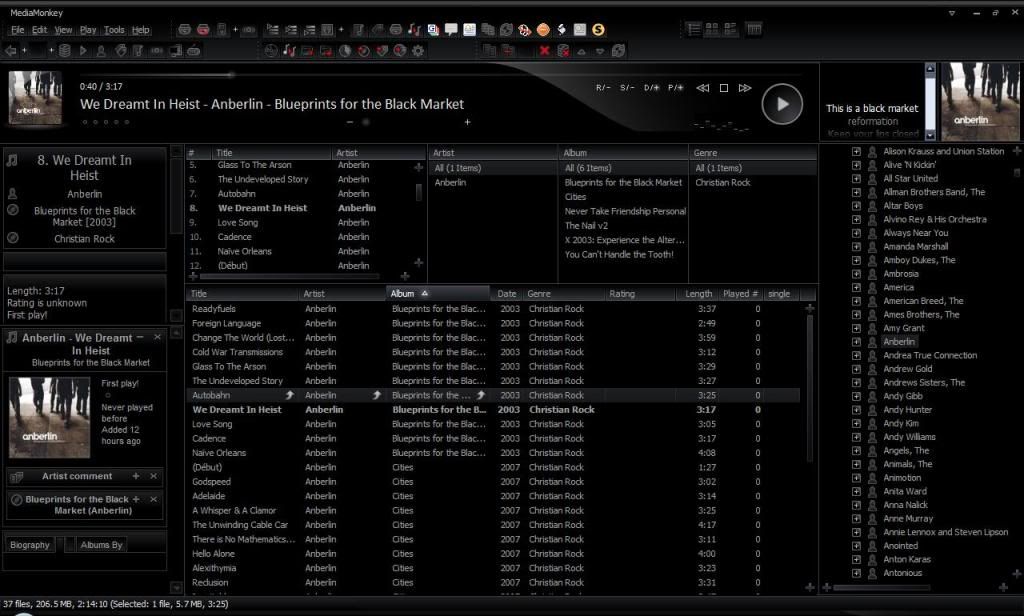
Re: Monkey Rok 5.3 - Updated 27/06/2010
Posted: Mon Jul 19, 2010 4:19 am
by trixmoto
I'll look at adding an option in the next version which allows you to specify the minimum number of tracks which constitutes an album - this isn't currently possible.
On the "More" tab you can define which sections are visible - I think going down to the level of individual statistics would be too many options. I might try and find some more groupings, such as "Tracks Per..." and allow you to switch all of those off in on go.
As far as I'm aware I've fixed all of the tab issues, but it meant changes to the skin files so it's possible that the skin you are using has not been fixed. Can you replicate these issues in the "classic_tabs" skin?
You can hide the artwork by setting the "Artwork Mode" to "None".

