Page 51 of 57
Posted: Tue Jan 08, 2008 6:56 pm
by MeMeMe
If it's installed correctly (and if I'm in the right thread!), the script activates automatically when you reach the last song in your Now Playing list.
So empty your Now Playing list, put one song in it, and press play.
What you should see, after a small delay, is another song appear in the Now Playing list after that one.
Then when the next song starts playing, a third song will appear.
And so on.
basically, the script uses the current song, scans LastFM and for similar groups and compares them to those in your database, and picks one thyat you possess at random, and plays that.
It reapeats this each time it reaches the last song in the Now Playing list.
settings too tight error
Posted: Tue Jan 08, 2008 7:52 pm
by OlivesInNZ
Hi, thanks to everyone for all the amazing work on ScrobblerDJ!
I have MM 3.0.1.1109 Gold and the most recent version of the script as far as i know - it all behaves as i imagine it should (button there, options in tools etc) except for not finding a related artist in my library as described by ReVe Dec 14. I think i have the "loosest" settings, anything else i should check?
Thanks!
Posted: Tue Jan 08, 2008 9:56 pm
by dressen
MonkeyBone wrote:Could someone please help me here..
I've installed the thing that's on post 1, and I've installed the updated .vbs file on the previous page.. I have MM 3.0.1.1127..
It doesn't give me any error, like it does for others here.. and I can enter the options in the plugins -section..
But, how do I enable it? How do I make it work? How does it work?

Thanks!

Are you on the last track? Scrobbler only works when you are on the last track of your playlist, then it adds another.
Another possible problem is that the ScrobblerDJ entry is not in your Scripts.ini file with a "ScriptType=2". This should have been put there when you installed the script, but it's worth verifying if you can't get the script to work.
what's this?
Posted: Wed Jan 09, 2008 12:55 am
by aidan_cage
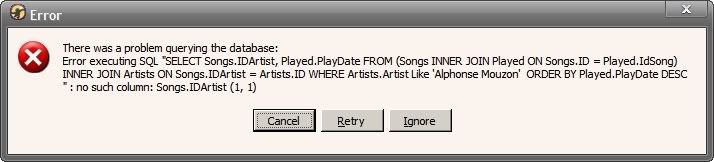
What's this? I just downloaded and installed the script from the front page. Is this script not compatible with MM3 yet?
I played the last song in my Now Playing window, with AutoDJ off and Scrobbler DJ on, and this window popped up.
PEACE
Posted: Wed Jan 09, 2008 5:09 am
by MonkeyBone
Thanks, guys!
Sorry for bothering..
I wasn't on the 'last track'
It works just fine!! Thanks a lot!! Great script!!
Posted: Wed Jan 09, 2008 10:39 am
by aidan_cage
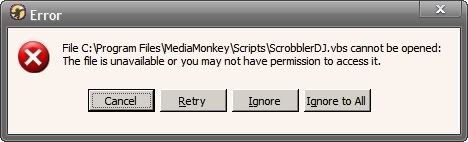
now, after uninstalling the script, I get this message whenever a track is played. What gives?
Posted: Wed Jan 09, 2008 11:36 am
by MonkeyBone
I have absolutely no idea, but I'm going to take a wild guess on how to solve it anyway..
Perhaps it was enabled when you uninstalled.. so, if you reinstall it, den disable it in the option -menu, and THEN uninstall it again, perhaps then you won't get that message!?
But, I really don't know.. it's just a suggestion!
Posted: Wed Jan 09, 2008 11:39 am
by Teknojnky
aidan_cage wrote:
now, after uninstalling the script, I get this message whenever a track is played. What gives?
Shut down mediamonkey.
Open the program files\mediamonkey\scripts folder and look for the 'scripts.ini' file.
Open the 'scripts.ini' file and locate the section [scrobblerdj] and then remove it.
Save the scripts.ini and restart MM.
Posted: Wed Jan 09, 2008 12:06 pm
by aidan_cage
Thanks
I missed it on my initial skim

any thoughts on why the initial bad behaviour?
Posted: Wed Jan 09, 2008 12:16 pm
by Teknojnky
you need to install it from the installer, then overwrite with the files posted a couple pages back.
Posted: Wed Jan 09, 2008 12:40 pm
by aidan_cage
thank you
I always expect the fixes to have sifted to the front page
it is working mostly now, though I expect I should tweak the settings
Posted: Wed Jan 09, 2008 12:52 pm
by Teknojnky
Yea, unfortunately it seems Psyxonova hasn't been around to update the script/first post so others have posted fixes which is harder to keep track of.
strange error
Posted: Wed Jan 09, 2008 1:02 pm
by aidan_cage
I'm getting a strange error
I will get a notice that the request timed out on a particular track
but then when I select the track as a fresh track for the now playing list, I get a result
why is this?
Problem querying database
Posted: Wed Jan 09, 2008 4:49 pm
by Galaxian
Using MM3 1129 and DJ Scrobbler 1.26 with Vista and getting the following error:
There was a problem querying the database:
Error executing SQL "SELECT Songs.IDArtist, Played.PlayDate FROM (Songs INNER JOIN Played ON Songs.ID = Played.IdSong) INNER JOIN Artists ON Songs.IDArtist = Artists.ID WHERE Artists.Artist Like 'Queen' ORDER BY Played.PlayDate DESC
" : no such column: Songs.IDArtist (1, 1)
What's wrong?
Posted: Wed Jan 09, 2008 4:57 pm
by Teknojnky
read back 2 or 3 pages.