Page 1 of 1
MM RC6 : problems with large fonts
Posted: Sun Dec 23, 2007 2:34 am
by GuHu
Hello,
after working a while with MM 3 I'm pretty lucky with it. Especially the option of using larger fonts is good for my eyes. Unfortunately, this is buggy:
- in the mode "show album art with details" there is no possiblility to expand the details beyond the album art.
- inverted, not bold text isn't written with large fonts, but with normal fonts (for example if you mark an album in the album tree and then mark the album in the result list. Then the album in the album tree is inverted, not bold and then you will see the small font).
With regards, Guido
Posted: Sun Dec 30, 2007 9:14 am
by GuHu
... what should said it to me that there is no response?
Especially the point that I can not see all songs of an album if I'm in the album art + details mode is bad ..
Regards, GuHu
Posted: Sun Dec 30, 2007 9:41 am
by Big_Berny
Maybe a screenshot would help?
Posted: Sun Dec 30, 2007 10:24 pm
by kingoomieiii
I posted this error way back in beta-sumthin, and it got no responses. Same screenshots again:
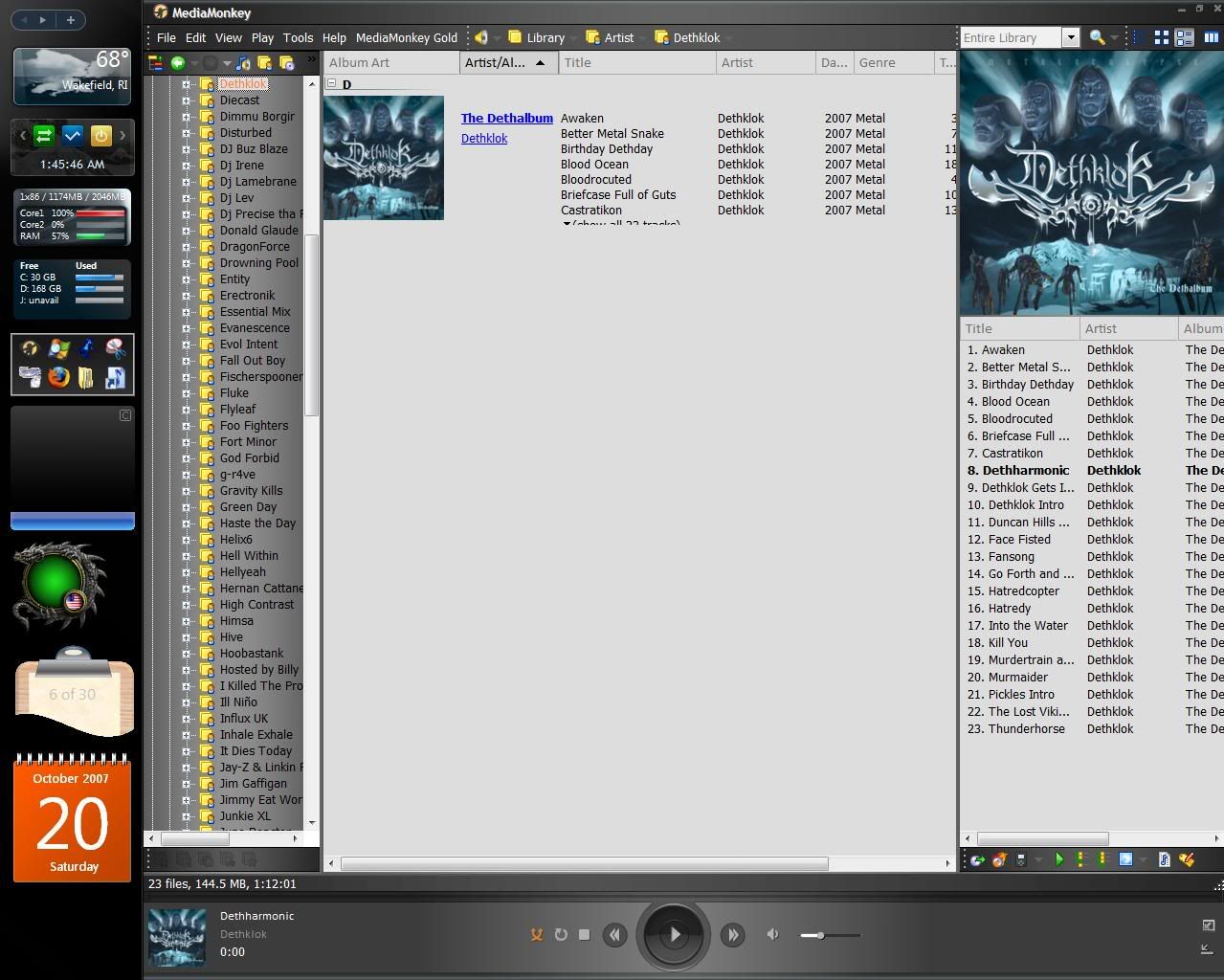
Large
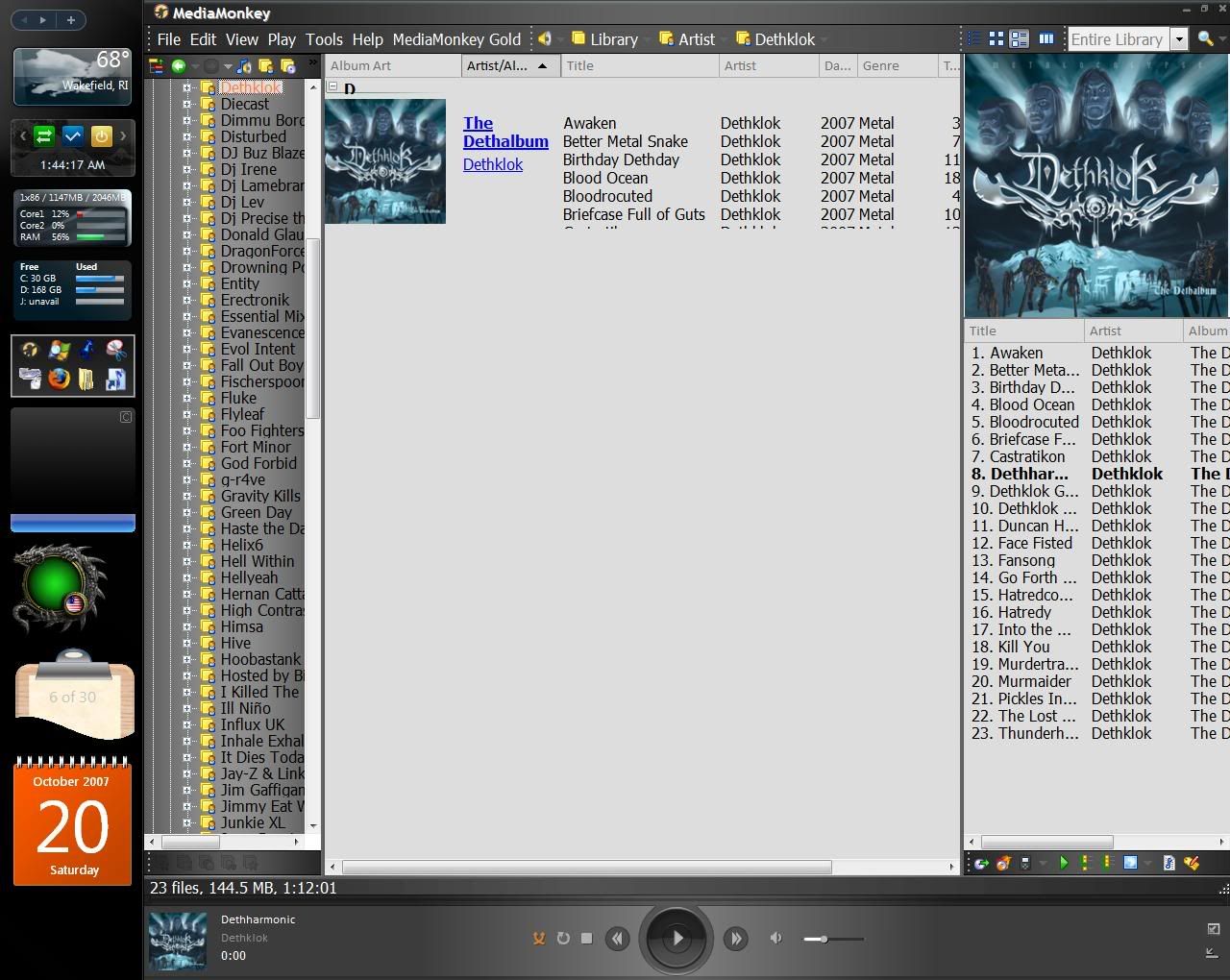
Extra Large
Posted: Mon Dec 31, 2007 12:05 am
by Peke
What font Size you have set in MediaMonkey tools -> Options -> Skins?
Posted: Mon Dec 31, 2007 2:43 am
by rovingcowboy
thats the way nohitter151 has coded the fonts in the skin.
this is his first skin and he is getting it worked up but still needs to do adjustments. he might have made the tree font change color and go smaller since he has the normal font bolded. that is done so you have a visual clue as to what was selected.
you are apearing to be gripping about the way he set up the fonts. but the link in the album list view i am not sure if he could set them up right now or not? i have not tried to for awhile in my skins so i cant remember about that area?

Posted: Mon Dec 31, 2007 6:32 am
by MusicBringer
I too have to use Large Fonts.
I have found that there is a problem with using Large Fonts with several skins, not just this one.
It seems to me that the space allocated to the field is too small to accommodate the Large Font size.
Which means that tails of letters such as Ys, Gs, and Js get chopped off and makes reading the text difficult. Large fonts is not practical when you cannot see the lower half of words

Posted: Mon Dec 31, 2007 7:42 am
by GuHu
.. same problem with skin "Glided" (distributed with MM3)
see also the small font in the artist tree (inverted, not in focus). But this is a bug which does not hurt much ..
Regards, GuHu

Posted: Mon Dec 31, 2007 2:46 pm
by kingoomieiii
rovingcowboy wrote:thats the way nohitter151 has coded the fonts in the skin.
this is his first skin and he is getting it worked up but still needs to do adjustments. he might have made the tree font change color and go smaller since he has the normal font bolded. that is done so you have a visual clue as to what was selected.
you are apearing to be gripping about the way he set up the fonts. but the link in the album list view i am not sure if he could set them up right now or not? i have not tried to for awhile in my skins so i cant remember about that area?
As I recall, it looks that way with Glided also.
(pff, like I would ever gripe about nohitter's skin... love that thing

)
Posted: Mon Jan 07, 2008 8:47 am
by GuHu
A Feedback from the developers of the kind
is a bug/is a feature/is a wish/we need further informations xxx / would be great.
GuHu
Posted: Mon Jan 07, 2008 12:18 pm
by PetrCBR
It's definitely bug. Will be fixed in next release.
Posted: Mon Jan 07, 2008 1:17 pm
by MusicBringer
PetrCBR wrote:It's definitely bug. Will be fixed in next release.
Great. Thanks
