Page 1 of 2
Clean Scripts.ini
Posted: Mon Mar 17, 2008 9:38 pm
by onenonymous
This script will clean the orphaned entries out of your Scripts.ini file. Please backup your files before running (just in case). I recommend Trix's
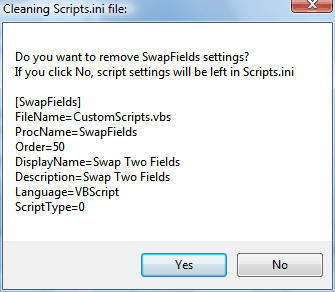
Backupscript. The script is very basic. It reads through the Scripts.ini file looking for [SomeScript] followed by Filename=somefile.vbs, then checks to be sure that somefile.vbs exists. It puts up a message box for each script entry it can't find. Click yes to delete the entry or no to leave it in place. It repeats with a new message box for each missing script. Tested on MM3.
Installer file:
CleanScriptsIni.mmip
Version 0.8 Update March 23, 2008
-Fixed code to delete entries which failed if the entries were at the end of the script
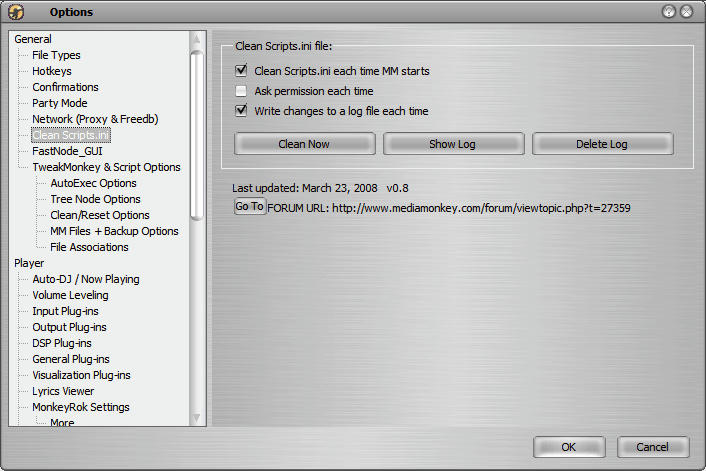
-Added Option sheet
-Removed access from scripts menu
-Added ability to turn on/off logging and messaging
-Changed logging to make it easier to copy the entry from the log and paste it back into the scripts.ini file if needed
Version 0.81 Update March 23, 2008
-Fixed code to show message box before changes
Here are screen shots:
Posted: Mon Mar 17, 2008 9:44 pm
by nynaevelan
One:
I cannot test this for you since I just cleaned up my scripts.ini in order to fix problem with RC4S script, but I have one query. Does this give a report of what it will be cleaned out of the ini file? If not, would it be possible to add some type of report, I would like to know what is being removed.
Nyn
Posted: Mon Mar 17, 2008 9:49 pm
by onenonymous
For now, it's pretty basic. It puts up a message box for each script entry it can't find. Click yes to delete the entry or no to leave it in place. It repeats with a new message box for each missing script.
When I get a chance, I'll enhance it to read through the entire file, the put up one dialog box showing all missing scripts with a checkbox by each to let you choose which ones to delete.
Posted: Mon Mar 17, 2008 10:02 pm
by nynaevelan
No need to enhance any further, the message box would be enough for me to know whether I wanted it removed or not. One other question, if there are ini entries which are commented out, will it ask to delete those??
Nyn
Posted: Mon Mar 17, 2008 10:08 pm
by onenonymous
It shouldn't. It looks for [SomeScript] followed by Filename=somefile.vbs, so if those are commented, they will be ignored.
Posted: Mon Mar 17, 2008 10:10 pm
by nynaevelan
Cool

Too bad I don't have any way to test it.

Nyn
Posted: Sun Mar 23, 2008 1:05 pm
by onenonymous
Updated script - see first post
Version 0.8 Update March 23, 2008
-Fixed code to delete entries which failed if the entries were at the end of the script
-Added Option sheet
-Removed access from scripts menu
-Added ability to turn on/off logging and messaging
-Changed logging to make it easier to copy the entry from the log and paste it back into the scripts.ini file if needed
Posted: Sun Mar 23, 2008 1:17 pm
by RedX
Nice script!
Maybe add a messagebox if no problems were found as it was confusing to know wether it had run sucessfully or not (looked at the log file).
But still nice idea

Regards,
Red
Posted: Sun Mar 23, 2008 1:48 pm
by onenonymous
RedX wrote:Maybe add a messagebox if no problems were found as it was confusing to know wether it had run sucessfully or not (looked at the log file).
Regards,
Red
It is supposed to do as you suggest if the 2nd check box ("Ask permission each time") is checked. I checked my code and had a an extra 'Not' that I forgot to remove. I'll fix and re-post.
EDIT - installer has been updated.
Posted: Sun Mar 23, 2008 6:57 pm
by Vyper
Works a treat.

Posted: Tue Apr 15, 2008 7:03 am
by nynaevelan
One:
Is it possible to have this script review the scripts.ini file and put the script data in the order that the user specifies? Right now I have my script.ini file separated by script type and ordered alphabetically but each time I install a new script I have to manually reset the order. Is something like this possible or will I have to keep doing it manually??
Nyn
Posted: Tue Apr 15, 2008 7:52 am
by onenonymous
nynaevelan wrote:One:
Is it possible to have this script review the scripts.ini file and put the script data in the order that the user specifies? Right now I have my script.ini file separated by script type and ordered alphabetically but each time I install a new script I have to manually reset the order. Is something like this possible or will I have to keep doing it manually??
Nyn
I've got my working copy with a button to sort the entries alphabetically. I need to clean it up so it can be posted. I'll see about doing that this weekend.
Re: Clean Scripts.ini
Posted: Sun Dec 14, 2008 10:59 pm
by Vyper
Did you ever do nyn's request?

Re: Clean Scripts.ini
Posted: Sun Dec 14, 2008 11:17 pm
by nynaevelan
Wow Vyper I forgot about this one, but I've still having to update my ini manually and I install a lot of scripts but I guess this is the beast I have to live with. Unless of course the scripters figure out a way to not overwrite the ini entries if they already exist??
Nyn
Re: Clean Scripts.ini
Posted: Thu Dec 18, 2008 6:07 pm
by onenonymous
This one got back-burnered behind my other scripts (and life away from the monkey...). I'll see about re-visiting it one of these days. If I recall, I changed my parsing routines that reads scripts.ini in my RCFS script, and intended to use that in this one - just never got to it.
~One