Page 1 of 2
Please fix high resolution DPI problem [#13832]
Posted: Mon Dec 26, 2016 6:03 am
by MMuser2011
MM5 seems to have problem with high resolution screens and non standard 100% DPI.
Please have a look at two examples:
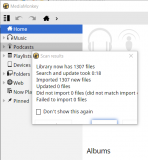
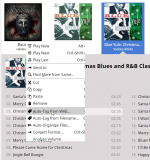
Buttons or text on them are not visible, menu shortcuts are cut off.
Re: Please fix high resolution DPI problem
Posted: Mon Dec 26, 2016 7:23 pm
by PetrCBR
Do you have installed any monitor manager or something like that ? I've tried to set DPI to 150% on clean Windows 7 (also using 125% on my surface pro with Win10) and everything is working perfectly.
Re: Please fix high resolution DPI problem
Posted: Mon Dec 26, 2016 7:52 pm
by Peke
Re: Please fix high resolution DPI problem [#13832]
Posted: Tue Dec 27, 2016 2:32 am
by MMuser2011
OS: Windows 10 Pro, newest available official build 1607, 14393.576, fully patched
Native screen resolution: 2048x1152
No additional screen software, just plain Win10 with DPI manually set to 125% with Font "9-point Segoe UI"
Re: Please fix high resolution DPI problem [#13832]
Posted: Tue Dec 27, 2016 6:51 am
by PetrCBR
I see ... it looks like we're having problem with resolution more than 1080p.
Re: Please fix high resolution DPI problem
Posted: Thu Dec 29, 2016 12:49 pm
by stax76
MM5 looks amazing so far! Biggest issue I have is none of the context menus are displayed correctly, they are all trimmed and at wrong location.
MM 5.0.0.2056
Win 10 Pro 1607
288 DPI
4K resolution
Re: Please fix high resolution DPI problem [#13832]
Posted: Thu Dec 29, 2016 11:12 pm
by Peke
Examples please, so that we can correct that.
FYI Your Signature contains invalid links.
Re: Please fix high resolution DPI problem [#13832]
Posted: Sat Dec 31, 2016 9:53 am
by stax76
every context menu in the main dialog is trimmed and in wrong location
not working:
MM 5.0.0.2056
Win 10 Pro 1607
288 DPI
4K resolution
MM 5.0.0.2056
Win 7
144 DPI
1080p resolution
working:
MM 5.0.0.2056
Win 10 Pro 1607
96 DPI
4K resolution
MM 5.0.0.2056
Win 7
96 DPI
1080p resolution
Re: Please fix high resolution DPI problem [#13832]
Posted: Sat Dec 31, 2016 10:29 am
by Peke
Pictures Please.
Re: Please fix high resolution DPI problem [#13832]
Posted: Sat Dec 31, 2016 10:48 am
by stax76
licecap

Re: Please fix high resolution DPI problem [#13832]
Posted: Sat Dec 31, 2016 9:45 pm
by Peke
Re: Please fix high resolution DPI problem [#13832]
Posted: Tue Jan 10, 2017 2:35 pm
by stax76
Thanks for adding the ticket, do you know by chance if there is already a ticket for MM4 and 4K with 288 DPI?
I use alt key for the main menu, alt+f is file menu of course but the others are hard to guess or remember.
virtual mode is horribly pixelated on 4K.
It took me a crazy amount of work to make StaxRip high DPI aware so I know...


Re: Please fix high resolution DPI problem [#13832]
Posted: Wed Jan 11, 2017 11:06 am
by stax76
Re: Please fix high resolution DPI problem [#13832]
Posted: Thu Jan 19, 2017 2:10 pm
by PetrCBR
Fixed 4K display with High DPI issue ... anybody with 4k display to confirm (PM me, please) ?
Re: Please fix high resolution DPI problem [#13832]
Posted: Thu Jan 19, 2017 4:10 pm
by stax76
Do you take donations to buy a 4 display?