Page 8 of 117
Re: Discogs Tagger 4.38 (Updated: 2014-02-25)
Posted: Mon Mar 10, 2014 3:46 am
by skywalka
skywalka wrote:Hi Sven,
The artists for this release end up being bunched together.
Does it stray from the standard.
Thanx.
Here is another example. Look at the artists for Track 11.

Re: Discogs Tagger 4.30 (Updated: 2013-09-25)
Posted: Sat Mar 15, 2014 4:20 am
by thexesyproject
adrianmarsh wrote:Since the 4.30 upgrade and upgrading to MM 4.1.0.1661 I now get an error from Discogs:
Error 424 microsoft vbscript runtime error
object required: "ImageLIst"
File: "c:\users\adrian\appdata\roaming\mediamonkey\scripts\DiscogsAutoTagWeb.vbs" line 2481, column 1
then
Error happened during script execution
Object Required: "ImageList"
Usually when I'm closing the window after trying to search. I've tried reinstalling with elevated admin too.
me too. can't figure it out.... tried everything in this thread.
Re: Discogs Tagger 4.41 (Updated: 2014-03-13)
Posted: Sat Mar 15, 2014 4:28 am
by crap_inhuman
Very simple, just install the latest Version of Discogs Tagger !
Re: Discogs Tagger 4.42 (Updated: 2014-03-25)
Posted: Tue Mar 25, 2014 6:14 pm
by crap_inhuman
I released a new Discogs Tagger Version, V4.42. See the first post in this thread for details !
thexesyproject wrote:adrianmarsh wrote:Since the 4.30 upgrade and upgrading to MM 4.1.0.1661 I now get an error from Discogs:
Error 424 microsoft vbscript runtime error
object required: "ImageLIst"
File: "c:\users\adrian\appdata\roaming\mediamonkey\scripts\DiscogsAutoTagWeb.vbs" line 2481, column 1
then
Error happened during script execution
Object Required: "ImageList"
Usually when I'm closing the window after trying to search. I've tried reinstalling with elevated admin too.
me too. can't figure it out.... tried everything in this thread.
Does it work with the newest version ? In Version 4.30 there was an bug with ImageList..
skywalka wrote:skywalka wrote:Hi Sven,
The artists for this release end up being bunched together.
Does it stray from the standard.
Thanx.
Here is another example. Look at the artists for Track 11.
I found the bug with the bunched artists, please download the new version !
Thank you Steve for using the script with "non"-normal albums, so we can make the script perfect !
Re: Discogs Tagger 4.43 (Updated: 2014-04-02)
Posted: Mon Apr 07, 2014 4:32 am
by skywalka
Thanx for the recent updates. This is my favorite script in the world!
Ran into an error:


Re: Discogs Tagger 4.43 (Updated: 2014-04-02)
Posted: Tue Apr 08, 2014 2:27 pm
by paco_hojaverde
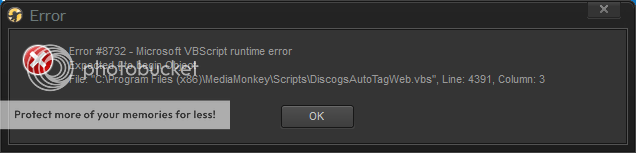
Discogs Tagger freezes for a long time and then gives me error messages and causes me to restart MediaMonkey. Any suggestions? Here are my specs:
- MediaMonkey 4.1.1.1703 Standard Edition
Discogs Tagger 4.4.3
Windows 7 Professional 64-bit SP1, up-to-date
6 GB DDR3 RAM
1 GB GDDR5 GPU - Radeon HD 5800 Series
Core i7 CPU
Here are some screenshots of the error messages I get:

Re: Discogs Tagger 4.43 (Updated: 2014-04-02)
Posted: Tue Apr 08, 2014 7:41 pm
by crap_inhuman
skywalka wrote:Thanx for the recent updates. This is my favorite script in the world!
Ran into an error:
Hi Steve,
thank you for posting the error ! I found the bug and release a new version soon.
Sven
Re: Discogs Tagger 4.43 (Updated: 2014-04-02)
Posted: Tue Apr 08, 2014 7:43 pm
by crap_inhuman
paco_hojaverde wrote:Discogs Tagger freezes for a long time and then gives me error messages and causes me to restart MediaMonkey. Any suggestions? Here are my specs:
- MediaMonkey 4.1.1.1703 Standard Edition
Discogs Tagger 4.4.3
Windows 7 Professional 64-bit SP1, up-to-date
6 GB DDR3 RAM
1 GB GDDR5 GPU - Radeon HD 5800 Series
Core i7 CPU
Hi paco_hojaverde,
please post the artist and the album name you searched for.
Sven
Re: Discogs Tagger 4.43 (Updated: 2014-04-02)
Posted: Tue Apr 08, 2014 8:54 pm
by skywalka
crap_inhuman wrote:skywalka wrote:Thanx for the recent updates. This is my favorite script in the world!
Ran into an error:
Hi Steve,
thank you for posting the error ! I found the bug and release a new version soon.
Sven
Thanx mate!
Re: Discogs Tagger 4.43 (Updated: 2014-04-02)
Posted: Tue Apr 08, 2014 10:02 pm
by paco_hojaverde
crap_inhuman wrote:paco_hojaverde wrote:Discogs Tagger freezes for a long time and then gives me error messages and causes me to restart MediaMonkey. Any suggestions? Here are my specs:
- MediaMonkey 4.1.1.1703 Standard Edition
Discogs Tagger 4.4.3
Windows 7 Professional 64-bit SP1, up-to-date
6 GB DDR3 RAM
1 GB GDDR5 GPU - Radeon HD 5800 Series
Core i7 CPU
Hi paco_hojaverde,
please post the artist and the album name you searched for.
Sven
Thanks for your quick reply. I right-clicked on a music file in my local collection called
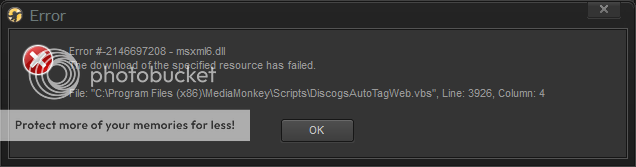
Locked Up by Larcy from within MediaMonkey and opted to "Auto-tag from Web...". When I selected Discogs Tagger from the list of sources, the problem I described begins. So, to answer your question, I didn't have the opportunity to search because it would freeze from the start.
Now, there's a new problem to add. I right-click the same file, select the same tagging option, but the window doesn't show up. The whole program freezes for about a minute, and then a new set of error messages come up (screenshots below). After I dismiss the error messages, the auto-tag window comes up, but it only declares that it is "Searching" and remains that way indefinitely. Why am I having so many problems? I've been using MediaMonkey and Discogs Tagger for a while, so why all the problems now?

Re: Discogs Tagger 4.43 (Updated: 2014-04-02)
Posted: Wed Apr 09, 2014 5:28 pm
by crap_inhuman
I will try to reconstruct the issue. But i need to know the content of the artist-tag, song-tag and album-tag of the music file, cause the script use this for the search.
You have to restart Media-Monkey after an error occur. The script don't work till you restart MediaMonkey.
Re: Discogs Tagger 4.43 (Updated: 2014-04-02)
Posted: Sun Apr 13, 2014 12:02 pm
by iceolate
I too am getting an error when I try to search for a CD that I wanted to rip. I'm trying to search for
http://www.discogs.com/dreamSTATE-Betwe ... ase/363413. I keep getting the following series of errors:
Error #13 - Microsoft VBScript runtime error
Type mismatch: '[string:""]'
File: "C:\Users\iceolate\AppData\Roaming\MediaMonkey\Scripts\DiscogsAutoTagWeb.vbs", Line: 1657, Column: 8
Re: Discogs Tagger 4.43 (Updated: 2014-04-02)
Posted: Sun Apr 13, 2014 9:38 pm
by crap_inhuman
iceolate wrote:I too am getting an error when I try to search for a CD that I wanted to rip. I'm trying to search for
http://www.discogs.com/dreamSTATE-Betwe ... ase/363413. I keep getting the following series of errors:
Error #13 - Microsoft VBScript runtime error
Type mismatch: '[string:""]'
File: "C:\Users\iceolate\AppData\Roaming\MediaMonkey\Scripts\DiscogsAutoTagWeb.vbs", Line: 1657, Column: 8
Hi iceolate,
did you use the newest version (V4.43 ?)
One problem with the release are the wrong track positions. Wrong, cause the Database Guidelines from Discogs use the point for subtracks (e.g. 1.1 , 1.2 , 1.3)
The track positions in this release are 1. , 2. , 3. ...and the script "think" these are subtracks...
In future releases the script will be smarter and delete the points.
Re: Discogs Tagger 4.43 (Updated: 2014-04-02)
Posted: Mon Apr 14, 2014 1:29 pm
by Guest
Hello, yes, I uninstalled the old version I was using, and installed the newest one, restarting MediaMonkey after each. I'll check it again. Thanks.
Re: Discogs Tagger 4.43 (Updated: 2014-04-02)
Posted: Mon Apr 14, 2014 1:31 pm
by Guest
Oh I see!! Yes, whoever made that Discogs entry did it wrong. I will fix the Discogs entry, and then try again. Thanks for pointing that out! I didn't even notice!


