Duplicate greyed-out Side Navigation items appear when adding duplicate songs to a playlist [#22322]
Posted: Tue Sep 15, 2026 2:29 pm
MediaMonkey Version: 2027.0.0.3521
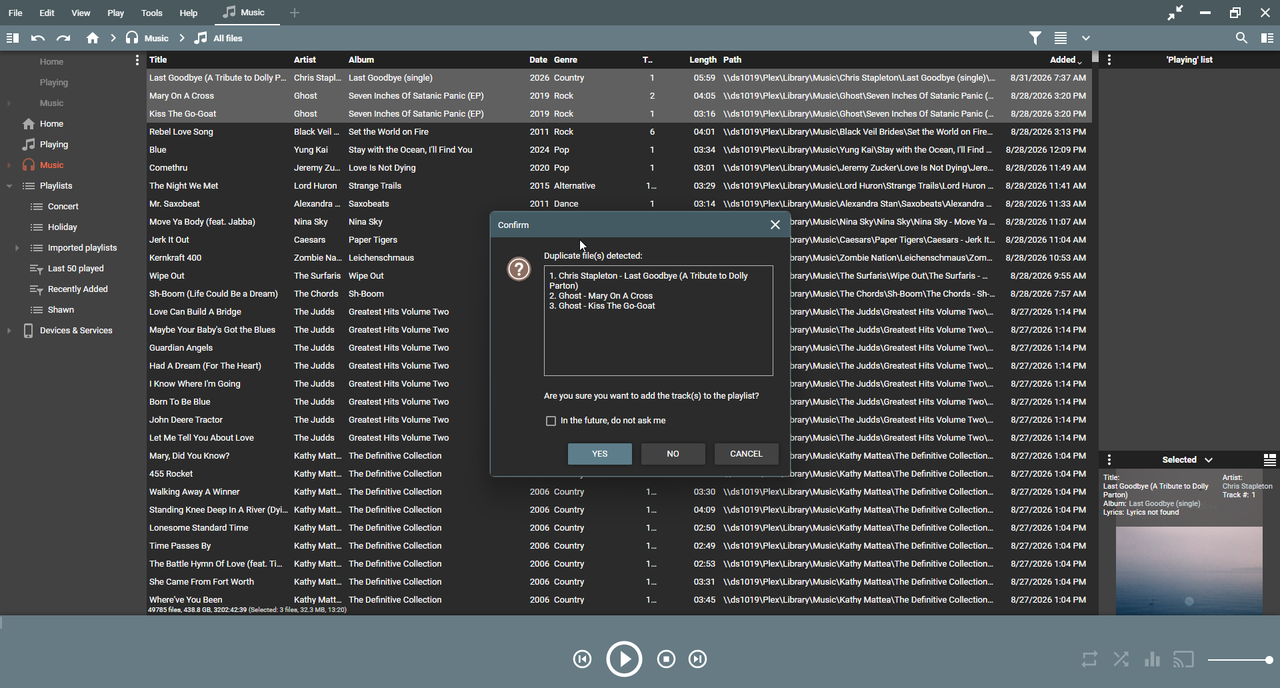
There appears to be a minor UI issue when adding songs to a playlist that are already present in the playlist.
When selecting one or more songs and dragging them to a playlist, MediaMonkey correctly displays the "Duplicate file(s) detected" confirmation window if the selected songs are duplicates.
However, while this confirmation window is displayed, the Side Navigation bar in the upper-left corner displays duplicate playlist/menu items as greyed out.
The number of duplicate/greyed-out items appears to correspond to the number of songs being added.
For example:
Select 1 duplicate song → 1 duplicate/greyed-out item appears
Select 3 duplicate songs → 3 duplicate/greyed-out items appear
The duplicate entries disappear after the operation/dialog is completed.
Steps to Reproduce:
- Open MediaMonkey 2027.
- Select a playlist that already contains one or more songs.
- Locate songs that are already in that playlist.
- Select one or more of those songs.
- Drag the selected songs to the playlist.
- The "Duplicate file(s) detected" confirmation dialog appears.
- While the dialog is displayed, look at the Side Navigation bar in the upper-left corner.
The number of duplicate entries corresponds to the number of selected songs.
Additional Information:
This has been occurring in all MediaMonkey 2027 versions released so far, not just 2027.0.0.3521.
The duplicate-file confirmation dialog itself appears to be working correctly. The issue is the unexpected duplicate/greyed-out entries appearing in the Side Navigation while the dialog is open.
PC is running latest Windows 11.
Thanks!
Shawn
There appears to be a minor UI issue when adding songs to a playlist that are already present in the playlist.
When selecting one or more songs and dragging them to a playlist, MediaMonkey correctly displays the "Duplicate file(s) detected" confirmation window if the selected songs are duplicates.
However, while this confirmation window is displayed, the Side Navigation bar in the upper-left corner displays duplicate playlist/menu items as greyed out.
The number of duplicate/greyed-out items appears to correspond to the number of songs being added.
For example:
Select 1 duplicate song → 1 duplicate/greyed-out item appears
Select 3 duplicate songs → 3 duplicate/greyed-out items appear
The duplicate entries disappear after the operation/dialog is completed.
Steps to Reproduce:
- Open MediaMonkey 2027.
- Select a playlist that already contains one or more songs.
- Locate songs that are already in that playlist.
- Select one or more of those songs.
- Drag the selected songs to the playlist.
- The "Duplicate file(s) detected" confirmation dialog appears.
- While the dialog is displayed, look at the Side Navigation bar in the upper-left corner.
The number of duplicate entries corresponds to the number of selected songs.
Additional Information:
This has been occurring in all MediaMonkey 2027 versions released so far, not just 2027.0.0.3521.
The duplicate-file confirmation dialog itself appears to be working correctly. The issue is the unexpected duplicate/greyed-out entries appearing in the Side Navigation while the dialog is open.
PC is running latest Windows 11.
Thanks!
Shawn