Page 1 of 1
[SOLVED] VBS-SYNTAX PLEASE HELP
Posted: Fri Mar 01, 2019 1:16 pm
by Erwin Hanzl
This is the result of my programming experiments with the following code:
ENTRY in VB-Script:
Doc.Add " <h3>"& sVar &" ... "& itm.title &" </h3></span>" 'Number / PlaylistsName
Doc.Add " <h5>"& ExtensionEH &" </h5></span>" 'Extension
ENTRY in style.css:
h3 { font-size:12pt; background:url('commandbar.bmp') padding:0px 0px 20px;} /*for PlaylistsName
h5 { font-size:12pt; padding:0px 0px 0px 300px; } /* für Extension
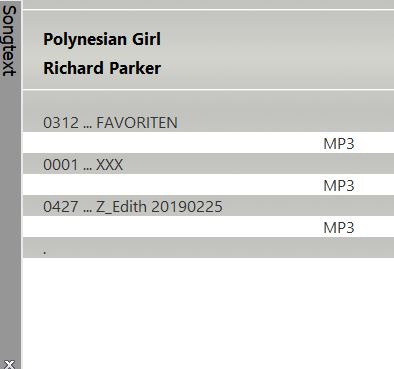 With which syntax can I extend this second line with the first line so that the extension is always in the same line?
Is there a tabulator function for this?
That's not well:
Doc.Add " <h3>"& sVar &" ... "& itm.title &" __ ." & ExtensionEH &" </h3></span>"
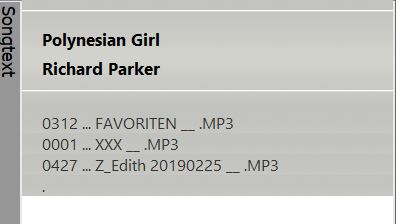
I politely ask for a goal-oriented answer.
Thank you
Google translation
Re: VBS-SYNTAX PLEASE HELP
Posted: Sun Mar 03, 2019 11:06 am
by Peke
Hi,
Create two functions for Left and Right padding:
Code: Select all
Function Lpad(strInput, length)
  Lpad = Right(space(length) & strInput, length)
end function
Function Rpad(strInput, length)
  Rpad = Left(strInput & Space(length), length)
end function
So you can then use that in your code:
Code: Select all
Doc.Add " <h3>"& sVar &" ... "& Rpad(itm.title,50) & ExtensionEH &" </h3></span>"
But as you use HTML you need to use non-breaking space
https://www.w3schools.com/html/html_entities.asp so it complicates things a bit

I would rather expand that and fully use CSS FLEXBOX container
https://css-tricks.com/snippets/css/a-guide-to-flexbox/ and possibly Text Align inside each Flex-Item
https://www.computerhope.com/issues/ch001710.htm
Have fun.
Re: VBS-SYNTAX PLEASE HELP
Posted: Mon Mar 04, 2019 6:56 am
by Erwin Hanzl
Hello Pavle,
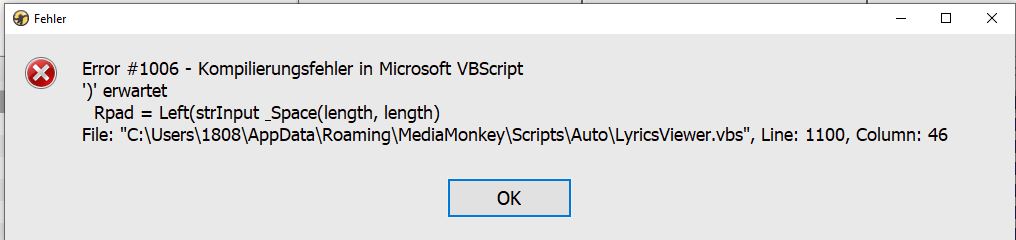
ich habe deine Function-Code an das Ende des VBScripts hineinkopiert. Mehrmals geprüft und nach MM-Start kommt folgender Fehler:
Re: VBS-SYNTAX PLEASE HELP
Posted: Mon Mar 04, 2019 9:54 pm
by Peke
Hi,
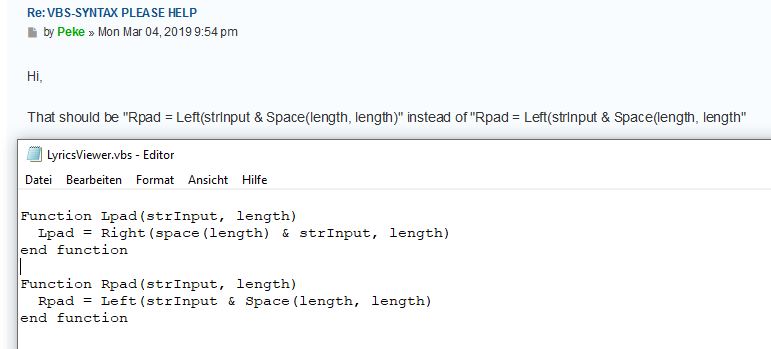
That should be "Rpad = Left(strInput & Space(length), length)" instead of "Rpad = Left(strInput & Space(length, length"
Re: VBS-SYNTAX PLEASE HELP
Posted: Tue Mar 05, 2019 1:51 am
by Erwin Hanzl
Hallo Pavle,
danke für die Antwort, aber es fehlt nach wie vor eine schließende Klammer und es kommt zur obigen Fehlermeldung.
Rpad = Left(strInput & Space(length, length)
2 x "("...... aber nur 1 x ")"
Natürlich habe ich alles mehrfach geprüft und auch mit allen Varianten der schließenden Klammer getestet.
Entschuldige, aber es funktioniert mit keiner Variante.
Ich möchte dich nochmals um Prüfung bitten. Danke
Schöne Grüße
Re: VBS-SYNTAX PLEASE HELP
Posted: Tue Mar 05, 2019 5:44 am
by Peke
Hi,
Sorry, corrected it. It is "Rpad = Left(strInput & Space(length), length)"
Re: VBS-SYNTAX PLEASE HELP
Posted: Tue Mar 05, 2019 6:14 am
by Erwin Hanzl
Hallo Pavle,
danke für Deine rasche Antwort. Jetzt gibt es keine Fehlermeldungen, jedoch komme ich nicht zu meinem gewünschten Ergebnis.
Zusammenfassung:
CODE:
Code: Select all
Doc.Add " <h3>"& sVar &" ... "& Rpad(itm.title,50) & ExtensionEH &" </h3></span>"
und
Code: Select all
Function Lpad(strInput, length)
  Lpad = Right(space(length) & strInput, length)
end function

Function Rpad(strInput, length)
   Rpad = Left(strInput & Space(length), length)
end function
Das führt zu folgendem Ergebnis: mp3 sollte rechtsbündig angezeigt werden
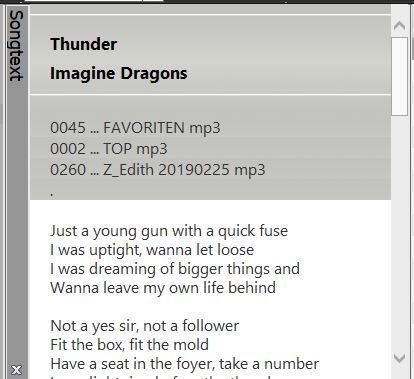 Länge von itm.Title=50 (habe ich über eine eigene Ausgabe geprüft) aber anscheinend werden alle Leerzeichen durch "Doc.Add" entfernt.
Ich danke für Deine Bemühungen und werde eben mit diesem Ergebnis leben.
Grüße Erwin
Re: VBS-SYNTAX PLEASE HELP
Posted: Tue Mar 05, 2019 9:32 pm
by Peke
Hi,
As I pointed you need to use
instead of single space.
Code: Select all
Function Lpad(strInput, length)
  Lpad = Right(space(length) & strInput, length)
  LPad = Replace(Lpad," "," ")
end function

Function Rpad(strInput, length)
   Rpad = Left(strInput & Space(length), length)
   RPad = Replace(Rpad," "," ")
end function
Re: VBS-SYNTAX PLEASE HELP
Posted: Wed Mar 06, 2019 11:43 am
by Erwin Hanzl
gelöscht
Re: VBS-SYNTAX PLEASE HELP
Posted: Wed Mar 06, 2019 2:38 pm
by Erwin Hanzl
Hallo Pavle, GESCHAFFT
ZUSAMMENFASSUNG: Deine Code
Code: Select all
Doc.Add " <h3>"& sVar &" .. "&Rpad(itm.title,20) & ExtensionEH &" </h3></span>"
Code: Select all
Function Lpad(strInput, length)
  Lpad = Right(space(length) & strInput, length)
  LPad = Replace(Lpad," "," ")
end function

Function Rpad(strInput, length)
   Rpad = Left(strInput & Space(length), length)
   RPad = Replace(Rpad," "," ")
end function
Code: Select all
body { font:12pt Courier, 'Segoe UI', 'Tahoma', Arial, sans serif;
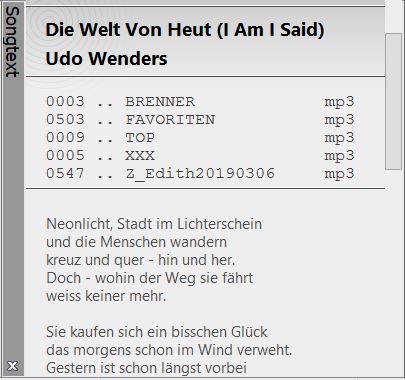
Vielen Dank nochmals für Deine Mühe und Deine Geduld.
Re: [SOLVED] VBS-SYNTAX PLEASE HELP
Posted: Wed Mar 06, 2019 8:20 pm
by Peke
Hi,
It was my pleasure.
Do you plan to release full Script or just for you?
Re: [SOLVED] VBS-SYNTAX PLEASE HELP
Posted: Thu Mar 07, 2019 1:19 am
by Erwin Hanzl
Hello Pavle,
da die Software nicht meine Entwicklung ist, steht es mir nicht zu, eine Veröffentlichung durchzuführen. Ich verwende die Weiterentwicklung NUR für mich privat. Deshalb habe ich die Code aus früheren Posts wieder gelöscht.
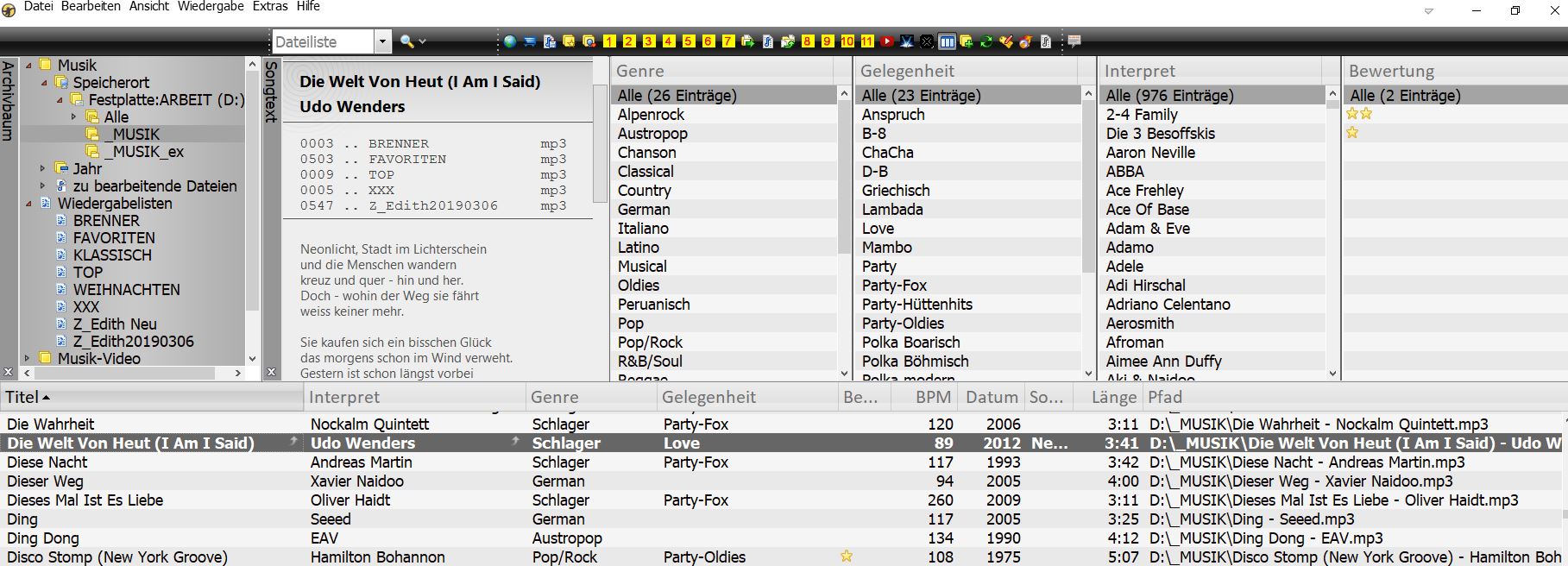
Es wäre für mich sehr erfreulich, wenn Du meine Idee aufgreifst und diese in einem offiziellem Update zur Verfügung stellen würdest.
Gerne lasse ich Dir bei Bedarf über "Privat Messages" alle Veränderungen zukommen.
Mit freundlichen Grüßen
Erwin
Ich denke, Information ist doch alles. Und das ist wieder gut für die User und damit auch für MediaMonkey.
Re: [SOLVED] VBS-SYNTAX PLEASE HELP
Posted: Fri Mar 08, 2019 11:29 am
by Peke
Hi,
OK, you can send me code and steps to install/setup and I'll create MMIP install.