Just discovered this plugin today. Where have I been? Got it installed and seems to be working.....I think. I'm not entirely sure I'm using it properly however. I did try to sync an artist from MM. When I went back to iTunes I discovered I had duplicates of every song for that artist. I did this several times with the same result.
A very early post mentioned FAQs. I've searched but can't locate them. If available could you point me to them or any other documentation. Thanks for your work on this.
MediaMonkey iTunes plugin (d_itunes4.dll)
Re: MediaMonkey iTunes plugin (d_itunes.dll & d_itunes4.dll)
I just downloaded mm4 and the current iTunes.dll, but I'm having trouble creating folders in iTunes. With build folders selected, im getting some funny behavior. Any slash in the playlist name creates a new branch, unlike the previous iTunes.dll in mm3. Also it only goes one branch deep. I'll do some more testing tomorrow
When I get to my computer again.
When I get to my computer again.
-
fishnet37222
- Posts: 47
- Joined: Tue Mar 23, 2010 9:11 pm
Re: MediaMonkey iTunes plugin (d_itunes.dll & d_itunes4.dll)
Hello,
I just upgraded to MediaMonkey 4 today. I had been using the MediaMonkey 3 version of this plugin with no problems whatsoever. However, after installing the MediaMonkey 4 version, I cannot get any tracks to sync over to iTunes. I'm using the latest version of iTunes, 10.5.1.42 on Windows 7 x64. I have one playlist, "iPod", that I have the plugin configured to sync to iTunes. When I add tracks to the playlist and then try to sync with iTunes, I keep getting an error message stating that iTunes has been scanned and found to contain no tracks.
Dave
I just upgraded to MediaMonkey 4 today. I had been using the MediaMonkey 3 version of this plugin with no problems whatsoever. However, after installing the MediaMonkey 4 version, I cannot get any tracks to sync over to iTunes. I'm using the latest version of iTunes, 10.5.1.42 on Windows 7 x64. I have one playlist, "iPod", that I have the plugin configured to sync to iTunes. When I add tracks to the playlist and then try to sync with iTunes, I keep getting an error message stating that iTunes has been scanned and found to contain no tracks.
Dave
Dave F.
-
markstuartwalker
- Posts: 931
- Joined: Fri Jul 10, 2009 8:10 am
Re: MediaMonkey iTunes plugin (d_itunes.dll & d_itunes4.dll)
Create a playlist of the tracks that you want rather than selecting the artist directly.MADinAK wrote:Just discovered this plugin today. Where have I been? Got it installed and seems to be working.....I think. I'm not entirely sure I'm using it properly however. I did try to sync an artist from MM. When I went back to iTunes I discovered I had duplicates of every song for that artist. I did this several times with the same result.
A very early post mentioned FAQs. I've searched but can't locate them. If available could you point me to them or any other documentation. Thanks for your work on this.
There is a manual installed in the plugin folder 'd_itunes4-manual.pdf' The FAQ is within that.
Q1: I have a very large library and I would rather not have to duplicate the tracks from MM into iTunes.
A1: Keeping a separate copy in the cache is the only certain way to isolate MM and iTunes from affecting each other. By setting the Cache Path entry to an empty string the Cache mechanism will be disabled. See the “Explanation of the Cache” section for more explanation.
Q: Every time that I sync into iTunes all of my flac files get reconverted into mp3 files and this takes a very long time.
A: This should not happen. It is usually symptomatic of having some clock discrepancy between multiple PCs or NAS devices. If MM is used to change ID3tag attributes to many files then the timestamp of the file would be updated and this can cause updates en-masse.
Q: Where does the plugin store it's configuration information?
A: A normal installation will use the registry at 'HKEY_CURRENT_USER\Software\MediaMonkey\Device\d_itunes4.dll on computername' where computername is the name of your PC. If you have a portable installation then this will be stored in the mediamonkey.registry file. It is possible but not recommended to modify the registry entries manually.
Q: I have more than one iDevice. Can I sync them all from one iTunes library?
A: Yes. iTunes supports multiple devices from the same library quite happily. You'll have to manage which tracks go to which device. If you wish to auto-sync them after an MM sync then you can list all of them on the configuration page.
Q: I've just installed the plugin and I get a message 'iTunes has been scanned and found to contain no tracks'
A: This is actually normal. Answer 'No' so that it does not terminate the sync and let the sync continue. The message is a safety net in case comms to iTunes has failed and all the content might be deleted. Usually of course there will be some tracks in iTunes and you will not see the message.
Last edited by markstuartwalker on Thu Nov 17, 2011 2:49 am, edited 1 time in total.
Windows 7,8 / Ubuntu 13.10 / Mavericks 10.9 / iOS 7.1 / iTunes 11.1
iTunes plugin (d_itunes & itunes4) http://www.mediamonkey.com/forum/viewto ... =2&t=45713
Running MM under Mac OS X with Wine http://www.mediamonkey.com/forum/viewto ... =4&t=58507
iTunes plugin (d_itunes & itunes4) http://www.mediamonkey.com/forum/viewto ... =2&t=45713
Running MM under Mac OS X with Wine http://www.mediamonkey.com/forum/viewto ... =4&t=58507
-
markstuartwalker
- Posts: 931
- Joined: Fri Jul 10, 2009 8:10 am
Re: MediaMonkey iTunes plugin (d_itunes.dll & d_itunes4.dll)
That is a new safety net added in case comms to iTunes fails. Reply 'No' so the sync does not terminate and let it procede.fishnet37222 wrote:Hello,
I just upgraded to MediaMonkey 4 today. I had been using the MediaMonkey 3 version of this plugin with no problems whatsoever. However, after installing the MediaMonkey 4 version, I cannot get any tracks to sync over to iTunes. I'm using the latest version of iTunes, 10.5.1.42 on Windows 7 x64. I have one playlist, "iPod", that I have the plugin configured to sync to iTunes. When I add tracks to the playlist and then try to sync with iTunes, I keep getting an error message stating that iTunes has been scanned and found to contain no tracks.
Dave
Windows 7,8 / Ubuntu 13.10 / Mavericks 10.9 / iOS 7.1 / iTunes 11.1
iTunes plugin (d_itunes & itunes4) http://www.mediamonkey.com/forum/viewto ... =2&t=45713
Running MM under Mac OS X with Wine http://www.mediamonkey.com/forum/viewto ... =4&t=58507
iTunes plugin (d_itunes & itunes4) http://www.mediamonkey.com/forum/viewto ... =2&t=45713
Running MM under Mac OS X with Wine http://www.mediamonkey.com/forum/viewto ... =4&t=58507
Re: MediaMonkey iTunes plugin (d_itunes.dll & d_itunes4.dll)
Dave,fishnet37222 wrote:Hello,
I just upgraded to MediaMonkey 4 today. I had been using the MediaMonkey 3 version of this plugin with no problems whatsoever. However, after installing the MediaMonkey 4 version, I cannot get any tracks to sync over to iTunes. I'm using the latest version of iTunes, 10.5.1.42 on Windows 7 x64. I have one playlist, "iPod", that I have the plugin configured to sync to iTunes. When I add tracks to the playlist and then try to sync with iTunes, I keep getting an error message stating that iTunes has been scanned and found to contain no tracks.
Dave
I get something similar each time i try and sync it tells me itunes was found to be empty. I noticed that every time I click on the Library option underneath the d_iTunes4.dll pluging it the list of tracks clears and starts to slowly rescan my library again.
Any ideas?
-
markstuartwalker
- Posts: 931
- Joined: Fri Jul 10, 2009 8:10 am
Re: MediaMonkey iTunes plugin (d_itunes.dll & d_itunes4.dll)
A quick test shows nesting deeper than one branch works fine. Please double check.JuBe wrote:I just downloaded mm4 and the current iTunes.dll, but I'm having trouble creating folders in iTunes. With build folders selected, im getting some funny behavior. Any slash in the playlist name creates a new branch, unlike the previous iTunes.dll in mm3. Also it only goes one branch deep. I'll do some more testing tomorrow
When I get to my computer again.
Make sure that the separating character is not anything that typically appears within the playlist folder names. I suspect you're is set to '/'. This is to do with the internal implementation of the way that the plugin handles file path - a path is stored as a single string using this separator so any additional occurrences of the separator causes the behaviour you have experienced.
Windows 7,8 / Ubuntu 13.10 / Mavericks 10.9 / iOS 7.1 / iTunes 11.1
iTunes plugin (d_itunes & itunes4) http://www.mediamonkey.com/forum/viewto ... =2&t=45713
Running MM under Mac OS X with Wine http://www.mediamonkey.com/forum/viewto ... =4&t=58507
iTunes plugin (d_itunes & itunes4) http://www.mediamonkey.com/forum/viewto ... =2&t=45713
Running MM under Mac OS X with Wine http://www.mediamonkey.com/forum/viewto ... =4&t=58507
-
fishnet37222
- Posts: 47
- Joined: Tue Mar 23, 2010 9:11 pm
Re: MediaMonkey iTunes plugin (d_itunes.dll & d_itunes4.dll)
If I let it proceed, no tracks get synced to iTunes.markstuartwalker wrote:That is a new safety net added in case comms to iTunes fails. Reply 'No' so the sync does not terminate and let it procede.fishnet37222 wrote:Hello,
I just upgraded to MediaMonkey 4 today. I had been using the MediaMonkey 3 version of this plugin with no problems whatsoever. However, after installing the MediaMonkey 4 version, I cannot get any tracks to sync over to iTunes. I'm using the latest version of iTunes, 10.5.1.42 on Windows 7 x64. I have one playlist, "iPod", that I have the plugin configured to sync to iTunes. When I add tracks to the playlist and then try to sync with iTunes, I keep getting an error message stating that iTunes has been scanned and found to contain no tracks.
Dave
Dave F.
-
markstuartwalker
- Posts: 931
- Joined: Fri Jul 10, 2009 8:10 am
Re: MediaMonkey iTunes plugin (d_itunes.dll & d_itunes4.dll)
Have you recreated your auto-sync lists?fishnet37222 wrote:If I let it proceed, no tracks get synced to iTunes.
Windows 7,8 / Ubuntu 13.10 / Mavericks 10.9 / iOS 7.1 / iTunes 11.1
iTunes plugin (d_itunes & itunes4) http://www.mediamonkey.com/forum/viewto ... =2&t=45713
Running MM under Mac OS X with Wine http://www.mediamonkey.com/forum/viewto ... =4&t=58507
iTunes plugin (d_itunes & itunes4) http://www.mediamonkey.com/forum/viewto ... =2&t=45713
Running MM under Mac OS X with Wine http://www.mediamonkey.com/forum/viewto ... =4&t=58507
-
fishnet37222
- Posts: 47
- Joined: Tue Mar 23, 2010 9:11 pm
Re: MediaMonkey iTunes plugin (d_itunes.dll & d_itunes4.dll)
I did that before the first time I tried syncing.markstuartwalker wrote:Have you recreated your auto-sync lists?fishnet37222 wrote:If I let it proceed, no tracks get synced to iTunes.
Dave F.
-
markstuartwalker
- Posts: 931
- Joined: Fri Jul 10, 2009 8:10 am
Re: MediaMonkey iTunes plugin (d_itunes.dll & d_itunes4.dll)
fishnet37222 wrote:I did that before the first time I tried syncing.markstuartwalker wrote:Have you recreated your auto-sync lists?fishnet37222 wrote:If I let it proceed, no tracks get synced to iTunes.
 switch on the debug and collect some output please. This MUST be obvious
Windows 7,8 / Ubuntu 13.10 / Mavericks 10.9 / iOS 7.1 / iTunes 11.1
iTunes plugin (d_itunes & itunes4) http://www.mediamonkey.com/forum/viewto ... =2&t=45713
Running MM under Mac OS X with Wine http://www.mediamonkey.com/forum/viewto ... =4&t=58507
iTunes plugin (d_itunes & itunes4) http://www.mediamonkey.com/forum/viewto ... =2&t=45713
Running MM under Mac OS X with Wine http://www.mediamonkey.com/forum/viewto ... =4&t=58507
-
DaveFrischknecht
- Posts: 23
- Joined: Wed Mar 25, 2009 12:33 am
Re: MediaMonkey iTunes plugin (d_itunes.dll & d_itunes4.dll)
I downloaded DebugView, set the debug value in the registry to 2 and tried syncing again. I think it has a problem to do with UAC in Windows 7. The following lines in the debug output makes me think that.markstuartwalker wrote:
[3300] d_itunes4.dll 1:52:55 PM Delete folder C:\Users\Dave\Music\iTunes\iTunes Media\Automatically Add to iTunes
[3300] d_itunes4.dll 1:52:55 PM EXCEPTION DEVICE_GetFlag EInOutError File access denied
Dave
Dave F
-
markstuartwalker
- Posts: 931
- Joined: Fri Jul 10, 2009 8:10 am
Re: MediaMonkey iTunes plugin (d_itunes.dll & d_itunes4.dll)
OK 10/10 for being inventive! I would never have thought of using the iTunes Media folder as the cache location for the plugin.DaveFrischknecht wrote: I downloaded DebugView, set the debug value in the registry to 2 and tried syncing again. I think it has a problem to do with UAC in Windows 7. The following lines in the debug output makes me think that.
[3300] d_itunes4.dll 1:52:55 PM Delete folder C:\Users\Dave\Music\iTunes\iTunes Media\Automatically Add to iTunes
[3300] d_itunes4.dll 1:52:55 PM EXCEPTION DEVICE_GetFlag EInOutError File access denied
Dave
At the end of sync the cache location is recursively scanned for empty folders which are then deleted (a new MM4 function). This folder you is a special folder that iTunes has to add files to itself. It cannot be deleted and hence the error message. I suspect that this folder has other protection rights which will stop it being used as a cache location - there may be other messages that you haven't seen. If the files aren't written to the cache they won't be transferred into iTunes.
Change the cache path to (say) it's default location C:\Users\Dave\Music\MMiTunes and try again.
Did the same cache location work for the MM3 plugin?
Windows 7,8 / Ubuntu 13.10 / Mavericks 10.9 / iOS 7.1 / iTunes 11.1
iTunes plugin (d_itunes & itunes4) http://www.mediamonkey.com/forum/viewto ... =2&t=45713
Running MM under Mac OS X with Wine http://www.mediamonkey.com/forum/viewto ... =4&t=58507
iTunes plugin (d_itunes & itunes4) http://www.mediamonkey.com/forum/viewto ... =2&t=45713
Running MM under Mac OS X with Wine http://www.mediamonkey.com/forum/viewto ... =4&t=58507
-
DaveFrischknecht
- Posts: 23
- Joined: Wed Mar 25, 2009 12:33 am
Re: MediaMonkey iTunes plugin (d_itunes.dll & d_itunes4.dll)
I don't remember what I used for MM3, but changing the cache location solved the problem. (And also re-enabling the auto-sync items.)markstuartwalker wrote:OK 10/10 for being inventive! I would never have thought of using the iTunes Media folder as the cache location for the plugin.DaveFrischknecht wrote: I downloaded DebugView, set the debug value in the registry to 2 and tried syncing again. I think it has a problem to do with UAC in Windows 7. The following lines in the debug output makes me think that.
[3300] d_itunes4.dll 1:52:55 PM Delete folder C:\Users\Dave\Music\iTunes\iTunes Media\Automatically Add to iTunes
[3300] d_itunes4.dll 1:52:55 PM EXCEPTION DEVICE_GetFlag EInOutError File access denied
Dave
At the end of sync the cache location is recursively scanned for empty folders which are then deleted (a new MM4 function). This folder you is a special folder that iTunes has to add files to itself. It cannot be deleted and hence the error message. I suspect that this folder has other protection rights which will stop it being used as a cache location - there may be other messages that you haven't seen. If the files aren't written to the cache they won't be transferred into iTunes.
Change the cache path to (say) it's default location C:\Users\Dave\Music\MMiTunes and try again.
Did the same cache location work for the MM3 plugin?
Dave
Dave F
Re: MediaMonkey iTunes plugin (d_itunes.dll & d_itunes4.dll)
Hey Mark, I'm still getting some funny results. I'm attaching some photos. I did not have this problem with the previous version of the plug in, and I was using the same settings and the same playlists. ITunes would recreate it exactly as Mediamonkey had it organized, but now if you look at the photos, its kind of scrambled.markstuartwalker wrote:A quick test shows nesting deeper than one branch works fine. Please double check.JuBe wrote:I just downloaded mm4 and the current iTunes.dll, but I'm having trouble creating folders in iTunes. With build folders selected, im getting some funny behavior. Any slash in the playlist name creates a new branch, unlike the previous iTunes.dll in mm3. Also it only goes one branch deep. I'll do some more testing tomorrow
When I get to my computer again.
Make sure that the separating character is not anything that typically appears within the playlist folder names. I suspect you're is set to '/'. This is to do with the internal implementation of the way that the plugin handles file path - a path is stored as a single string using this separator so any additional occurrences of the separator causes the behaviour you have experienced.
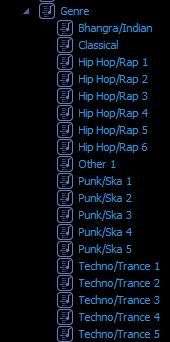
The playlists in MM:
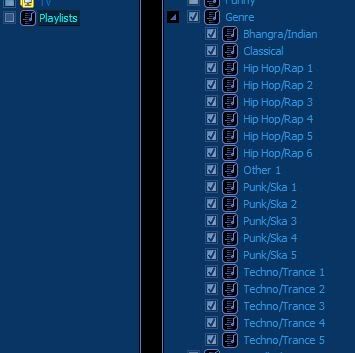
The playlists selected under the iTunes device for syncing:
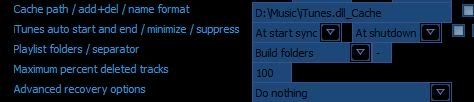
The settings to build folder and default separator (isn't the separator only for flatten folders anyways?):
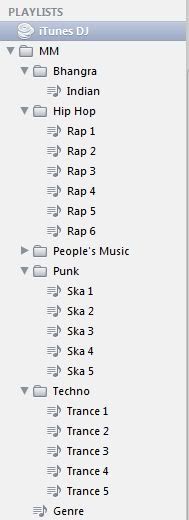
How it looks in iTunes. Note Genre is all the way at the bottom rather than being one folder up: