I'm having an issue with 1692 where after I select an album and run the autotag from file name or auto organize files, upon completion, the album or files are no longer selected.
I have to then go out of the folder and return to perform other functions such as case & leading zero checker, properties, etc. When I reselect the files without going out and back in, it tells me that no files are selected, even though they are highlighted.
Not a major issue, more of an annoyance, but thought I would mention it as I didn't have this issue with previous releases.
[BUG11910] Selection Issues
Moderator: Gurus
[BUG11910] Selection Issues
Last edited by nohitter151 on Thu Feb 27, 2014 8:01 am, edited 3 times in total.
Reason: Moved to correct Forum, add bug#
Reason: Moved to correct Forum, add bug#
Re: Selection Issues
Do you use the tab or window version of Auto-Organize Files?
Similar: http://www.ventismedia.com/mantis/view.php?id=10943
Similar: http://www.ventismedia.com/mantis/view.php?id=10943
Download MediaMonkey ♪ License ♪ Knowledge Base ♪ MediaMonkey for Windows 2024 Help ♪ MediaMonkey for Android Help
Lowlander (MediaMonkey user since 2003)
Lowlander (MediaMonkey user since 2003)
Re: Selection Issues
Actually, never really noticed this until now... I right click for the function I want to perform, such as auto organize, and when I run it a new tab opens. So I guess tab?
Re: Selection Issues
Here is a screen shot after running auto organize and then trying to run the case & leading zero checker. You can see that the files are selected and the error stating that no files are selected...
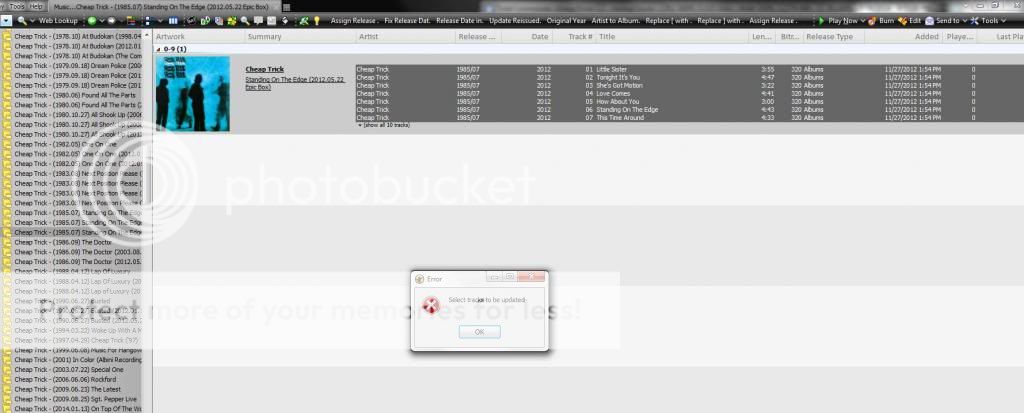

-
nohitter151
- Posts: 23640
- Joined: Wed Aug 09, 2006 10:20 am
- Location: NJ, USA
- Contact:
Re: Selection Issues
Running build 1693 I get different behavior:
1. Music > Album > Select some album node with >1 track (must be in Art + Details view)
2. Edit > Select all
3. Tools > Auto-organize (new tab opens)
4. OK
5. Return to previous tab, no tracks are selected
If you use "Details" view, the tracks remain selected after auto-organize
http://www.ventismedia.com/mantis/view.php?id=11910
1. Music > Album > Select some album node with >1 track (must be in Art + Details view)
2. Edit > Select all
3. Tools > Auto-organize (new tab opens)
4. OK
5. Return to previous tab, no tracks are selected
If you use "Details" view, the tracks remain selected after auto-organize
http://www.ventismedia.com/mantis/view.php?id=11910
MediaMonkey user since 2006
Need help? Got a suggestion? Can't find something?
Please no PMs in reply to a post. Just reply in the thread.
Need help? Got a suggestion? Can't find something?
Please no PMs in reply to a post. Just reply in the thread.