MM4 Icons for each file type
Moderator: Gurus
Re: MM4 Icons for each file type
Great idea! I'd keep the original colors though...
Windows 7 Ultimate 64bit
AMD Phenom II x4 940 (3GHz)
ASRock A780
4GB DDR2 333
ATI Radeon HD 3200
Library on two disks : Western Digital Caviar 1.5TB - WDC 640GB
AMD Phenom II x4 940 (3GHz)
ASRock A780
4GB DDR2 333
ATI Radeon HD 3200
Library on two disks : Western Digital Caviar 1.5TB - WDC 640GB
Re: MM4 Icons for each file type
Is there any way to the original icon's psd file to monkey around with?
Windows 7 Ultimate 64bit
AMD Phenom II x4 940 (3GHz)
ASRock A780
4GB DDR2 333
ATI Radeon HD 3200
Library on two disks : Western Digital Caviar 1.5TB - WDC 640GB
AMD Phenom II x4 940 (3GHz)
ASRock A780
4GB DDR2 333
ATI Radeon HD 3200
Library on two disks : Western Digital Caviar 1.5TB - WDC 640GB
Re: MM4 Icons for each file type
Nice!DreadM wrote:Greetings
Another MM logo ,

Could you send that image without the background please?
Seven Ultimate X64 SP1 / Sansa Clip 2go (with RockBox)
Re: MM4 Icons for each file type
Hello DreadM.
I tried with the image you sent me.
Converted it to a 256x256 .ico with icoFX
Changed the resource of Icon Group > MAINICON in Mediamonkey.exe with resource Hacker to test it.
But it looks a bit weird. Especially the border of the icon.
See screenshot:

I tried with the image you sent me.
Converted it to a 256x256 .ico with icoFX
Changed the resource of Icon Group > MAINICON in Mediamonkey.exe with resource Hacker to test it.
But it looks a bit weird. Especially the border of the icon.
See screenshot:

Seven Ultimate X64 SP1 / Sansa Clip 2go (with RockBox)
Re: MM4 Icons for each file type
Hm ,Try with Size 128,96,64,.....
Works fine here.
Works fine here.

Re: MM4 Icons for each file type
You're right. it seems the scaling was causing this.
tried with a 16x16 icon.
And it looks nice:

I think this is a good candidate to replace the old icon!
tried with a 16x16 icon.
And it looks nice:

I think this is a good candidate to replace the old icon!
Seven Ultimate X64 SP1 / Sansa Clip 2go (with RockBox)
Re: MM4 Icons for each file type
I like it! I still miss the original colors but the design is great. You have my vote too.
The original logo (as featured on the website tec...) could remain unchanged and this slightly more minimalist version could be used inside MM's window, and adapted to file types icons.
The original logo (as featured on the website tec...) could remain unchanged and this slightly more minimalist version could be used inside MM's window, and adapted to file types icons.
Windows 7 Ultimate 64bit
AMD Phenom II x4 940 (3GHz)
ASRock A780
4GB DDR2 333
ATI Radeon HD 3200
Library on two disks : Western Digital Caviar 1.5TB - WDC 640GB
AMD Phenom II x4 940 (3GHz)
ASRock A780
4GB DDR2 333
ATI Radeon HD 3200
Library on two disks : Western Digital Caviar 1.5TB - WDC 640GB
Re: MM4 Icons for each file type
I don't, I really don't!vpsaxman wrote:I still miss the original colors.
How can the original color be superior to an unobtrusive grey scale that will accord with every skins and theme?
Also IMO there should be no icon displayed on the left corner of the title bar! Like in Google Chrome.
They removed it cause it has no purpose and it's distracting.
Seven Ultimate X64 SP1 / Sansa Clip 2go (with RockBox)
Re: MM4 Icons for each file type
 You really don't like yellow do you? I think it's part of the logo's identity...
Windows 7 Ultimate 64bit
AMD Phenom II x4 940 (3GHz)
ASRock A780
4GB DDR2 333
ATI Radeon HD 3200
Library on two disks : Western Digital Caviar 1.5TB - WDC 640GB
AMD Phenom II x4 940 (3GHz)
ASRock A780
4GB DDR2 333
ATI Radeon HD 3200
Library on two disks : Western Digital Caviar 1.5TB - WDC 640GB
Re: MM4 Icons for each file type
Greetings
Ok, i work a bit more with this version,
one with original background color,
still there was a problem with right side from head and arm on 16x16
so i try with a bit more round head ,and it displays now nice on 16x16

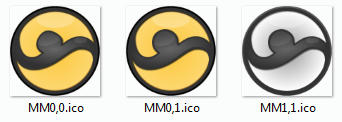
If you like to test here is a Download Link:
http://www.mediafire.com/download.php?vgfxuuqpi62s427
zip file contains the 3 icons from screenshot above,
each icon include 128,96,64,48,32,42,16 size icons
Ok, i work a bit more with this version,
one with original background color,
still there was a problem with right side from head and arm on 16x16
so i try with a bit more round head ,and it displays now nice on 16x16
If you like to test here is a Download Link:
http://www.mediafire.com/download.php?vgfxuuqpi62s427
zip file contains the 3 icons from screenshot above,
each icon include 128,96,64,48,32,42,16 size icons
Re: MM4 Icons for each file type
Awesome! MM0,1 is my favorite.
Windows 7 Ultimate 64bit
AMD Phenom II x4 940 (3GHz)
ASRock A780
4GB DDR2 333
ATI Radeon HD 3200
Library on two disks : Western Digital Caviar 1.5TB - WDC 640GB
AMD Phenom II x4 940 (3GHz)
ASRock A780
4GB DDR2 333
ATI Radeon HD 3200
Library on two disks : Western Digital Caviar 1.5TB - WDC 640GB
Re: MM4 Icons for each file type
On a related note, I like the design and feel of the generic icons provided by nohitter!
They look nice and clean!
But nohitter, could you please make them in all resolutions. So that they appear nicely at 256,128,96,64, ...
Well 256 is not that important. But up to 128 would be really nice.
Thank you.
They look nice and clean!
But nohitter, could you please make them in all resolutions. So that they appear nicely at 256,128,96,64, ...
Well 256 is not that important. But up to 128 would be really nice.
Thank you.
Seven Ultimate X64 SP1 / Sansa Clip 2go (with RockBox)
Re: MM4 Icons for each file type
I guess.vpsaxman wrote:
For some reason tho the yellow on the DreadM's version doesn't bother me that much.
Seven Ultimate X64 SP1 / Sansa Clip 2go (with RockBox)
-
nohitter151
- Posts: 23640
- Joined: Wed Aug 09, 2006 10:20 am
- Location: NJ, USA
- Contact:
Re: MM4 Icons for each file type
I didDreadlau wrote:On a related note, I like the design and feel of the generic icons provided by nohitter!
They look nice and clean!
But nohitter, could you please make them in all resolutions. So that they appear nicely at 256,128,96,64, ...
Well 256 is not that important. But up to 128 would be really nice.
Thank you.
 (even up to 256)
I'm not quite sure why they don't show at all resolutions. I'm going to ask petr.
MediaMonkey user since 2006
Need help? Got a suggestion? Can't find something?
Please no PMs in reply to a post. Just reply in the thread.
Need help? Got a suggestion? Can't find something?
Please no PMs in reply to a post. Just reply in the thread.