This add-on works with MediaMonkey v2.x-4.x (there is also version of the add-on that works with MM v5). It allows finding and selecting of the currently playing track in the Media Tree and main tracklist, i.e. it works similarly as the built-in Find More from Same and Focus tracklist on currently playing item MM options combined.
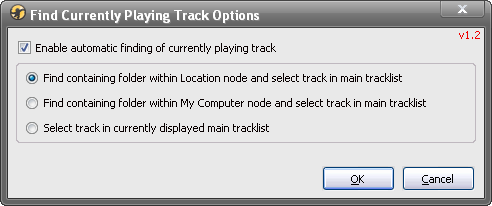
However, when the Enable automatic finding of currently playing track option is turned on, the main tracklist will locate and set the keyboard focus on the currently playing track whenever any of them starts playing. Or, you could turn that option off and use a hotkey or the toolbar button to locate the playing file instead. You could use its other options in the Options dialog box to determine where in the Media Tree you want to locate the playing files.
Download:
https://zvezdan-d.github.io/FindCurrent ... Track.html
What is new:
v1.3 - 2013-11-09
* Added: Ctrl+Alt+F hotkey for manual finding of the currently playing track (could be modified in Options\General\Hotkeys - General: Execute script: Find Currently Playing Track).
v1.2 - 2012-02-13
* Added: toolbar button for manual finding of the currently playing track;
* Added: independent toolbar for buttons instead of Shortcuts toolbar [MM4];
* Fixed: finding of tracks in FD (removable media), CD and net (mapped drives) sub-folders of Location branch.
v1.1.3 - 2011-06-15
* Fixed: response of the program when a new track starts to play.
v1.1.2 - 2010-09-20
* Fixed: selecting of the track in the Album Art with details view mode.
v1.1.1 - 2010-05-09
* Fixed: error during start-up.
v1.1 - 2010-05-09
* Added: button on the Shortcuts toolbar to toggle finding of the currently playing track;
* Added: option to select track in the currently displayed tracklist without changing node;
* Fixed: finding of containing folder in the Library\Location node with non-English GUI.
v1.0 - 2010-05-06
* First public version.
Installation:
- For MediaMonkey 3.0 or higher - just double-click on the FindCurrentPlayingTrack-xx.mmip file; if you are on Vista or Win7 make sure you have MM3 set to "Run as Administrator"; if you downloaded the installation package with IE7 and it changed its extension to a .zip, you should first change it back to a .mmip.
- For MediaMonkey 2.x - rename a .mmip extension to a .zip, extract the FindCurrentPlayingTrack.vbs file to the MediaMonkey's "Scripts\Auto" folder and restart MM program.
The add-on settings are in the Tools / Options dialog box within the General / Find Currently Playing Track page: you could turn on/off the automatic finding of tracks on playback and you could choose if you want to locate folder containing the currently playing track within the Library\Location node or within the My Computer node, or if you want just to select track in the currently displayed tracklist.
You could also toggle automatic finding and start manual finding of tracks using the buttons on the Shortcuts [MM2-3] / Find Currently Playing Track [MM4] toolbar.
Limitations:
- Selecting of the track in the main tracklist works only with the program v3.1.0.1218 or higher.
- Finding of tracks in the My Computer folder is not possible with the network drives (although Network works fine within the Library\Location folder); actually, even the built-in Find More from Same\Folder (My Computer) MM option doesn't work with the network drives.

