Update Location of Files in Database 1.3 (2012-06-12) [MM2+]
-
kazadharri
- Posts: 109
- Joined: Fri Jul 28, 2006 1:07 am
Re: Update Location of Files in Database 1.1 (2012-02-04) [M
I finally got the Adv Dup script to work, but thanks for all of your help. /Jeff
-
tommycrock
- Posts: 215
- Joined: Sat May 21, 2011 9:13 am
Re: Update Location of Files in Database 1.1 (2012-02-04) [M
Thanks, I'm not going to be at my machine for a few days but will do when I get back. Of course it's fixed for me now but for future users.
P.S. The Track Redirection & Synchronization script looks brilliant, there are so many amazing MM scripts (and scripters) out there that I don't know about.
P.S. The Track Redirection & Synchronization script looks brilliant, there are so many amazing MM scripts (and scripters) out there that I don't know about.
Re: Update Location of Files in Database 1.1 (2012-02-04) [M
Thanks for the report and cooperation, I have resolved that problem.eXentric wrote:It is a UNC share but I did have it mapped to drive letter 'M:'. I uploaded the database and sent you a PM with the link.
No need to upload your database, I was able to reproduce and fix the mentioned problem. There is the new update, v1.2 - 2012-02-13:tommycrock wrote:Thanks, I'm not going to be at my machine for a few days but will do when I get back.
* Added: support for mapped network drives;
* Added: support for URL/UPnP old paths (cannot be specified as new paths);
* Added: selection of the new drive/folder in the tree panel after the update;
* Fixed: display of the updated paths in the tracklist;
* Fixed: Update and Cancel buttons could be clicked when searching for existing files if the Update paths only for existing files option is turned off.
● Magic Nodes 4.3.3 / 5.2 ● RegExp Find & Replace 4.4.9 / 5.2 ● Invert Selection/Select None 1.5.1 ● Export/Create Playlists for Child Nodes 4.1.1 / 5.4.1 ● Expand Child Nodes/Expand All 1.1.2 ● Event Logger 2.7 ● Filtered Statistics Report 1.6 ● Track Redirection & Synchronization 3.4.2 ● Restore/Synchronize Database 3.1.8 / 4.0.1 ● Find Currently Playing Track 1.3.2 ● Queue List 1.2.1 ● Add to Library on Play 1.0.1 ● Tree Report for Child Nodes 1.1.1 ● Update Location of Files in Database 1.4.5 / 2.3 ● Inherit Child Playlists 1.0.3 ● Add Currently Playing/Selected Track(s) to Playlist 1.2
-
tommycrock
- Posts: 215
- Joined: Sat May 21, 2011 9:13 am
Re: Update Location of Files in Database 1.2 (2012-02-13) [M
Fantastic, thanks
Re: Update Location of Files in Database 1.2 (2012-02-13) [M
Thank you so much for your script. I just moved all my collection to a new computer, when I realized that MM did not find some 500 files even if they were there (using the add/rescan function).
Your work probably saved me hours!
Your work probably saved me hours!
-
tommycrock
- Posts: 215
- Joined: Sat May 21, 2011 9:13 am
Re: Update Location of Files in Database 1.2 (2012-02-13) [M
Can I ask for an addition?
My sync lists for my portable devices were based on location rather than artist etc. and it seems these have not transferred as part of the update of locations - when I look at the sync list it has a partially filled in box for location but all the folders beneath it are empty.
Thanks!
My sync lists for my portable devices were based on location rather than artist etc. and it seems these have not transferred as part of the update of locations - when I look at the sync list it has a partially filled in box for location but all the folders beneath it are empty.
Thanks!
Re: Update Location of Files in Database 1.2 (2012-02-13) [M
Hm, I though that that is covered. Could you upload your database file packed with Zip to some file server?tommycrock wrote:My sync lists for my portable devices were based on location rather than artist etc. and it seems these have not transferred as part of the update of locations - when I look at the sync list it has a partially filled in box for location but all the folders beneath it are empty.
● Magic Nodes 4.3.3 / 5.2 ● RegExp Find & Replace 4.4.9 / 5.2 ● Invert Selection/Select None 1.5.1 ● Export/Create Playlists for Child Nodes 4.1.1 / 5.4.1 ● Expand Child Nodes/Expand All 1.1.2 ● Event Logger 2.7 ● Filtered Statistics Report 1.6 ● Track Redirection & Synchronization 3.4.2 ● Restore/Synchronize Database 3.1.8 / 4.0.1 ● Find Currently Playing Track 1.3.2 ● Queue List 1.2.1 ● Add to Library on Play 1.0.1 ● Tree Report for Child Nodes 1.1.1 ● Update Location of Files in Database 1.4.5 / 2.3 ● Inherit Child Playlists 1.0.3 ● Add Currently Playing/Selected Track(s) to Playlist 1.2
Re: Update Location of Files in Database 1.2 (2012-02-13) [M
I just downloaded this script and am having a few problems.
I now have all of my music files on an external hard drive :
example path
H:\iTunes Media\4 Non Blondes\Album\15 What's up_.mp3
I recently upgraded my laptop with a large drive that will now hold all of my music and would like to transfer the music from thje external drive to the laptop hard drive in the location:
c:\jim\music
At the same time I would like to do away with the Itunes media part of the path, so the above file should be:
c:\jim\music\4 Non Blondes\Album\15 What's up_.mp3
Here are my questions:
1) Will the program actually copy the music or should I do that myself as the first step?
2) What exactly should be entered in the dialog boxes before I run the program?
I tried running the program without doing any file transfers. In the old drive/path, it did not see the drive as H: rather it showed M: I accepted the entries, specified my new location c:\jim\music which I already set up. The program ran very quickly but nothing changed and none of the songs were accessible.
( I backed up my database and restored the old file and now everything works as before)
I'd like to try again but I need more guidance.
Any help you could provide would be appreciated. Great program.
I now have all of my music files on an external hard drive :
example path
H:\iTunes Media\4 Non Blondes\Album\15 What's up_.mp3
I recently upgraded my laptop with a large drive that will now hold all of my music and would like to transfer the music from thje external drive to the laptop hard drive in the location:
c:\jim\music
At the same time I would like to do away with the Itunes media part of the path, so the above file should be:
c:\jim\music\4 Non Blondes\Album\15 What's up_.mp3
Here are my questions:
1) Will the program actually copy the music or should I do that myself as the first step?
2) What exactly should be entered in the dialog boxes before I run the program?
I tried running the program without doing any file transfers. In the old drive/path, it did not see the drive as H: rather it showed M: I accepted the entries, specified my new location c:\jim\music which I already set up. The program ran very quickly but nothing changed and none of the songs were accessible.
( I backed up my database and restored the old file and now everything works as before)
I'd like to try again but I need more guidance.
Any help you could provide would be appreciated. Great program.
Re: Update Location of Files in Database 1.2 (2012-02-13) [M
By "the program" you mean MediaMonkey, right? Well, it could copy files, there are some guides about it at the Support pages, but if you want to use this add-on it would be better if you do that by yourself without letting the program to add tracks to the Library. In that way, you would keep your old data, e.g. playlists, playing history,... By the way, this add-on does not copy files, it only updates the location of files in the existing database.jdoornek wrote:1) Will the program actually copy the music or should I do that myself as the first step?
If you had file at H:\iTunes Media\4 Non Blondes\Album\15 What's up_.mp3, and now it is at c:\jim\music\4 Non Blondes\Album\15 What's up_.mp3, then the old path should be:jdoornek wrote:2) What exactly should be entered in the dialog boxes before I run the program?
H:\iTunes Media\ (or ?:\iTunes Media\ with the specified old drive), and the new path should be: c:\jim\music\.
So, here is the short guide:
- open the MM program and turn off the File Monitor if you have it previously enabled;
- exit the program;
- copy your old MM.DB database file to the same location where it was before (e.g. c:\Documents and Settings\your_name\Application Data\MediaMonkey\ for MM4 and XP);
- copy your media files to the new location using your preferred program for backup;
- start the MM program;
- apply this add-on with the mentioned settings for the old and new paths;
- turn on the File Monitor if you had it enabled before.
● Magic Nodes 4.3.3 / 5.2 ● RegExp Find & Replace 4.4.9 / 5.2 ● Invert Selection/Select None 1.5.1 ● Export/Create Playlists for Child Nodes 4.1.1 / 5.4.1 ● Expand Child Nodes/Expand All 1.1.2 ● Event Logger 2.7 ● Filtered Statistics Report 1.6 ● Track Redirection & Synchronization 3.4.2 ● Restore/Synchronize Database 3.1.8 / 4.0.1 ● Find Currently Playing Track 1.3.2 ● Queue List 1.2.1 ● Add to Library on Play 1.0.1 ● Tree Report for Child Nodes 1.1.1 ● Update Location of Files in Database 1.4.5 / 2.3 ● Inherit Child Playlists 1.0.3 ● Add Currently Playing/Selected Track(s) to Playlist 1.2
Re: Update Location of Files in Database 1.2 (2012-02-13) [M
Thanks for the help. It worked beautifully.
Now I see why I was misled at the start. I did a trial run with just several folders instead of the entire music folder. It appeared as though everything was converted in the MM database because all songs had the NEW path. However, only the songs that were actually copied to the new folder were actually converted. All of the others appeared greyed out.
Now I converted the entire database flawlessly.
Thanks again.
By the way, it wasn't clear to me from the instructions that you had to copy the music first. I was misled by the checkbox in the lower left corner of the dialog box. I thought this should be checked only if the files already existed on the new location, but that the script would do the transferring if the box was left unchecked.
Sorry about my lack of knowledge on this.
Jim
Now I see why I was misled at the start. I did a trial run with just several folders instead of the entire music folder. It appeared as though everything was converted in the MM database because all songs had the NEW path. However, only the songs that were actually copied to the new folder were actually converted. All of the others appeared greyed out.
Now I converted the entire database flawlessly.
Thanks again.
By the way, it wasn't clear to me from the instructions that you had to copy the music first. I was misled by the checkbox in the lower left corner of the dialog box. I thought this should be checked only if the files already existed on the new location, but that the script would do the transferring if the box was left unchecked.
Sorry about my lack of knowledge on this.
Jim
-
tommycrock
- Posts: 215
- Joined: Sat May 21, 2011 9:13 am
Re: Update Location of Files in Database 1.2 (2012-02-13) [M
Here you go: http://dl.dropbox.com/u/39561993/mmdb.zipZvezdanD wrote:Hm, I though that that is covered. Could you upload your database file packed with Zip to some file server?tommycrock wrote: My sync lists for my portable devices were based on location rather than artist etc. and it seems these have not transferred as part of the update of locations - when I look at the sync list it has a partially filled in box for location but all the folders beneath it are empty.
Re: Update Location of Files in Database 1.2 (2012-02-13) [M
Thanks for the database, I have added support for the sync folders. However, I suppose you know that your sync folders are located on the different drive than media files, although both have the same label. So, you should update location of files in two steps.tommycrock wrote:Here you go:
It is now too late since this add-on already served its purpose to you, but just to inform you that I have added the option for coping files, although it has its limits mentioned in the Usage section of the first post.jdoornek wrote:it wasn't clear to me from the instructions that you had to copy the music first.
There is the new update, v1.3 - 2012-02-24:
* Added: Copy files from the old to the new location first option;
* Added: update of drive-id/paths in SynchLocation table;
* Fixed: update of drive-id/paths in Playlists table;
* Fixed: update of locations when only for existing files option is turned on, the old path is the root of a drive and the old and new drives are the ones with the drive letter (i.e. they are not UNC/URL).
● Magic Nodes 4.3.3 / 5.2 ● RegExp Find & Replace 4.4.9 / 5.2 ● Invert Selection/Select None 1.5.1 ● Export/Create Playlists for Child Nodes 4.1.1 / 5.4.1 ● Expand Child Nodes/Expand All 1.1.2 ● Event Logger 2.7 ● Filtered Statistics Report 1.6 ● Track Redirection & Synchronization 3.4.2 ● Restore/Synchronize Database 3.1.8 / 4.0.1 ● Find Currently Playing Track 1.3.2 ● Queue List 1.2.1 ● Add to Library on Play 1.0.1 ● Tree Report for Child Nodes 1.1.1 ● Update Location of Files in Database 1.4.5 / 2.3 ● Inherit Child Playlists 1.0.3 ● Add Currently Playing/Selected Track(s) to Playlist 1.2
-
tommycrock
- Posts: 215
- Joined: Sat May 21, 2011 9:13 am
Re: Update Location of Files in Database 1.2 (2012-02-13) [M
Hi ZvezdanD, thanks for that although I'm not sure I understand. The device I was syncing to wasn't what I changed (I haven't changed my MP3 player - Sansa Clip+ and Sansa uSD). However, the files that were on my auto-sync list to my MP3 player and came from the hard drive I changed (D:\ [Stuff]) no longer are. Do you mean the sync folders are coming from a different drive than the files in the library; that the portable/audio device is different; something elseZvezdanD wrote:Thanks for the database, I have added support for the sync folders. However, I suppose you know that your sync folders are located on the different drive than media files, although both have the same label. So, you should update location of files in two steps.tommycrock wrote:Here you go:

So currently everything in my library is correctly pointing to the relevant files except in my auto sync list where (I guess) they're still pointing to the old locations. Can I rescue the situation from here or do I need to step back to an old version of the db?
Sorry

[edit]
Okay, I've tried it (should have done that before) and it worked - fantastic, thanks so much again!
One little oddity, when I had ?:\ as the old path and D:\ as the new path it said there were 7 existing folders and 360 missing; when I tried swapping to D:\Music as the new path it said all 360 were existing so I did that. Unfortunately that didn't work so I restored my database and tried again with the ?:\ as the old path and D:\ as the new path and unticked the only for existing files option. It's worked - when I look in my sync list the folders are all marked but it's odd it didn't recognise them properly.
Re: Update Location of Files in Database 1.2 (2012-02-13) [M
Thanks for the report. There is the new release, v1.3.1 - 2012-02-26:tommycrock wrote:One little oddity, when I had ?:\ as the old path and D:\ as the new path it said there were 7 existing folders and 360 missing; when I tried swapping to D:\Music as the new path it said all 360 were existing so I did that. Unfortunately that didn't work so I restored my database and tried again with the ?:\ as the old path and D:\ as the new path and unticked the only for existing files option. It's worked - when I look in my sync list the folders are all marked but it's odd it didn't recognise them properly.
* Fixed: result of searching for existing paths from SynchLocation table.
● Magic Nodes 4.3.3 / 5.2 ● RegExp Find & Replace 4.4.9 / 5.2 ● Invert Selection/Select None 1.5.1 ● Export/Create Playlists for Child Nodes 4.1.1 / 5.4.1 ● Expand Child Nodes/Expand All 1.1.2 ● Event Logger 2.7 ● Filtered Statistics Report 1.6 ● Track Redirection & Synchronization 3.4.2 ● Restore/Synchronize Database 3.1.8 / 4.0.1 ● Find Currently Playing Track 1.3.2 ● Queue List 1.2.1 ● Add to Library on Play 1.0.1 ● Tree Report for Child Nodes 1.1.1 ● Update Location of Files in Database 1.4.5 / 2.3 ● Inherit Child Playlists 1.0.3 ● Add Currently Playing/Selected Track(s) to Playlist 1.2
-
YoursTruly
- Posts: 8
- Joined: Sat Sep 25, 2010 8:14 am
Re: Update Location of Files in Database 1.3 (2012-02-26) [M
Hello - i am also having issues here, I have been reading the thread (thanks to LowLander) but I too am having issues. selecting the root folder is not working; i hope my pics explain this better
Win7 / MM 3.2.5 (MM4 initially messed me up always used move device content script but since win7 it no longer works) / mmip 1.1.3

so now i try to run script; you can see the old path cannot define the old drive, hence ?:\MUSIC (root folder on drive)\...the remaining is the path
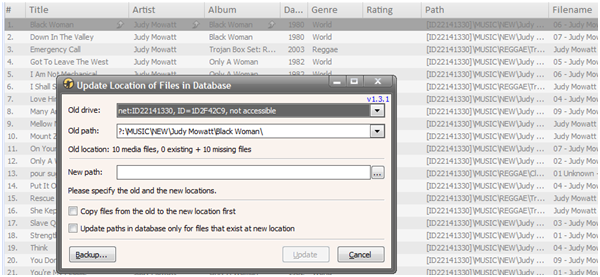
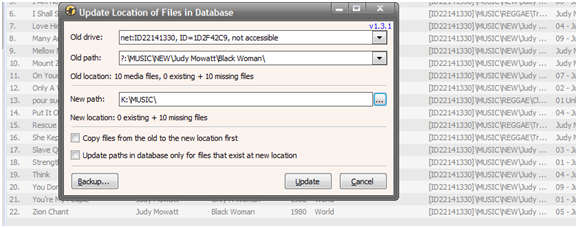
I select - new path ROOT
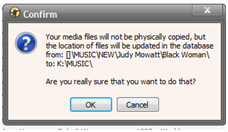
confirm the action - i assume as per above that the root and subfloders will be updated accordingly
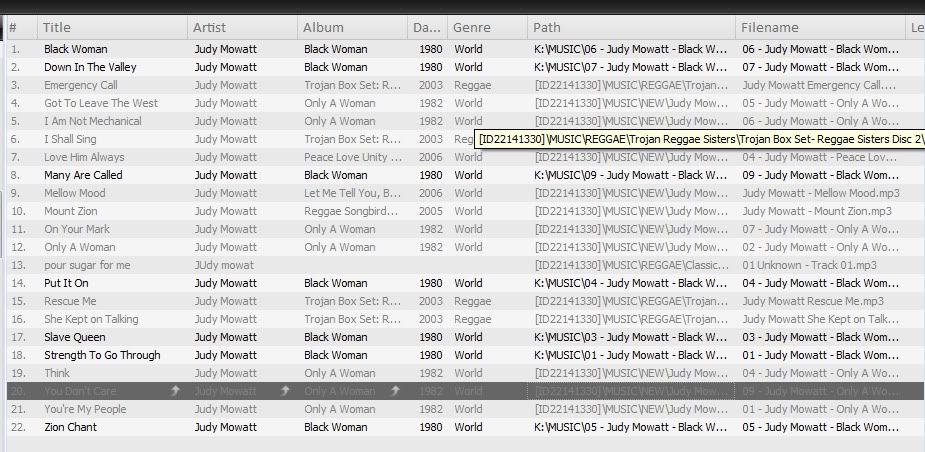
as you can see this is not the case???
Not only is it sporadically updating the files, they are being pointed tot he root folder - which we know they are located in a sub folder of that root
I amtrying to play from playlists - I have over 50. My music is catalogued into genre folders and then sub folders by albums, i need to be able to play from the playlists, but the script is not correctly updating. Any ideas how or what to do.?
Posted here http://www.mediamonkey.com/forum/viewto ... =1&t=64822 my initial issues for a little more context. I am using win7 - as per the post you will see if i use admin (after script install) i cannot see the shared drive (i am not sure why )
I have not mapped any drives, the HDD is a wireless device.
PLEASE can someone help?, i have tried to document as best i can! THANKS YT DJ in need of help!!
Win7 / MM 3.2.5 (MM4 initially messed me up always used move device content script but since win7 it no longer works) / mmip 1.1.3
here is the path - i wish to update, as you can see greyed media ID in path. The root is [ID.....]cyberlarson wrote: I didn't also write that the old and new paths are in fact the base folders. I think that it is obvious, but I will try to explain it further. For example, if I specify C:\Music\, all files which have that as the base path would be updated, like C:\Music\Pink Floyd\Money.mp3, but not files like C:\My Documents\Pink Floyd\Money.mp3 since it has different base folders.
so now i try to run script; you can see the old path cannot define the old drive, hence ?:\MUSIC (root folder on drive)\...the remaining is the path
I select - new path ROOT
confirm the action - i assume as per above that the root and subfloders will be updated accordingly
as you can see this is not the case???
Not only is it sporadically updating the files, they are being pointed tot he root folder - which we know they are located in a sub folder of that root
I amtrying to play from playlists - I have over 50. My music is catalogued into genre folders and then sub folders by albums, i need to be able to play from the playlists, but the script is not correctly updating. Any ideas how or what to do.?
Posted here http://www.mediamonkey.com/forum/viewto ... =1&t=64822 my initial issues for a little more context. I am using win7 - as per the post you will see if i use admin (after script install) i cannot see the shared drive (i am not sure why )
I have not mapped any drives, the HDD is a wireless device.
PLEASE can someone help?, i have tried to document as best i can! THANKS YT DJ in need of help!!