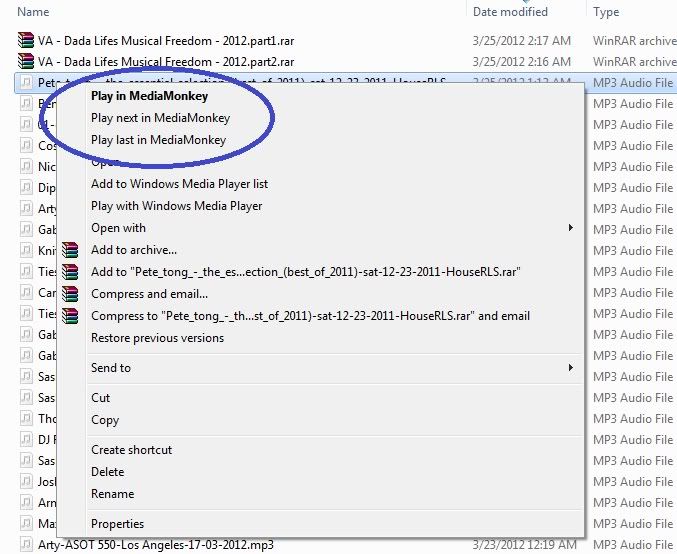
)
)Can someone stick this in Mantis please.
P.S. I used build 1461 too
Moderator: Gurus
)Hey, this helped! Thank yoU!!.. This certainly is a bug in the latest MM 4.x release and developers should make note of this.. I installed MediaMonkey_4.0.3.1476 on a fresh Windows 7 64-bit OS install and the context menus, when selecting songs to play in Windows Explorer, have never come up.. How very sad and odd, seeing how this was an amazing and desired feature of MM and to see it not working or have gone away is just terrible! So THANKS, MaxiM!, I did as you instructed.. I uninstalled MM 4.0.3.1476, installed MM 4.0.0.1459, checked to see if the context menus appeared, and (as you expressed above) *ta-da!*, they appeared!!..MaxiM wrote:Ha! Update on the subject at hand.
Instead of further messing with registry, i've decided to find the oldest MM4 release, which was 4.0.1.1461. Uninstalled the 4.0.3 one, installed the oldie, and *ta-dam* it works. MM is now listed under Default Programs, it assotiates the files via Options no problem, all music registered files have their proper icons and so on. Seems to me that 4.0.3 installer is broken. Should be fairly easy to fix, but for pete's sake, do it. I know many less patient people who would uninstall this program and never come back after encountering something like this. And there's a saying that applies to this: 1 happy customer will bring 10 more; 1 unhappy customer will deter other 100
My system info just in case it's helpful: Windows 7 Enterprise 64-bit (6.1, Built 7601), Service Pack 1, GENUINE (not some pirated crap of unknown origin).
EDIT: Installing 4.0.3 over 4.0.1 also worked. Maybe many of you didn't noticed the problem because you started with the older version and upgraded.
 .. I then re-installed MM 4.0.3.1476 over MM 4.0.0.1459 and the menus still remain! Now, I have yet to restart my system but hopefully when I do, they will not have gone away!.. Thank yoU!! and here is a screen shot of what I'm referring to: