
Hello, happy New Year,
After the latest update, when I re-scan to add new media to Media Monkey and Select "Properties", Adjust, or provide any missing fields, I found found that when selecting the next button, the changes I have made were not committed.
Instead, I now need to select properties on each new item and select "Ok" for the information to actually save. Should be easy to reproduce, quite frustrating and I hope you are able to look into this. Thanks so much for all the work!
"Next" Button Issue When reScanning New Media (After Update)
Moderator: Gurus
-
MarioWhoLikesFood
- Posts: 23
- Joined: Sun Feb 16, 2025 3:40 pm
Re: "Next" Button Issue When reScanning New Media (After Update)
Can you please details the exact interaction between Rescan and editing Properties? Also which Build (Help > About) of MediaMonkey are you seeing this with?
Download MediaMonkey ♪ License ♪ Knowledge Base ♪ MediaMonkey for Windows 2024 Help ♪ MediaMonkey for Android Help
Lowlander (MediaMonkey user since 2003)
Lowlander (MediaMonkey user since 2003)
-
MarioWhoLikesFood
- Posts: 23
- Joined: Sun Feb 16, 2025 3:40 pm
Re: "Next" Button Issue When reScanning New Media (After Update)
Absolutely these are the steps used visually, thank you Lowlander
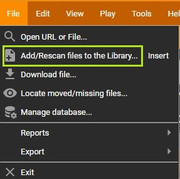
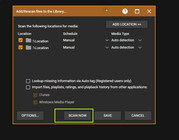
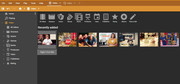
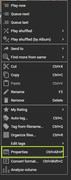
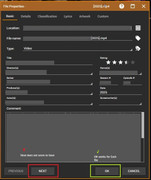
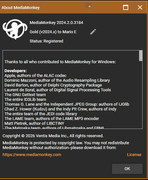
https://postimg.cc/gallery/NfcQbMh
https://postimg.cc/gallery/NfcQbMh
Re: "Next" Button Issue When reScanning New Media (After Update)
Thanks for the screenshots. I'm unable to reproduce on the latest beta. Can you please try it and see if it's working for you too?
Download MediaMonkey ♪ License ♪ Knowledge Base ♪ MediaMonkey for Windows 2024 Help ♪ MediaMonkey for Android Help
Lowlander (MediaMonkey user since 2003)
Lowlander (MediaMonkey user since 2003)
Re: "Next" Button Issue When reScanning New Media (After Update)
Hi,
Please update to latest build from https://www.mediamonkey.com/forum/viewt ... 86639&sd=d and see if you can reproduce, we improved tag updating and file access permission in latest versions.
Please update to latest build from https://www.mediamonkey.com/forum/viewt ... 86639&sd=d and see if you can reproduce, we improved tag updating and file access permission in latest versions.
Best regards,
Peke
MediaMonkey Team lead QA/Tech Support guru
Admin of Free MediaMonkey addon Site HappyMonkeying



How to attach PICTURE/SCREENSHOTS to forum posts
Peke
MediaMonkey Team lead QA/Tech Support guru
Admin of Free MediaMonkey addon Site HappyMonkeying
How to attach PICTURE/SCREENSHOTS to forum posts
-
MarioWhoLikesFood
- Posts: 23
- Joined: Sun Feb 16, 2025 3:40 pm
 Re: "Next" Button Issue When reScanning New Media (After Update)
Peke. Lowlander, thanks again I appreciate the help. I've upgraded and will report back after my next batch.
-
MarioWhoLikesFood
- Posts: 23
- Joined: Sun Feb 16, 2025 3:40 pm
Re: "Next" Button Issue When reScanning New Media (After Update)
Alright I think I can better pinpoint this now.
I did not scan in a new batch, however I did review the last added and identified what I believe is the issue.
When using Next to cycle through recently added videos, to review recently tagged videos, it is the Publisher field on the Details tab which does not update the display of the actual value.
When individually selected (via right click Properties...) the correct value is displayed. So it is correctly committing the update when editing this Field, the field is just not refreshing when viewed from next it appears.
I have also discovered the same results seem to apply globally and are not limited to the "Recently added" section. i.e. when the field is viewed from Actors, Directors ect. sections. I know this was not previous behavior.
I hope this is of help
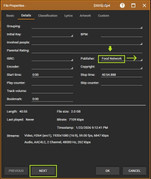
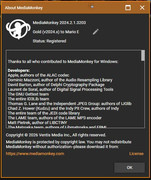
I did not scan in a new batch, however I did review the last added and identified what I believe is the issue.
When using Next to cycle through recently added videos, to review recently tagged videos, it is the Publisher field on the Details tab which does not update the display of the actual value.
When individually selected (via right click Properties...) the correct value is displayed. So it is correctly committing the update when editing this Field, the field is just not refreshing when viewed from next it appears.
I have also discovered the same results seem to apply globally and are not limited to the "Recently added" section. i.e. when the field is viewed from Actors, Directors ect. sections. I know this was not previous behavior.
I hope this is of help
Re: "Next" Button Issue When reScanning New Media (After Update)
I can't reproduce, actually I see quite the opposite problem. There definitely is an issue with Publisher, added as: https://www.ventismedia.com/mantis/view.php?id=21951
Please capture this failing to save in a debug log (step 4b) and attach the log to a Support Ticket, referencing this post or the above linked bug: https://www.mediamonkey.com/forum/viewtopic.php?t=86643
Please capture this failing to save in a debug log (step 4b) and attach the log to a Support Ticket, referencing this post or the above linked bug: https://www.mediamonkey.com/forum/viewtopic.php?t=86643
Download MediaMonkey ♪ License ♪ Knowledge Base ♪ MediaMonkey for Windows 2024 Help ♪ MediaMonkey for Android Help
Lowlander (MediaMonkey user since 2003)
Lowlander (MediaMonkey user since 2003)
-
MarioWhoLikesFood
- Posts: 23
- Joined: Sun Feb 16, 2025 3:40 pm
Re: "Next" Button Issue When reScanning New Media (After Update)
Indeed, this sounds pretty similar if not the same.
If their is anything particular of interest in this log I am happy to provide that.
There is quite a bit of irrelevant information in the created in debug log (step 4b)
and I am not quite versed enough to know what is important.
Thank you Lowlander
If their is anything particular of interest in this log I am happy to provide that.
There is quite a bit of irrelevant information in the created in debug log (step 4b)
and I am not quite versed enough to know what is important.
Thank you Lowlander
Re: "Next" Button Issue When reScanning New Media (After Update)
You stated that changes to Publisher aren't saved. This was not reproduced, I saw the changes saved to the original file and then stick when the next file is viewed (instead of the value Publisher already had).
Download MediaMonkey ♪ License ♪ Knowledge Base ♪ MediaMonkey for Windows 2024 Help ♪ MediaMonkey for Android Help
Lowlander (MediaMonkey user since 2003)
Lowlander (MediaMonkey user since 2003)
-
MarioWhoLikesFood
- Posts: 23
- Joined: Sun Feb 16, 2025 3:40 pm
Re: "Next" Button Issue When reScanning New Media (After Update)
No idea. I feel like I have done by best to help identify an issue I have found, but glad to hear it is not happening on your end.
Perhaps this will clear up.
Perhaps this will clear up.