COM object error, And a playlist question

This forum is for reporting bugs in MediaMonkey for Windows 4. Note that version 4 is no longer actively maintained as it has been replaced by version 5.

Moderator: Gurus

Izzmit

COM object error, And a playlist question

Post by Izzmit »

First:
Each time I exit, I get this error:
Image
If I decide not to close the application, MM shows up in task manager ad playing in skinless version, but no music plays, and you cant see MM or start a new one.

Secondly:
Often, when im playing music I come across a song I dont want on my playlist. Can i remove it easily through something like the now playing window? I can remove it from "Now Playing" but not the actual playlist I am playing.

Thanks

PS: Getting a wired error trying to post in the help section, so I am trying here to see if it goes through. Sorry
Izzmit
Posts: 24
Joined: Sun Jun 03, 2007 11:59 pm
Location: Phoenix

Post by Izzmit »

Coming back to edit.....logged in now

What changed:
Downloaded "Messenger Plus!" for windows live messenger.
Set it to read info from Media Monkey <--it works, and i dont think the error started here.
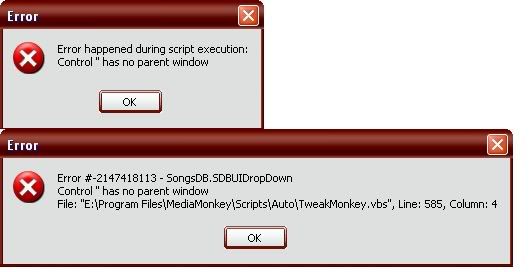
Added "Tweak Monkey" script....another error there, might be releated
Image

Added "Black Monkey" skin <--(odd issue here, the text stays black)

I listed the other errors here hoping they might be related....not expecting people too solve em all at once here. I havnt looked into them much yet.

Windows XP sp2
MM 2.5.5.998
Standard
Songs stored on HD

Will reinstalling MM remove my changes i have made to library, or can i just save my playlist somewhere, reinstall, and everything will be the same?
rovingcowboy
Posts: 14163
Joined: Sat Oct 25, 2003 7:57 am
Location: (Texas)
Contact:

Post by rovingcowboy »

you've got a plugin not closing is my guess.

if your closing monkey then theres no harm in closing the com's it opened.

run a registry cleaner and see if there is any mess that needs cleaned up. also try a defragement of your computer see if any duck is not inline. 8)
roving cowboy / keith hall. My skins http://www.mediamonkey.com/forum/viewto ... =9&t=16724 for some help check on Monkey's helpful messages at http://www.mediamonkey.com/forum/viewto ... 4008#44008 MY SYSTEMS.1.Jukebox WinXp pro sp 3 version 3.5 gigabyte mb. 281 GHz amd athlon x2 240 built by me.) 2.WinXP pro sp3, vers 2.5.5 and vers 3.5 backup storage, shuttle 32a mb,734 MHz amd athlon put together by me.) 3.Dell demension, winxp pro sp3, mm3.5 spare jukebox.) 4.WinXp pro sp3, vers 3.5, dad's computer bought from computer store. )5. Samsung Galaxy A51 5G Android ) 6. amd a8-5600 apu 3.60ghz mm version 4 windows 7 pro bought from computer store.
Steegy
Posts: 3452
Joined: Sat Nov 05, 2005 7:17 pm

Post by Steegy »

Concerning the TweakMonkey error you showed:
° are you using the latest version of TweakMonkey (1.02)? If not, please try that one first.
° when does the error happen?
Extensions: ExternalTools, ExtractFields, SongPreviewer, LinkedTracks, CleanImport, and some other scripts (Need Help with Addons > List of All Scripts).
rovingcowboy
Posts: 14163
Joined: Sat Oct 25, 2003 7:57 am
Location: (Texas)
Contact:

Post by rovingcowboy »

the second set of images is one for windows telling you the scripting host had an error trying to run a script
the other i believe is monkey telling you what script had the error.

removing the song from the now playing is possible but you need to make a new playlist. just remove the one you dont want in the now playing list. copy the others in the list to the new playlist. then start that new playlist. monkey makes m3u lists to use as the now playing playlist so once it loaded you need to change the playlist, if you want to get rid of a song in it.

steegy i'm guessing that tweakmonkey error happens at strart up since the little window says " during script execution " :wink:

the strange forum error is more then likely because of internet traffic jam.

8)
roving cowboy / keith hall. My skins http://www.mediamonkey.com/forum/viewto ... =9&t=16724 for some help check on Monkey's helpful messages at http://www.mediamonkey.com/forum/viewto ... 4008#44008 MY SYSTEMS.1.Jukebox WinXp pro sp 3 version 3.5 gigabyte mb. 281 GHz amd athlon x2 240 built by me.) 2.WinXP pro sp3, vers 2.5.5 and vers 3.5 backup storage, shuttle 32a mb,734 MHz amd athlon put together by me.) 3.Dell demension, winxp pro sp3, mm3.5 spare jukebox.) 4.WinXp pro sp3, vers 3.5, dad's computer bought from computer store. )5. Samsung Galaxy A51 5G Android ) 6. amd a8-5600 apu 3.60ghz mm version 4 windows 7 pro bought from computer store.
Izzmit
Posts: 24
Joined: Sun Jun 03, 2007 11:59 pm
Location: Phoenix

Post by Izzmit »

Ok, the Tweak Monkey error is gone after a defrag/restart.
And thanks for the help guys. Now all I have left is the dam COM object error.
Steegy
Posts: 3452
Joined: Sat Nov 05, 2005 7:17 pm

Post by Steegy »

If you rename MediaMonkey's Plugins folder (e.g. to PluginsBAK, to disable it) and the (re)start MediaMonkey, does the COM warning still come up?
If not, then rename the folder back to what it was, and only disable e.g. the MSN Messenger plugin (change its file extension, e.g. from dll to dll.off). After a (re)start of MediaMonkey, is the warning still gone?
Extensions: ExternalTools, ExtractFields, SongPreviewer, LinkedTracks, CleanImport, and some other scripts (Need Help with Addons > List of All Scripts).
Izzmit
Posts: 24
Joined: Sun Jun 03, 2007 11:59 pm
Location: Phoenix

Post by Izzmit »

Ok, disabling the plugins went horribly. It scrolled through my entire playlist superfast, and was "not responding". I believe that was caused by the fact that all the file type readers were plugins?
Disabling scripts....it worked.
Inside the scripts.....disabled the "tweak monkey" script and it fixed the problem. Problems, actually. There is another error showing up....i dont remember it being there last nite, but i was annoyed, tired, and pissed at the com object that wasnt closing.
Heres the second thing that shows up when i close teh monkey.

(It shows 7 times, just keep pressing OK. Usually the last number is all 0's, sometimes its got a couple different numbers on the end, like 00074)
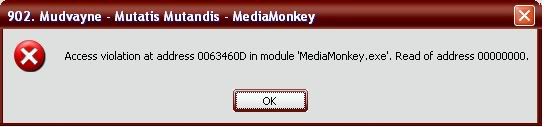
Image

So, I have this error and the COM error

EDIT:
odd.....disable resume play on startup, and the problems go away. renable it and the problem didnt come back?
whyyyyyyyy

EDIT2:
they are back
messenger plugin seems to conflict with tweakmonkey
dammit

Edit3:
com object is back when messenger is enabled, even with the tweak script renamed. now i am sad

Edit4:
Went to the messenger plugin's site, got this answer:
Originally posted by -dt-

quote:Originally posted by Izzmit

So, I recently got mad at Windows Media player, and went looking for a new media player. I found Media Monkey, and really like it. But I must have my MSN messenger message show what im playing,(why? i dont know...) so I found this script, and it works exactly how I want, except for a problem. The below error shows up whenever I exit:

thats normal, MediaMonkey just asks if you want to close it because theres other applications using it (Smilie)
Facinating.

Well, I guess its settled, although that Memory Error still bothers me. I just cant seem to pinpoint its cause enough to be of any real help I dont think[/quote]

Steegy
Posts: 3452
Joined: Sat Nov 05, 2005 7:17 pm

Post by Steegy »

About the TweakMonkey problem:
Yes, the Access Violation errors are a known problem under MM2. Sometimes they occur, sometimes not... it probably also depends on what system you have. The debug version of MM doesn't seem to have this problem (at least in my case). The cause of the problem is known a little bit (some action in MM is working but causes an (useless) error at the end), but can't be circumvented.
So the best is to disable/uninstall the TweakMonkey script if you have problems with it.
(Disable it by changing the extension from .vbs to something else. Changing the name of the script won't help.).

About the COM warning:
We all know what it means (just like the guy in Messenger's plugins site) so that's not the issue. The issue is that this is not supposed to happen on a properly behaving plugin... so obviously some plugin is not behaving well.
What happens: the plugin keeps running and still "uses" MediaMonkey while MM wants to shut down. Normally when MM shuts down, the plugins are closed first, so this problem doesn't happen. For some reason yours doesn't. Normally this warning does .not. happen.
Extensions: ExternalTools, ExtractFields, SongPreviewer, LinkedTracks, CleanImport, and some other scripts (Need Help with Addons > List of All Scripts).
rovingcowboy
Posts: 14163
Joined: Sat Oct 25, 2003 7:57 am
Location: (Texas)
Contact:

Post by rovingcowboy »

i belive the access errors are monkey trying to find the songs to play that tweakmonkey is wanting to resume on start up.

but the songs are no longer stored in that block of ram memory.
so you get the access error.

how to fix that not use the resume on start up option is my guesstament? 8)

the com server error might be fixed by getting a free pogram that has a tweak to shut down programs forcefully when their host program is shutting down.

i use to say get i tweak u but that is not free anymore if it is still around it went to a trial version several years ago, and it was for win98.

if you can program or code? get the xteq program from xteq.com or its new site, and get their sdk program make a plug in for that program that will close the com server when you close monkey..

i hope you get it fixed if you want to use the messager option.
other wise its take the messager script out.

:-?
roving cowboy / keith hall. My skins http://www.mediamonkey.com/forum/viewto ... =9&t=16724 for some help check on Monkey's helpful messages at http://www.mediamonkey.com/forum/viewto ... 4008#44008 MY SYSTEMS.1.Jukebox WinXp pro sp 3 version 3.5 gigabyte mb. 281 GHz amd athlon x2 240 built by me.) 2.WinXP pro sp3, vers 2.5.5 and vers 3.5 backup storage, shuttle 32a mb,734 MHz amd athlon put together by me.) 3.Dell demension, winxp pro sp3, mm3.5 spare jukebox.) 4.WinXp pro sp3, vers 3.5, dad's computer bought from computer store. )5. Samsung Galaxy A51 5G Android ) 6. amd a8-5600 apu 3.60ghz mm version 4 windows 7 pro bought from computer store.
Izzmit
Posts: 24
Joined: Sun Jun 03, 2007 11:59 pm
Location: Phoenix

Post by Izzmit »

Iv decided that i can do without the resume play, which i was hoping would work like my mp3 and portable cdplayer and just start exactly where i left off as soon as i started it, but its no big deal. I will keep it just because it allows me to auto expand nodes. that is so cool.

As for the com object error....I can program a little c++, but it is all on a different level i think. I glanced at the scripts people had written.....made some sort of logic, but Im too bust with school to really get into it :)
Since i rarely exit my media player anyway, I will just leave it. Theres nothing potentially damaging, right? just a com object not being released because another app is trying to read it?

thanks for the input guys.

PS....any clue why doubleclicking my playlist does nothing? It plays tracks, just not playlists
Post Reply