1346: Art pane cut off / Now Playing tab lost [#7333]

Beta Testing for Windows Products and plugins

Moderator: Gurus

Mizery_Made
Posts: 2283
Joined: Tue Aug 29, 2006 1:09 pm
Location: Kansas City, Missouri, United States

1346: Art pane cut off / Now Playing tab lost [#7333]

Post by Mizery_Made »

To reduce the number/size of screen shots needed, here's a mock-up of my layout in text form:

Code: Select all

-------------------------------------------
|  Tree     |       Library               |
|           |                             |
|           |                             |
|           |                             |
|           |                             |
|           |                             |
|           |                             |
|           |                             |
|           |-----------------------------|
|           |    Now Playing     |  Art   |
|           |                    |        |
-------------------------------------------
|                 Player                  |
-------------------------------------------
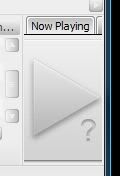
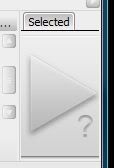
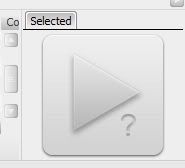
Now. I had MM maximized with this layout, as I normally do. For one reason or another (I can't recall now), I decided to momentarily shrink the window. Thus, I hit the "restore down" button and soon noticed that the "Art" pane was cut off, as the layout didn't fully adapt to the smaller window size [see fig. 1]. Now, with the pane cut off like this, switch from the Now Playing tab to the Selected tab. Notice that after clicking Selected, it shifts to the left side, where the Now Playing tab once was [see fig. 2]. Once the tabs have shifted like this, even Maximizing the window (thus giving both tabs plenty of room to be displayed), the Now Playing tab doesn't return [see fig. 3]. Once you're at this point, I've found no way of getting the Now Playing tab back (expected closing to tray or switching to mini/micro player and back would fix the issue, but no such luck). Restarting MM restores the tabs to their proper place.

fig. 1
Image

fig. 2
Image

fig. 3
Image
Dreadlau
Posts: 1967
Joined: Sun Nov 25, 2007 6:49 am

Re: 1346: Art pane cut off / Now Playing tab lost

Post by Dreadlau »

I can reproduce.

1.Shrink the width of the art panel so that the tabs are cut off.
2.Click on "Selected".
=> "Select" jumps to the left and "Now playing" disappears.
Seven Ultimate X64 SP1 / Sansa Clip 2go (with RockBox)
Lowlander
Posts: 59024
Joined: Sat Sep 06, 2003 5:53 pm

Re: 1346: Art pane cut off / Now Playing tab lost

Post by Lowlander »

That I was able to reproduce as well. Added as: http://www.ventismedia.com/mantis/view.php?id=7333
Mizery_Made
Posts: 2283
Joined: Tue Aug 29, 2006 1:09 pm
Location: Kansas City, Missouri, United States

Re: 1346: Art pane cut off / Now Playing tab lost

Post by Mizery_Made »

Dreadlau wrote:1.Shrink the width of the art panel so that the tabs are cut off.
For me, this isn't exactly necessary. When you have MM maximized, and then un-maximize it, the Art window (or it may actually be the Now Playing panel) doesn't re-size correctly to fit in the smaller MM window. So I guess there's two bugs being reported. One being that Now Playing pane/Art & Details pane doesn't resize correctly, and then because of this (or manual resize of Art & Details) you can lose the Now Playing tab.
Lowlander
Posts: 59024
Joined: Sat Sep 06, 2003 5:53 pm

Re: 1346: Art pane cut off / Now Playing tab lost [#7333]

Post by Lowlander »

With your configuration the Art window doesn't resize here, thus not having this issue.
Mizery_Made
Posts: 2283
Joined: Tue Aug 29, 2006 1:09 pm
Location: Kansas City, Missouri, United States

Re: 1346: Art pane cut off / Now Playing tab lost [#7333]

Post by Mizery_Made »

Okay, nevermind, I see what the problem was. For some reason, I had "Lock aspect ratio" turned off, so therefor the pane was correctly not resizing. Turning that on causes the pane to resize as I was seeing in MM3 (which had that option turned on, as I normally do in MM4 as well).
Post Reply