OK!
Yes, you *CAN* do that

I have a DROID3.
With the applesauce/spinach/chinese food OS (or whatever the latest is, right now)
I just tested what you want to do, from that phone.
And I have a
nightmare for a LAN network

I'm a Cisco Engineer (n00b-but it's my day job
) and I spend time effing with stuff, and end up with a tangled mess, most days
So, a plain vanilla network (router/desktop PC/Android) will be light years
easier to configure.
Ready?
THIS IS HARD!!!
Step 1. If you are not already using Media Monkey as a Media Server, do that.
Tools > Options > Library > Media Sharing
Tick all the check boxes.
Don't be afraid.
You don't have to know what the heck you're doing.
It'll look like this.
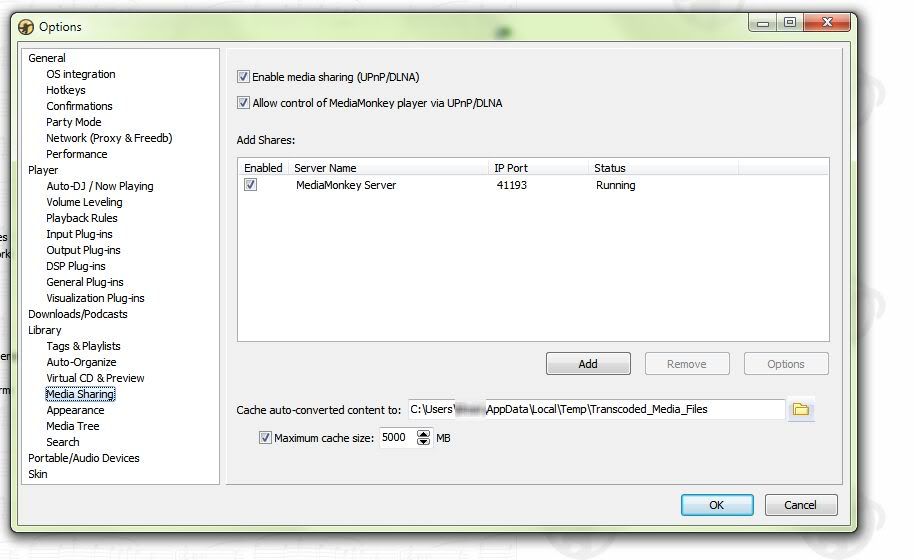
Okay.
Step 2.
(Oh...click "OK" at the bottom of that MM Screen...<forehead slap>)
Step 2.
On your Droid:
A. Make sure you are connected to your wireless network.
(If you need help doing this, holler to me at
spamspambacon@gmail.com)
B. Surf to apps already on your device. (Don't go to the market)
Look for a green icon called "DLNA".
(Swear to krap, it's nothing fancier than that....)
Start that app like you normally do all the others.
It might ask you a stupid question... I can't remember... but it should be just a simple start up process.
If you've got more than 1 media server running, it'll ask you to pick one.
Pick Media Monkey.
My DLNA App has 4 huge buttons:
PLAY Media
Copy Media to Server
Copy Media to Phone
Share Media
Clicking on "Copy to Phone" brings up all your media (music, video, podcasts, ebooks, etc) listed in MM...
and you can download the pieces you like...
I grab Cisco podcasts to listen to, on the way to work.
(That's a lie, but it sounds like I'm studious and hardworking)
Enjoy!
Spammy