Custom Report 3.2 - Updated 29/07/2014

Download and get help for different MediaMonkey for Windows 4 Addons.

Moderatori: Peke, Gurus

Onweerwolf
Messaggi: 714
Iscritto il: mar dic 12, 2006 5:32 pm

Re: Custom Report 3.2 - Updated 29/07/2014

Messaggio da Onweerwolf »

RCBAudio ha scritto: gio mag 24, 2018 8:12 am I have installed Media Monkey and Custom Report 3.2 on a new laptop and when I execute the Custom Report Script I am seeing this same error:
Error #70 - Microsoft VBScript runtime error
Permission denied
File: "E:\MediaMonkey\Scripts\CustomReport.vbs", Line: 3187, Column: 4
I read through the thread but must have overlooked the resolution. How was this resolved?

Thanks in Advance.
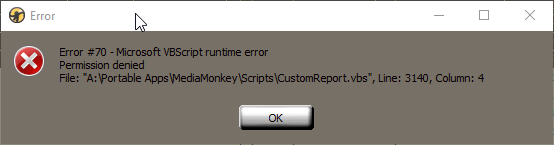
I am getting a very similar problem every now and then:

Immagine

edit: actually just found out what causes this. When I make a custom report and have it export as a .csv file and then immediately open that in Excel, then do another custom report with the same settings that opens into the same .csv but the former file is still open in Excel this error results. If I close the former file in Excel it works.
Immagine
arvo
Messaggi: 5
Iscritto il: mer set 09, 2015 5:21 am

Re: Custom Report 3.2 - Updated 29/07/2014

Messaggio da arvo »

I get two errors when i try and create a report.

After clicking on custom report I get the following errors.
First Error message
Error #9 - Microsoft VBscript runtime error
Subscript out of range: '[number:3]
"File: C:\users\Brett\AppData\Roaming\MediaMonkey\Scripts\CustomReport.vbs" ,Line 24B, column: 4

then it comes up with the following error message
Error happened during script execution:
Subscript out of range: "[Number 3]'

and the script window doesn't open. anyone know what causes this and how to resolve it.

cheers Brett
lothars
Messaggi: 1
Iscritto il: lun giu 15, 2020 7:46 am

Re: Custom Report 3.2 - Updated 29/07/2014

Messaggio da lothars »

Does this work with the MM5 Betas? If not, is there a similar script that does?
m.pipik54
Messaggi: 8
Iscritto il: ven lug 17, 2020 9:03 am

Re: Custom Report 3.2 - Updated 29/07/2014

Messaggio da m.pipik54 »

When I try to run the report Custom Report 3.2, MM just crashes.

I'm new to MM and I can't figure out how to delete the report since I don't want anything unstable around.
Lowlander
Messaggi: 59412
Iscritto il: sab set 06, 2003 5:53 pm

Re: Custom Report 3.2 - Updated 29/07/2014

Messaggio da Lowlander »

Tools > Extensions should allow you to remove it.
beg
Messaggi: 193
Iscritto il: mer feb 04, 2009 12:36 pm

Re: Custom Report 3.2 - Updated 29/07/2014

Messaggio da beg »

Hello,

is there a way to export a custom field where I can put in a html link including the title of the track?

Like: <a href="URL-titlesearch=%Title%">Details</a>

I see that there is a Hyperlink format option, but I don't understand how to use it.

I'd like to add a HTML link like this to each track
<a href="https://tango-dj.at/database/index.htm? ... Details</a>
robbyell
Messaggi: 1
Iscritto il: gio mar 23, 2023 4:09 am

Custom reports stopped working

Messaggio da robbyell »

Hi all - I've used MM4 for WIndows for a while now, exporting ratings, last played etc via csv into my own MS Excel database. But Custom Report has just stopped working, giving me:

Error #9 - Microsoft VBscript runtime error
Subscript out of range: '[number:0]
"File: C:\users\Me\AppData\Roaming\MediaMonkey\Scripts\CustomReport.vbs" ,Line 3001, column: 4


and on clicking "OK":

Error happened during script execution:
Subscript out of range: "[Number 0]'


Any ideas? I use a couple of addons which stop me migrating to MM5 just yet.

Thanks!

Rob
Rispondi