
Artwork no longer displays after converting .wav audio playlist to .mp3 format on a USB drive. Have spent several hours researching this issue on this forum and the internet in general. I know it used to work in Media Monkey using the previous version. The artwork displays in Media Monkey 2024 application just fine. I have tried rescanning the entire library for any issues and everything looks fine. It seems that the artwork is not being included in the converted .mp3 files.
What am I missing???
Artwork not displaying after converting files to USB drive [#21955]
Moderator: Gurus
-
toxicsludge
- Posts: 8
- Joined: Fri Apr 19, 2024 11:06 am
Re: Artwork not displaying after converting files to USB drive
Are the WAV files in the USB drive too? If so, are the MP3's converted to the same folder?
Download MediaMonkey ♪ License ♪ Knowledge Base ♪ MediaMonkey for Windows 2024 Help ♪ MediaMonkey for Android Help
Lowlander (MediaMonkey user since 2003)
Lowlander (MediaMonkey user since 2003)
-
toxicsludge
- Posts: 8
- Joined: Fri Apr 19, 2024 11:06 am
Re: Artwork not displaying after converting files to USB drive
The .wav files are only located on the Media Monkey Hard Drive, along with the artwork which resides in the Album folder. The .mp3 audio files output is on the USB Drive, which I listen to in my truck. The .mp3 files play with no problem and display the correct artist, album, and song title text. The artwork fails to display after conversion from the original .wav files
Re: Artwork not displaying after converting files to USB drive
Are you using Tools > Convert Format or Auto-Conversion in Sync? Also, which Build (Help > About) of MediaMonkey are you seeing this with?
Presumably MediaMonkey shows Artwork for all files on the Album for the WAV files?
Presumably MediaMonkey shows Artwork for all files on the Album for the WAV files?
Download MediaMonkey ♪ License ♪ Knowledge Base ♪ MediaMonkey for Windows 2024 Help ♪ MediaMonkey for Android Help
Lowlander (MediaMonkey user since 2003)
Lowlander (MediaMonkey user since 2003)
-
toxicsludge
- Posts: 8
- Joined: Fri Apr 19, 2024 11:06 am
Re: Artwork not displaying after converting files to USB drive
Media Monkey Version is 2024.2.0.3184
I have tried both Sync and Convert when populating the USB Drive.
All songs on Media Monkey have the correct image displayed.
It appears Media Monkey is not embedding the image into the song during conversion
I have tried both Sync and Convert when populating the USB Drive.
All songs on Media Monkey have the correct image displayed.
It appears Media Monkey is not embedding the image into the song during conversion
Re: Artwork not displaying after converting files to USB drive
For Sync you can control how Artwork is saved on Sync. What setting do you use?
Download MediaMonkey ♪ License ♪ Knowledge Base ♪ MediaMonkey for Windows 2024 Help ♪ MediaMonkey for Android Help
Lowlander (MediaMonkey user since 2003)
Lowlander (MediaMonkey user since 2003)
-
toxicsludge
- Posts: 8
- Joined: Fri Apr 19, 2024 11:06 am
Re: Artwork not displaying after converting files to USB drive
Save tag to image if possilbe
Re: Artwork not displaying after converting files to USB drive
Hi,
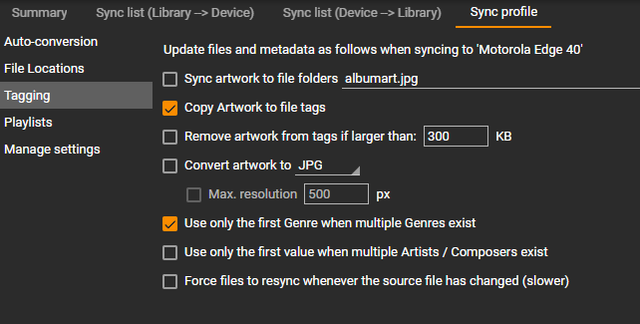
BTW I would really suggest that you convert all WAV files into FLAC files (unless they are 64 Bit files as FLAC support 32/384 as of FLAC Format v1.4.0) as beside that it will be 1/2 of WAV size it will also support Embed Album art in Tags.
I tested today with my Devices and below settings. On device sync and conversion all album arts are embed in destination MP3 file for all files that have Album Art be that linked or in Tag.
BTW I would really suggest that you convert all WAV files into FLAC files (unless they are 64 Bit files as FLAC support 32/384 as of FLAC Format v1.4.0) as beside that it will be 1/2 of WAV size it will also support Embed Album art in Tags.
Best regards,
Peke
MediaMonkey Team lead QA/Tech Support guru
Admin of Free MediaMonkey addon Site HappyMonkeying



How to attach PICTURE/SCREENSHOTS to forum posts
Peke
MediaMonkey Team lead QA/Tech Support guru
Admin of Free MediaMonkey addon Site HappyMonkeying
How to attach PICTURE/SCREENSHOTS to forum posts
Re: Artwork not displaying after converting files to USB drive
Convert Format not taking WAV Artwork to MP3 is being tracked here: https://www.ventismedia.com/mantis/view.php?id=21955
Download MediaMonkey ♪ License ♪ Knowledge Base ♪ MediaMonkey for Windows 2024 Help ♪ MediaMonkey for Android Help
Lowlander (MediaMonkey user since 2003)
Lowlander (MediaMonkey user since 2003)
-
toxicsludge
- Posts: 8
- Joined: Fri Apr 19, 2024 11:06 am
Re: Artwork not displaying after converting files to USB drive [#21955]
Thanks for the advice! I'll try the conversion and try to resync the files.