Need help duplicating a v4 fuction in MM v5

To discuss development of addons / skins / customization of MediaMonkey v5 / v2024

Moderators: jiri, drakinite, Addon Administrators

pokeefe0001
Posts: 117
Joined: Thu Oct 11, 2018 4:48 pm
Location: USA, Pacific Northwest

Need help duplicating a v4 fuction in MM v5

Post by pokeefe0001 »

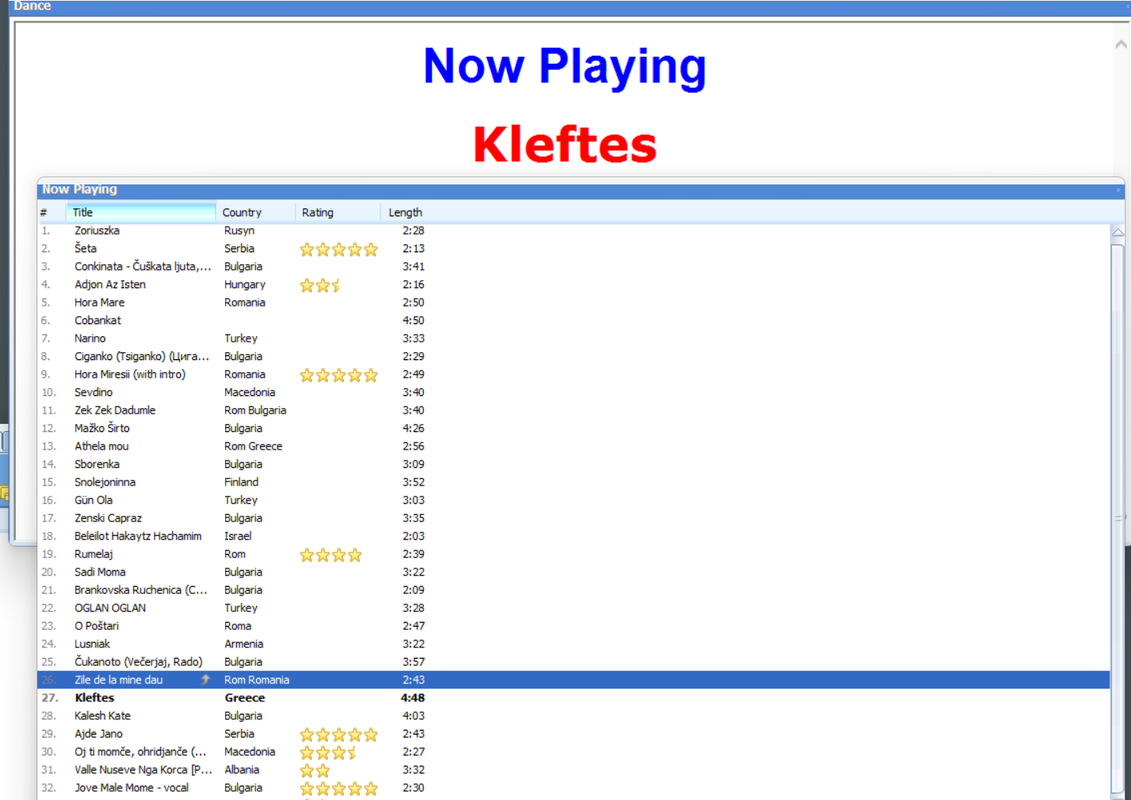
In MM v4 we have a simple script that displays a panel contining "Now playing" and the currently playing title in big letters. The script refreshes itself every second or do. (Inefficient, but it works.) We move this to an external monitor and move the Now Playing list underneath it.

I know that in MM v5 the Playing list can be undocked and moved to an external monitor. If a large headier showing "Now Playing" and the track title the we don't need a script. Otherwise we need a script that achieves the same effect as the v4 script.

Here is the v4 script:

Code: Select all

' a simple Show Dance Name script
'just adds a docking panel with a header and dance name
'
'
'here are the ini-Lines
'
' [ShowDance]
' FileName=ShowDance.vbs
' ProcName=ShowDance
' Order=17
' DisplayName=Show  Dance title
' Description=Shows Dance Title
' Language=VBScript
' ScriptType=0
'

Dim Tmr, strOldsong, HTMLstr 
Dim dncPanel

Sub ShowDance
	GetDanceData
	CreatePanel
	Set Tmr = SDB.CreateTimer(1000)
	Script.RegisterEvent Tmr, "OnTimer", "Update"
End Sub

Sub GetDanceData
	Dim Song, StrData, strHeader
  	If SDB.Player.IsPlaying Then
	   Set Song = SDB.Player.CurrentSong       
	   StrData = Song.title
	   strOldsong = song.path
        End If
        StrHeader = "<p align=center> <b><font face=Arial Size=16 color=#0000FF>Now Playing</font></b>"
	StrData = StrHeader & "<p align=center> <b> <font face=Verdana Size=7 color=red>" & StrData & " </font>" 
        HTMLstr = "<!DOCTYPE HTML><html><head></head><body>" & strData & "</body></html>"
End Sub


Sub CreatePanel
	Dim Form
	
	'creates the panel
        Set Form = SDB.Objects("DancePanel")
	If Form is Nothing Then
		Set Form = SDB.UI.NewDockablePersistentPanel("DancePanel")
		Form.DockedTo = 2
		Form.Common.Width = 250
		Form.Caption = "Dance"
		Set dncPanel = SDB.UI.NewActiveX(Form, "Shell.Explorer")
		dncPanel.Common.Align = 5  
                dncPanel.SetHTMLDocument(HTMLstr)
		Form.Common.Visible = True
		SDB.Objects("DancePanel") = Form    
		Script.RegisterEvent Form, "OnClose", "FormClose"
	End If
End Sub

Sub Update(Timer)
	Dim NewSong
  	If SDB.Player.IsPlaying Then
	   Set NewSong = SDB.Player.CurrentSong
	   If strOldsong <> NewSong.path Then
		GetDanceData
                dncPanel.SetHTMLDocument(HTMLstr)	
	   End If
        End If

End Sub

Sub FormClose(Node)
	SDB.Objects("DancePanel") = Nothing
	Script.UnregisterEvents Tmr
End Sub
This script, and everything else in MM v4, works fine for us, but Microsoft is going to drop VBScript so we need to move off of MMv4 in the next couple years. If we can make MM v5 look and feel very similar to MM v4 we will stay with MediaMonkey. Otherwise we will probably switch to something else. (MusicBee and the MITPlayer have proponents in our group.)

I said, "If we can make MM v5 ...", but that should really be "If I ..." I am our group's only MM technical support. And I don't know JavaScript. (We are in trouble regarding MM v5, but I'll be passing the support off to someone else anyway in the next year so it will be someone else's problem.)

The "We" I refereed to is a folkdance group that has used Mediamonkey since about 2009. There are currently 5 members of the group that run MM to play music for weekly dances. 3 of those 5 are nontechnical (actually, technophobes) and don't handle even small changes well. Switching to MM v5 will be traumatic to them. Making that banner for the Playing list. (So will finding a v5 equivalent for the v4 Aqua4 skin,)
MMV4 (1919) Portable
Multiple Win11 x64 25H2
Multiple Win10 x32, unknown builds
Lowlander
Posts: 59938
Joined: Sat Sep 06, 2003 5:53 pm

Re: Need help duplicating a v4 fuction in MM v5

Post by Lowlander »

pokeefe0001
Posts: 117
Joined: Thu Oct 11, 2018 4:48 pm
Location: USA, Pacific Northwest

Re: Need help duplicating a v4 fuction in MM v5

Post by pokeefe0001 »

Lowlander wrote: ↑Tue Nov 03, 2026 3:13 pm Check out: viewtopic.php?t=86756
I already did that, but
  • I'm almost sure the v4 logic isn't appropriate for v5.
  • I'm sure there's a much more efficient process - even in v4. I'm sure there's a way to have the display updated every time a new track is started rather than repeatedly checking every second or two to see if the currently playing track has changed.
  • I suspect (hope) there's a way to add that banner information directly to the undocked Playing list so that the script isn't needed at all. Although, in that case, I suspect there might need to be a script to refresh that modified Play panel.
MMV4 (1919) Portable
Multiple Win11 x64 25H2
Multiple Win10 x32, unknown builds
Peke
Posts: 18776
Joined: Tue Jun 10, 2003 7:21 pm
Location: Earth
Contact:

Re: Need help duplicating a v4 fuction in MM v5

Post by Peke »

Hi,
You can try latest MM 2027 from viewtopic.php?t=86639&sd=d and then:
1. Go to Playing Mode
2. Select Album Art view
3. Undock
4. Move it to any other Screen (I moved it to Projector Screen)
5. Maximize
6. Continue to use Main MM screen normally
Best regards,
Peke
MediaMonkey Team lead QA/Tech Support guru
Admin of Free MediaMonkey addon Site HappyMonkeying
Image
Image
Image
How to attach PICTURE/SCREENSHOTS to forum posts
pokeefe0001
Posts: 117
Joined: Thu Oct 11, 2018 4:48 pm
Location: USA, Pacific Northwest

Re: Need help duplicating a v4 fuction in MM v5

Post by pokeefe0001 »

Peke wrote: ↑Fri Nov 06, 2026 7:47 pm Hi,
You can try latest MM 2027 from viewtopic.php?t=86639&sd=d and then:
1. Go to Playing Mode
2. Select Album Art view
3. Undock
4. Move it to any other Screen (I moved it to Projector Screen)
5. Maximize
6. Continue to use Main MM screen normally
Either I don't understand what you said (which is definitely true) or you don't understand what I need (which, I think, is also true).

I could not find anything labeled "Playing Mode" and I'm pretty sure we want "None" for view.

What I need is shown in the (hopefully included) screen shot (as produced with MMW4).
Image
It hopefully shows a banner produced by our script with a Now Playing list below it which we move to an external monitor.

If we are going to use MMW5 we need to achieve the same effect. We need either a v5 script that produces the banner or we need to include that data as a heading in the undocked Playing panel. If the banned data can be included in the Playing p[anel then your your idea of maximizing the panel is good. If the banner is in its own panel then we obviously cannot maximize the Playing panel.

If your comment about selecting Album Art is implying that we could somehow fake Album Art data to include our banner then that would be a good solution ... if we can move it to the top of the Playing list.
MMV4 (1919) Portable
Multiple Win11 x64 25H2
Multiple Win10 x32, unknown builds
pokeefe0001
Posts: 117
Joined: Thu Oct 11, 2018 4:48 pm
Location: USA, Pacific Northwest

Re: Need help duplicating a v4 fuction in MM v5

Post by pokeefe0001 »

quote=Peke post_id=534902 time=1794012436 user_id=213]
1. Go to Playing Mode
2. Select Album Art view
3. Undock
4. Move it to any other Screen (I moved it to Projector Screen)
5. Maximize
6. Continue to use Main MM screen normally
[/quote]
I finally figured out what you were describing. I had disabled Preview so it wouldn't take space from the Playing pane. Once I enabled it I adjusted settings so that it said "Playing" and the track title underneath it. It took me a while to find Undock (I'm really not familiar with v5.) and discovered that (luckily) full screen does not imply "always on top". I was able to have the full screen Preview panel and position the undocked Playing panel right under the Preview text. This gives a rough approximation of our MM v4 look.

However, I think I'll still try to to work on an addon that will more closely duplicate that our v4 addon creates. I would really like more control over the size and color of the display. (Even with the Preview text set to Largest, it just isn't as big as I would like.) Duplicating the v4 addon function should be trivial once I figure out how to get any command added to a menu.

My impression is that adding a command in v5 seems much more difficult to me than adding one in v4. (Whether adding a definition in v4's scripts,ini or dynamically building the definition and loading the script in an Auto script was pretty straightforward.) I'm sure that once I figure out the technique in v5 it will be fairly easy, but I'm certainly not there yet.

I may sound unreasonable to want the look and feel of MM v5 to be the same as MM v4, but of the 5 people in our folkdance group that create and play music programs in Mediamonkey, 3 are technophobes that don't handle changes in their routines. If they have to be retrained they might as well be retrained on a different product. (The two tech-savvy people are interested in both MusicBee and the MITPlayer. And I don't count because I don't dance any more - health reasons.) The only real advantage that MediaMonkey v5 has over the other players is that we don't loose 18 years of history that's in the database. With Microsoft pulling the plug on VBScript, MM v4 is on its deathbed I don't have very long to make v5 look and act like v4.
MMV4 (1919) Portable
Multiple Win11 x64 25H2
Multiple Win10 x32, unknown builds
fetzenschaedl
Posts: 55
Joined: Mon Feb 17, 2014 12:06 pm

Re: Need help duplicating a v4 fuction in MM v5

Post by fetzenschaedl »

Hello,

would this be what you are looking for:

Image

Image

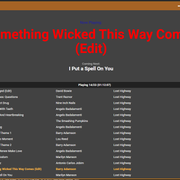
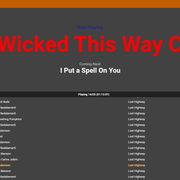
The infoheader will appear once you undock the playing panel, track changes will update the display, you can make changes to labels, fontsize and colors by editing the values in the header section of controls/playingListContainer_add.js (there is also a readme.md), be aware this only works with MM 2027.

https://www.swisstransfer.com/dl/01a1cf ... 386b34893f
I'm talking to the Monkey
New Build, Fresh Start, Clear Cache - Brave Heart
pokeefe0001
Posts: 117
Joined: Thu Oct 11, 2018 4:48 pm
Location: USA, Pacific Northwest

Re: Need help duplicating a v4 fuction in MM v5

Post by pokeefe0001 »

Thank you. I'll give that a try. It looks cleaner than what I'm doing.

I was finally able to give a detailed enough query to Google that it came up with a solution that almost worked for building a dialog addon that builds the banner. (I would still need to undock the Playing panel and place it under the banner.) I'm now tweaking the HTML to get the display formatted the way I want.
MMV4 (1919) Portable
Multiple Win11 x64 25H2
Multiple Win10 x32, unknown builds
pokeefe0001
Posts: 117
Joined: Thu Oct 11, 2018 4:48 pm
Location: USA, Pacific Northwest

Re: Need help duplicating a v4 fuction in MM v5

Post by pokeefe0001 »

I'm still working on my own solution mainly as a learning experience. I now have a very simple dialog. The logic works - the panel display the title of the currently playing dance (and the display updates when a new track plays). But the dialog script wipes out the panel's HTML formatting. I've tried a number "solutions" proposed by the Google AI but none have worked.

Here's my dialog HTML and js:

Code: Select all

!DOCTYPE html>
<html>
<head>
    <meta charset="utf-8">
    <title>Currently Playing</title>
    <script src="file:///mminit.js"></script>
    <script src="dlgNowPlaying.js"></script>
    <style>
        body {
            border: 2px solid blue;
            justify-content: center;
            align-items: center;
            text-align: center;
        }
        #nowPlaying {
            font-family: Arial, sans-serif;
            font-weight: bold;
            font-size: 60pt;
            color: blue;
            margin: 0 0 12px;
        }
        #trackTitle {
            font-size: 64pt;
            color: red;
            font-weight: bold;
            margin-bottom: 6px;
            word-break: break-word;
        }
    </style>
</head>
<body>
    <div id="nowPlaying"> Now Playing </div>
    <div id="trackTitle">
    
   <span id="trackTitleText">Nothing is playing</span>
    </div>


</body>
</html>

Code: Select all

function init() {
    var titleEl = document.getElementById('trackTitleText');

    function updateTrackInfo() {
        var track = app.player.getCurrentTrack();
        if (track) {
            titleEl.innerText = track.title || _('Unknown Title');
        } else {
            titleEl.innerText = _('No track playing');
        }
    }

    // Update immediately when the dialog opens
    updateTrackInfo();

    // Listen for track changes and playback state updates
    var onPlayerEvent = function (event) {
        if (event === 'trackChanged' || event === 'playbackState') {
            updateTrackInfo();
        }
    };

    app.listen(app.player, 'playbackState', onPlayerEvent);

    // Clean up listener when the dialog window is closed
    window.addEventListener('unload', function () {
        app.unlisten(app.player, 'playbackState', onPlayerEvent);
    });
}
Since I don't know Javascript I'm pretty much flying blind. The problem is obviously my use of .innerText. I guess I could try .innerHTML (I think) and include all and build all the formatting in the script, but I'm sure there's a way that keeps the formatting already in the panel definition.
MMV4 (1919) Portable
Multiple Win11 x64 25H2
Multiple Win10 x32, unknown builds
pokeefe0001
Posts: 117
Joined: Thu Oct 11, 2018 4:48 pm
Location: USA, Pacific Northwest

Re: Need help duplicating a v4 fuction in MM v5

Post by pokeefe0001 »

pokeefe0001 wrote: ↑Sat Nov 14, 2026 5:41 pm ...T he problem is obviously my use of .innerText. I guess I could try .innerHTML (I think) and include all and build all the formatting in the script, but I'm sure there's a way that keeps the formatting already in the panel definition.
In hindsight, that was a dumb statement. Parts of the panel that weren't touched by .innerText also lost their formatting. I guess there is something about dialogs, or perhaps the way I invoked the dialog, ignores HTML formatting.

Here's my invoking script:

Code: Select all

actions.showNowPlaying = {
    title: _('Show Now Playing Window'),
    icon: 'nowplaying',
    execute: function () {
        var dlg = uitools.openDialog('dlgNowPlaying', {
            show: true,
            modal: false,
            title: 'Currently Playing'
        });
    }
};

window._menuItems.tools.action.submenu.push({
    action: {
        title: 'Scripts',
        submenu: [
           {
           action: actions.showNowPlaying,
           order: 10,
           grouporder: 10
           }
                 ]
    },
    order: 5,      
    grouporder: 50  
});
Am I doing something wrong there?
MMV4 (1919) Portable
Multiple Win11 x64 25H2
Multiple Win10 x32, unknown builds
pokeefe0001
Posts: 117
Joined: Thu Oct 11, 2018 4:48 pm
Location: USA, Pacific Northwest

Re: Need help duplicating a v4 fuction in MM v5

Post by pokeefe0001 »

As a test I've simplified my addon down to nothing. The dialog is not just an HTML panel - no script, no MM functionality whatsoever. Browsers display the HTML formatted as I want. MediaMonkey removes all formatting when the dialog is invoked. Why?!?

Here's the panel def:

Code: Select all

<!DOCTYPE html>
<html>
<head>
    <meta charset="utf-8">
    <title>Currently Playing</title>


    <style>
        body {
            border: 1px solid blue;
            margin: 0;
            padding: 16px;
            justify-content: center;
            align-items: center;
            text-align: center;
        }
        #nowPlaying {
            font-size: 64pt;
            color: red;
            margin: 0 0 12px;
        }
        #trackTitle {
            font-size: 64pt;
            color: blue;
            font-weight: bold;
            margin-bottom: 6px;
            word-break: break-word;
        }
    </style>
</head>
  <body>
      <div id="nowPlaying"> Now Playing </div>
      <div id="trackTitle">
        <span id="trackTitleText">Nothing is playing</span>
      </div>
  </body>
</html>
MMV4 (1919) Portable
Multiple Win11 x64 25H2
Multiple Win10 x32, unknown builds
pokeefe0001
Posts: 117
Joined: Thu Oct 11, 2018 4:48 pm
Location: USA, Pacific Northwest

Re: Need help duplicating a v4 fuction in MM v5

Post by pokeefe0001 »

fetzenschaedl wrote: ↑Thu Nov 12, 2026 8:20 am ...
The infoheader will appear once you undock the playing panel, track changes will update the display, you can make changes to labels, fontsize and colors by editing the values in the header section of controls/playingListContainer_add.js (there is also a readme.md), be aware this only works with MM 2027.
...
Yes, that does exactly what I need and almost exactly what I want. It would be perfect if Pause did not trigger a switch to "Nothing playing". Is it alright if I tweak your code to see if I can achieve this? (I don't know Javascript so this will take me a while.)
MMV4 (1919) Portable
Multiple Win11 x64 25H2
Multiple Win10 x32, unknown builds
fetzenschaedl
Posts: 55
Joined: Mon Feb 17, 2014 12:06 pm

Re: Need help duplicating a v4 fuction in MM v5

Post by fetzenschaedl »

pokeefe0001 wrote: ↑Tue Nov 17, 2026 12:15 am
fetzenschaedl wrote: ↑Thu Nov 12, 2026 8:20 am ...
The infoheader will appear once you undock the playing panel, track changes will update the display, you can make changes to labels, fontsize and colors by editing the values in the header section of controls/playingListContainer_add.js (there is also a readme.md), be aware this only works with MM 2027.
...
Yes, that does exactly what I need and almost exactly what I want. It would be perfect if Pause did not trigger a switch to "Nothing playing". Is it alright if I tweak your code to see if I can achieve this? (I don't know Javascript so this will take me a while.)
Absolutely, go ahead.

But I checked the script again, and I couldn't reproduce the pause behaviour, when I pause the playback the infoheader still displays the currently playing/paused song. There is already a playback state check for pause in the code
function refreshText() {
const player = app.player;
const isActive = !!(player.isPlaying || player.paused);
const current = isActive ? player.getCurrentTrack() : undefined;
Or do you want the info also to show up when playback is stopped?
I'm talking to the Monkey
New Build, Fresh Start, Clear Cache - Brave Heart
pokeefe0001
Posts: 117
Joined: Thu Oct 11, 2018 4:48 pm
Location: USA, Pacific Northwest

Re: Need help duplicating a v4 fuction in MM v5

Post by pokeefe0001 »

fetzenschaedl wrote: ↑Thu Nov 12, 2026 8:20 am ...
But I checked the script again, and I couldn't reproduce the pause behaviour, when I pause the playback the infoheader still displays the currently playing/paused song. There is already a playback state check for pause in the code
...
I'll check that again. It seemed to be intermittent (which doesn't make sense). Sometimes the paused track title stayed displayed; sometimes it was replaced by the "Nothing playing" (after a few second's delay). I may have something weird in my setup ... although I haven't changed much except for changing skins.

I checked again. When I pause a track the header changes to "Nothing Playing". I'm not sure I'll get to it today, but I'll futz around with the code and see what I can do. If nothing else it will get me more familiar with Javascript and the internals of MM v5.

By the way, thank you very much for making unobfuscated code available. The only way I learned VBS and MM v4 internals was by reading (and sometimes tweaking) available add-ons. There are so many fewer v5 add-ons available, and the internals of v5 seem so much more convoluted (probably much more rigorous and structured, but so very much more difficult for me to understand) that any readable (and straightforward) working sample is a goldmine!
MMV4 (1919) Portable
Multiple Win11 x64 25H2
Multiple Win10 x32, unknown builds
pokeefe0001
Posts: 117
Joined: Thu Oct 11, 2018 4:48 pm
Location: USA, Pacific Northwest

Re: Need help duplicating a v4 fuction in MM v5

Post by pokeefe0001 »

fetzenschaedl wrote: ↑Tue Nov 17, 2026 3:07 am ...
Or do you want the info also to show up when playback is stopped?
I do. If it is to match behavior of the v4 banner panel it will play the current or previous title until the next track starts.

A while ago I asked AI to generate a dialog script and panel to duplicate the banner. The panel part did not work at all - all the HTML formatting was ignored - but the script retrieved and presented the title (mostly) the way I wanted. Here is that script:

Code: Select all

function init() {
    var titleEl = document.getElementById('trackTitleText');

    function updateTrackInfo() {
        var track = app.player.getCurrentTrack();
        if (track) {
            titleEl.innerText = track.title || _('Unknown Title');
        } else {
            titleEl.innerText = _('No track playing');
        }
    }

    // Update immediately when the dialog opens
    updateTrackInfo();

    // Listen for track changes and playback state updates
    var onPlayerEvent = function (event) {
        if (event === 'trackChanged' || event === 'playbackState') {
            updateTrackInfo();
        }
    };

    app.listen(app.player, 'playbackState', onPlayerEvent);

    // Clean up listener when the dialog window is closed
    window.addEventListener('unload', function () {
        app.unlisten(app.player, 'playbackState', onPlayerEvent);
    });
}
The only downside: When first brought up it returns the title of the last track played before MM was shut down.

(I'm not sure what "event === 'playbackState'" is supposed to do. Would listening to playbackState ever produce the value "playbackState"?) Anyway, I don't want to loose the "next track" part of your function so I'm thinking of trying to put this snippet in your code to see what it does.

Perhaps we should continue this discussion via PM so people won't get bored with my repeated display of ignorance.
MMV4 (1919) Portable
Multiple Win11 x64 25H2
Multiple Win10 x32, unknown builds
Post Reply