Hi everyone,
I am using MM 2024.1.0.3113 with Windows 10.
Not sure why this happened, but today when I went to play a playlist, it started with a 'now playing' column sitting immediately above the panel in the bottom right that normally displays album artwork . I was able to get rid of this 'now playing' column by clicking on 'hide right panel' in the top right corner. This got rid of the 'now playing' column, however the album art that was showing in the bottom right has disappeared. Can anyone show me how to restore things to how they were, so that the album art panel still displays, but without the 'now playing' panel? Thanks in advance.
Need help to restore artwork panel
Moderator: Gurus
-
Robbieboy65
- Posts: 136
- Joined: Thu Jan 10, 2008 10:09 pm
- Location: Australia
Re: Need help to restore artwork panel
You need to unhide the right panel, then enable Preview.
Download MediaMonkey ♪ License ♪ Knowledge Base ♪ MediaMonkey for Windows 2024 Help ♪ MediaMonkey for Android Help
Lowlander (MediaMonkey user since 2003)
Lowlander (MediaMonkey user since 2003)
-
Robbieboy65
- Posts: 136
- Joined: Thu Jan 10, 2008 10:09 pm
- Location: Australia
Re: Need help to restore artwork panel
Thank you Lowlander for your reply.
I followed those instructions but when I unhide the right panel and configure 'options' as instructed, the 'playing' column does not go away. I exited MM and re-opened, but it's still there.
I followed those instructions but when I unhide the right panel and configure 'options' as instructed, the 'playing' column does not go away. I exited MM and re-opened, but it's still there.
Re: Need help to restore artwork panel
Hi,
Can you rename persistent.json and start MM?
If taht fixes the issue, close MM and rename it back to see if you still observe issue. Finally if you still have issue and renaming fixed in first place please send us Zipped problematic persistent.json in support ticket.
Can you rename persistent.json and start MM?
If taht fixes the issue, close MM and rename it back to see if you still observe issue. Finally if you still have issue and renaming fixed in first place please send us Zipped problematic persistent.json in support ticket.
Best regards,
Peke
MediaMonkey Team lead QA/Tech Support guru
Admin of Free MediaMonkey addon Site HappyMonkeying



How to attach PICTURE/SCREENSHOTS to forum posts
Peke
MediaMonkey Team lead QA/Tech Support guru
Admin of Free MediaMonkey addon Site HappyMonkeying
How to attach PICTURE/SCREENSHOTS to forum posts
-
Robbieboy65
- Posts: 136
- Joined: Thu Jan 10, 2008 10:09 pm
- Location: Australia
Re: Need help to restore artwork panel
Thank you Peke: sorry if I am asking obvious questions, but do you mean that you want me to rename the media Monkey exe file as persistent.json?
Re: Need help to restore artwork panel
Hi,
No, I literally think that you rename Persistent.json file in MM settings folder (you can delete .BAK file) and then start MM. It should reset MM layout on start.
No, I literally think that you rename Persistent.json file in MM settings folder (you can delete .BAK file) and then start MM. It should reset MM layout on start.
Best regards,
Peke
MediaMonkey Team lead QA/Tech Support guru
Admin of Free MediaMonkey addon Site HappyMonkeying
How to attach PICTURE/SCREENSHOTS to forum posts
Peke
MediaMonkey Team lead QA/Tech Support guru
Admin of Free MediaMonkey addon Site HappyMonkeying
How to attach PICTURE/SCREENSHOTS to forum posts
Re: Need help to restore artwork panel
If I understand correctly you want the preview pane which shows the artwork but you do not want the now playing above it? What did you have in this space above it before?
The default layout does have both but there is a section in Options layout where you can add and delete things from the designated areas
The default layout does have both but there is a section in Options layout where you can add and delete things from the designated areas
Using V2024 LATEST alpha or beta build on Windows 11, HP laptop, managing 13k tracks
-
Robbieboy65
- Posts: 136
- Joined: Thu Jan 10, 2008 10:09 pm
- Location: Australia
Re: Need help to restore artwork panel
Thank you Rob, I tried configuring those areas you mentioned but unfortunately the 'now playing' column persists.
-
Robbieboy65
- Posts: 136
- Joined: Thu Jan 10, 2008 10:09 pm
- Location: Australia
Re: Need help to restore artwork panel
Thank you Peke for your assistance. I will give your suggested fix a try later today and let you know how that goes.
-
Robbieboy65
- Posts: 136
- Joined: Thu Jan 10, 2008 10:09 pm
- Location: Australia
Re: Need help to restore artwork panel
Hi again Peke, I tried renaming that json file but the problem persists.
Re: Need help to restore artwork panel
So did you actually un-ckeck or drag away "playing list" from the right hand pane in the layout??
This being in tools, options, and select the top level layout item. All possible panes are shown in a diagram.
When I do that, it is gone for me.
This being in tools, options, and select the top level layout item. All possible panes are shown in a diagram.
When I do that, it is gone for me.
Using V2024 LATEST alpha or beta build on Windows 11, HP laptop, managing 13k tracks
-
Robbieboy65
- Posts: 136
- Joined: Thu Jan 10, 2008 10:09 pm
- Location: Australia
Re: Need help to restore artwork panel
Thanks Rob, I unchecked 'playing' list in Options and left 'preview' checked. However the album art is not in the bottom right as it used to be, it's sitting directly underneath where the 'playing' list column was (in other words on the far right but about halfway up the page).
Re: Need help to restore artwork panel
Are you referring how things were before in MediaMonkey 5/2024 or in MediaMonkey 4?
You can make the Preview window taller/shorter (if the 'Playing' list is enabled in the same panel). But otherwise I don't see what you're requesting as possible. You may need to attach screenshots of what you see and maybe a rough drawing of what you're looking for.
You can make the Preview window taller/shorter (if the 'Playing' list is enabled in the same panel). But otherwise I don't see what you're requesting as possible. You may need to attach screenshots of what you see and maybe a rough drawing of what you're looking for.
Download MediaMonkey ♪ License ♪ Knowledge Base ♪ MediaMonkey for Windows 2024 Help ♪ MediaMonkey for Android Help
Lowlander (MediaMonkey user since 2003)
Lowlander (MediaMonkey user since 2003)
-
Robbieboy65
- Posts: 136
- Joined: Thu Jan 10, 2008 10:09 pm
- Location: Australia
Re: Need help to restore artwork panel
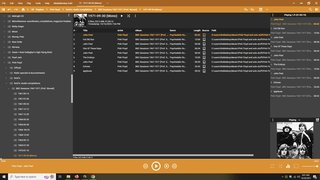
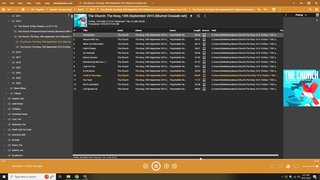
Thank you lowlander. Please see screenshots: the first one shows MM with the album art in the bottom right corner but with the unwanted 'playing' column sitting above it. The second one is after I went into Tools>Options and unticked 'playing' option but left 'preview' ticked in right panel pane. I just want the album art preview to sit in the bottom right as it did previously but without the 'playing' column above it.
Re: Need help to restore artwork panel
Hi,
It can't do that in MM5+ such layout was possible in MM4 (Along with skins that had Album art in player section, for now MM5+ do not have such skins) . May I suggest taht you Drag and Drop lLyrics panel to the right panel and disable Playing list which will give you mostly what you want Lyrics and Preview Panel.
It can't do that in MM5+ such layout was possible in MM4 (Along with skins that had Album art in player section, for now MM5+ do not have such skins) . May I suggest taht you Drag and Drop lLyrics panel to the right panel and disable Playing list which will give you mostly what you want Lyrics and Preview Panel.
Best regards,
Peke
MediaMonkey Team lead QA/Tech Support guru
Admin of Free MediaMonkey addon Site HappyMonkeying
How to attach PICTURE/SCREENSHOTS to forum posts
Peke
MediaMonkey Team lead QA/Tech Support guru
Admin of Free MediaMonkey addon Site HappyMonkeying
How to attach PICTURE/SCREENSHOTS to forum posts