
A lot of times I want to do an operation on multiple items in a tree view.
For example, I will go to Genres in the tree list, and want to select “Rock” and “Classic Rock”
In windows (like file selection in Explorer), this is typically done while holding ctrl key down while selecting and clicking on what you want to select. (shift+click to select a contiguous block)
In MMW I can only select one item at a time.
In MMA this works as expected and I can select multiple genres, artists, etc. This is very helpful in quickly creating a now playing queue on the fly.
Note: If column filter is enabled and the tree node is in the filter, then it will need to be updated with the selected nodes.
e.g. Multi Click on Genre, Rock and Classic Rock. If Genre is in the column filter, then Rock and Classic Rock should be selected in the column filter
Allow Ctrl-Click to Multi-Select from Tree View
Moderator: Gurus
-
MikeGahrns
- Posts: 107
- Joined: Thu Apr 09, 2020 9:37 pm
Re: [REQ] Allow Ctrl-Click to Multi-Select from Tree View
Hi,
If you Navigate Any Tree node in MM then you can select any multiple subnodes, but not In tree.
You can use any combination to Multi Select Shift+Click, CTRL+Click, Shift+CTRL+Click in Main Screen no matter of View Mode.
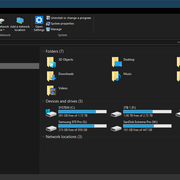
I am not sure what you refer to, but I have found that in Explorer Behave exactly the same as MM where you can't select Multiple Tree nodes (See Picture)MikeGahrns wrote: ↑Sun Jul 19, 2026 1:15 pm In windows (like file selection in Explorer), this is typically done while holding ctrl key down while selecting and clicking on what you want to select. (shift+click to select a contiguous block)
If you Navigate Any Tree node in MM then you can select any multiple subnodes, but not In tree.
You can use any combination to Multi Select Shift+Click, CTRL+Click, Shift+CTRL+Click in Main Screen no matter of View Mode.
Best regards,
Peke
MediaMonkey Team lead QA/Tech Support guru
Admin of Free MediaMonkey addon Site HappyMonkeying



How to attach PICTURE/SCREENSHOTS to forum posts
Peke
MediaMonkey Team lead QA/Tech Support guru
Admin of Free MediaMonkey addon Site HappyMonkeying
How to attach PICTURE/SCREENSHOTS to forum posts
-
MikeGahrns
- Posts: 107
- Joined: Thu Apr 09, 2020 9:37 pm
Re: [REQ] Allow Ctrl-Click to Multi-Select from Tree View
Thanks Peke,
I think I found where the discrepancy is and maybe it was a little of my wording. Sorry.
In Explorer, if you select a directory in the left hand tree structure and you select an item in the right pane, it gets selected (but the sub directory does not open, you need to double click it). Once a directory in the right pane was selected, I would hold the ctrl key and multi select a bunch of other directories.
In MM, if select a playlist in the left hand tree structure, and you select a sub playlist in the right pane, the sub playlist automatically opens and you can no longer select other sub playlists at the same level. This led me to believe you could not multi select other playlists in the right pane at the same level.
I just found out that if you hold the ctrl key down PRIOR to clicking on a playlist in the right pane, you can indeed select multiple playlists.
The fact that the playlist would immediately open instead of the expected double clicking to open it (which I think is the more standard and expected behavior of windows) is what threw me off.
I think I found where the discrepancy is and maybe it was a little of my wording. Sorry.
In Explorer, if you select a directory in the left hand tree structure and you select an item in the right pane, it gets selected (but the sub directory does not open, you need to double click it). Once a directory in the right pane was selected, I would hold the ctrl key and multi select a bunch of other directories.
In MM, if select a playlist in the left hand tree structure, and you select a sub playlist in the right pane, the sub playlist automatically opens and you can no longer select other sub playlists at the same level. This led me to believe you could not multi select other playlists in the right pane at the same level.
I just found out that if you hold the ctrl key down PRIOR to clicking on a playlist in the right pane, you can indeed select multiple playlists.
The fact that the playlist would immediately open instead of the expected double clicking to open it (which I think is the more standard and expected behavior of windows) is what threw me off.
Re: [REQ] Allow Ctrl-Click to Multi-Select from Tree View
Hi,
When you move mouse over on subplaylist (and hold over it) in Top right corner of icon you should get place where you can select any subplaylist without opening.
When you move mouse over on subplaylist (and hold over it) in Top right corner of icon you should get place where you can select any subplaylist without opening.
Best regards,
Peke
MediaMonkey Team lead QA/Tech Support guru
Admin of Free MediaMonkey addon Site HappyMonkeying
How to attach PICTURE/SCREENSHOTS to forum posts
Peke
MediaMonkey Team lead QA/Tech Support guru
Admin of Free MediaMonkey addon Site HappyMonkeying
How to attach PICTURE/SCREENSHOTS to forum posts
-
MikeGahrns
- Posts: 107
- Joined: Thu Apr 09, 2020 9:37 pm
Re: [REQ] Allow Ctrl-Click to Multi-Select from Tree View
Thanks Peke for the tips, I appreciate it.
I usually use list view (not icon), but did find what you described when I changed to icon view.
I spent some time playing around in list view, and found that if I right clicked instead of left clicked I could also multi select. It was a little messy though, as the right click opened up another context menu, but at least it gives me a way to get this functionality.
I usually use list view (not icon), but did find what you described when I changed to icon view.
I spent some time playing around in list view, and found that if I right clicked instead of left clicked I could also multi select. It was a little messy though, as the right click opened up another context menu, but at least it gives me a way to get this functionality.
Re: [REQ] Allow Ctrl-Click to Multi-Select from Tree View
Hi,
Thank you for update.
Thank you for update.
Best regards,
Peke
MediaMonkey Team lead QA/Tech Support guru
Admin of Free MediaMonkey addon Site HappyMonkeying
How to attach PICTURE/SCREENSHOTS to forum posts
Peke
MediaMonkey Team lead QA/Tech Support guru
Admin of Free MediaMonkey addon Site HappyMonkeying
How to attach PICTURE/SCREENSHOTS to forum posts