Excessive memory usage

Get answers about using MediaMonkey 4 for Windows.

Moderator: Gurus

Izzmit
Posts: 24
Joined: Sun Jun 03, 2007 11:59 pm
Location: Phoenix

Excessive memory usage

Post by Izzmit »

Hello all.
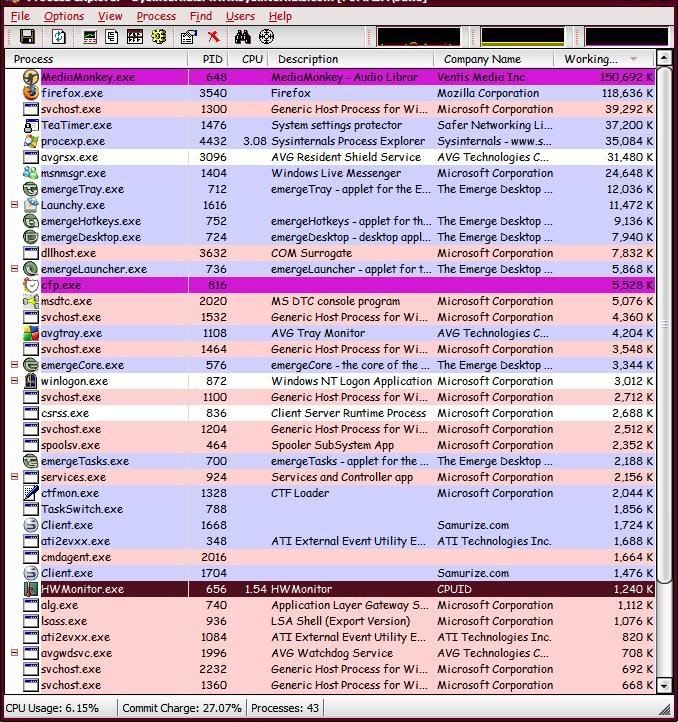
So, my problem is that untill recently MM only used about ~50mb ram.
Then sometime this week, that changed drastically. Now after leaving it running for about 2 days, it is at 155mb ram.
I really am not sure whats causing it, and it definitely is a slower issue, because when i first start MM it is at about 45mb.

the top process:

Image
nohitter151
Posts: 23640
Joined: Wed Aug 09, 2006 10:20 am
Location: NJ, USA
Contact:

Re: Excessive memory usage

Post by nohitter151 »

I'm no expert, but I believe that memory usage will climb the longer a program is open for any program - its just the way things are. 2 days is a pretty long time to have MM open...
MediaMonkey user since 2006
Need help? Got a suggestion? Can't find something?

Please no PMs in reply to a post. Just reply in the thread.
Lowlander
Posts: 58994
Joined: Sat Sep 06, 2003 5:53 pm

Re: Excessive memory usage

Post by Lowlander »

Are you using any scripts, using Auto-Organize or Analyze Volume? How big is your library? Does it stay at 155MB or does it drop down from there.

This could point to a possible memory leak.
rovingcowboy
Posts: 14163
Joined: Sat Oct 25, 2003 7:57 am
Location: (Texas)
Contact:

Re: Excessive memory usage

Post by rovingcowboy »

the program does not matter how long it runs. it might just be the windows computer needing to be rebooted,
the win98 systems needed rebooted daily.
the winXp systems need rebooted every 2 days.
if you are using your system as a jukebox like i do then you should use task scheduler to start and stop monkey and if you want to change playlists by the script peke made. and then you need to set up tasks to restart the computer after you have shut off mediamonkey, the task scheduler requires it be set up in minute units so this will mean you have to stop monkey for one full minute before you restart the computer, but that will keep your system working. :)
i use win98 and keep it running daily but i do the restarts twice a day and run maintance programs several times in between restarts and closing monkey, this is needed on win98 systems.
but doing that can let you have monkey run a long time,
even doing that win98 seems to have lots of bugs with restarting but it can be done.
i've been able to keep it going for a week with out having to do any defragmenting and or several hours of off time. but only a week on 98. :(

windows xp is good at the restarting stuff. :)

also this is where a ram cleaner would come in use. if you can find one that works on xp that runs automaticly that would be best. just remember it is not meant to be used instead of the restarts, but with the restarting. as it would just clear the ram in to the swap file, after too long of that on xp they seem to remove a file from the swap file that is needed to run certain things on xp which then causes you to need a restart, so use both of them.

:)
roving cowboy / keith hall. My skins http://www.mediamonkey.com/forum/viewto ... =9&t=16724 for some help check on Monkey's helpful messages at http://www.mediamonkey.com/forum/viewto ... 4008#44008 MY SYSTEMS.1.Jukebox WinXp pro sp 3 version 3.5 gigabyte mb. 281 GHz amd athlon x2 240 built by me.) 2.WinXP pro sp3, vers 2.5.5 and vers 3.5 backup storage, shuttle 32a mb,734 MHz amd athlon put together by me.) 3.Dell demension, winxp pro sp3, mm3.5 spare jukebox.) 4.WinXp pro sp3, vers 3.5, dad's computer bought from computer store. )5. Samsung Galaxy A51 5G Android ) 6. amd a8-5600 apu 3.60ghz mm version 4 windows 7 pro bought from computer store.
Izzmit
Posts: 24
Joined: Sun Jun 03, 2007 11:59 pm
Location: Phoenix

Re: Excessive memory usage

Post by Izzmit »

Ok, it looks like I found the cause.

About 5 days ago, I put a homemade CD in there (just a random mix of songs)
Well, today as I was skipping songs in MM, out popped this message "Song info could not be retrieved from FreeDB" (or something like that). Why was this message box hiding for 2 days? Dont know.
Anyways, I pushed "ok", removed the CD, and MM is running at its usual ~45 ram
ty for the help guys, glad it was an easy fix.

Another quick question: Is it possible to completely reset the MM window configuration?
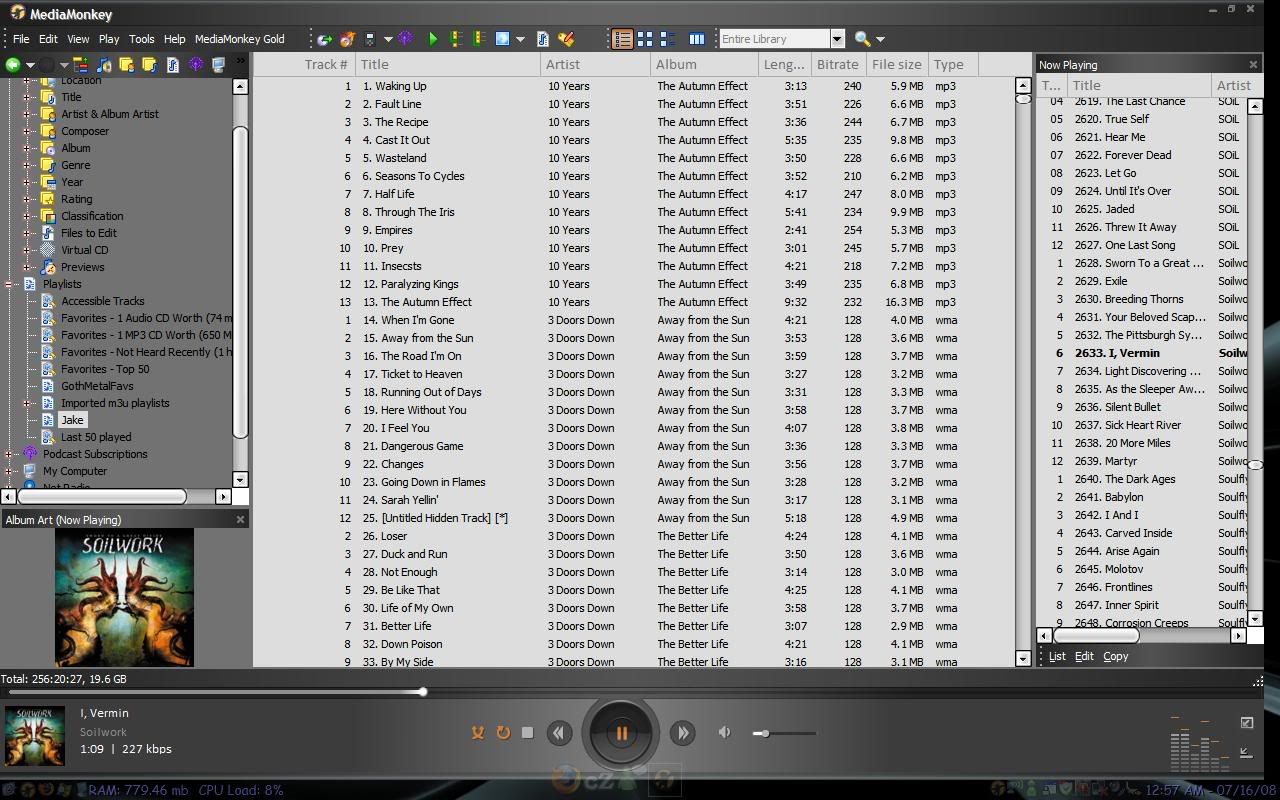
Because my MM doesnt fit my monitor when maximized. It seems to be about 1/4 inch too short on the right edge. Like its trying to conform to a 1190x800 screen instead of a 1200x800. Just a guess on dimensions, trying to describe it. Check out the far right side. This is MM maximized.
(ignore the bottom edge, that is intentional)

http://i143.photobucket.com/albums/r134 ... led-27.jpg
nohitter151
Posts: 23640
Joined: Wed Aug 09, 2006 10:20 am
Location: NJ, USA
Contact:

Re: Excessive memory usage

Post by nohitter151 »

That cutting off was a problem in an older version of MM, but I thought they had fixed it. Are you using the latest version? (3.0.3)
MediaMonkey user since 2006
Need help? Got a suggestion? Can't find something?

Please no PMs in reply to a post. Just reply in the thread.
Lowlander
Posts: 58994
Joined: Sat Sep 06, 2003 5:53 pm

Re: Excessive memory usage

Post by Lowlander »

You can reset the interface by modifying the mediamonkey.ini file. I unfortunately don't know which parts to modify so you'll have to search the forum or wait for someone that does know the answer.
Izzmit
Posts: 24
Joined: Sun Jun 03, 2007 11:59 pm
Location: Phoenix

Re: Excessive memory usage

Post by Izzmit »

nohitter151 wrote:That cutting off was a problem in an older version of MM, but I thought they had fixed it. Are you using the latest version? (3.0.3)
Yes, using the newest.
All was fine, then one day I did something and my interface exploded. took me like 5 minutes to re-position all the windows, and it was never the same again.
Im not even sure what happened.

Anyways, It seems to be only the Zune skin. Doing it. All the others seem fine. And the zune WAS working, not sure why it hates me now.
EDIT:
Switching to a different theme and then back seems to have fixed it. Well, all my problems are gone!

Still lovin MM!

EDIT again:
Crap, no MM is back to the silly too-small for the screen. bummer
Post Reply