I read a release candidate is soon to be released, and we shall report unsolved thing in this release. So, the following are still unsolved:
- the album art window can't be resized orizontally when docked next to the track browser or MonkeyFlow windows, unless you resize it vertically or hide its titlebar first.
- the microplayer image is 'broken' (a transparent vertical bold line appears on the rewind button) when minimizing MM from main window to taskbar (minimize to microplayer is enabled). The image fixes itself in a few seconds.
Also, the Windows white hourglass appears if you place the mouse arrow in the taskbar area, until the microplayer fixes itself.
Last edited by Fraxav on Wed Mar 11, 2009 6:27 am, edited 3 times in total.
I don't have no time for no MediaMonkey buisness...
Fraxav uses a Windows XP Home Edition SP2 on an Acer Aspire 5670 laptop with an Intel Core Duo T2300 (1.66 GHz) processor, ATI Mobility Radeon X1400 512 MB, 100 GB Hard Disc and 1 GB DDR2 Ram.
Fraxav wrote:Hi,
in the latest release:
- the album art window can't be resized vertically or orizontally when docked under the tree window or in the track browser area, respectively.
- the tray icon never shows in the tray, also with the option enabled.
- often the microplayer image is 'broken' (a white vertical bold line appears in on the play button) when minimizing MM from main window to taskbar (minimize to microplayer is enabled). Seems to happen randomly, and the image fixes itself in a few seconds or after a mouse click somewhere.
1 & 2 will be fixed in next build. I know about 3 and is on my to-do (with lower priority).
Great.
Also, MM is not starting full-windowed. It starts in a big window, but you manually have to maximize it for full sceen.
I don't have no time for no MediaMonkey buisness...
Fraxav uses a Windows XP Home Edition SP2 on an Acer Aspire 5670 laptop with an Intel Core Duo T2300 (1.66 GHz) processor, ATI Mobility Radeon X1400 512 MB, 100 GB Hard Disc and 1 GB DDR2 Ram.
Me again...
- Album art is now resizable in the tree area, but when dragging it near the track browser (in it's upper or lower docking area), you have to enable (and than disable) the browser's title bar (or just disable the art window title bar) before you can resize the album art orizontally. Not really a problem for me cause I hide titlebars, but maybe someone desn't. Please, mind leaving the possibility to resize docked windows without the titlebar, fixing this.
- Tray icon still not always shown.
I don't have no time for no MediaMonkey buisness...
Fraxav uses a Windows XP Home Edition SP2 on an Acer Aspire 5670 laptop with an Intel Core Duo T2300 (1.66 GHz) processor, ATI Mobility Radeon X1400 512 MB, 100 GB Hard Disc and 1 GB DDR2 Ram.
Fraxav wrote:Me again...
- Album art is now resizable in the tree area, but when dragging it near the track browser (in it's upper or lower docking area), you have to enable (and than disable) the browser's title bar (or just disable the art window title bar) before you can resize the album art orizontally. Not really a problem for me cause I hide titlebars, but maybe someone desn't. Please, mind leaving the possibility to resize docked windows without the titlebar, fixing this.
I was not able to reproduce, I am able to resize both horizontally and vertically in both positions with the title bar enabled.
Fraxav wrote:- Tray icon still not always shown.
I am not able to reproduce this either. I tried enabling and disabling and each time the tray icon showed as it should or shouldn't. Can you list steps which you took? I used 1201 to test with.
Well, for the tray icon, actually it shows only when in main (and mini) player views, but disappears as you minimize to microplayer. If you go back to main player, it reappears. Both 'minimize to microplayer' and 'always show tray icon' are enabled in options (as they are by default).
For the album art: I launch MM, right-click the art window and enable title bar, drag the window next to the track browser (on its left side) to dock it there. It docks, but cannot be resized orizontally until I do one of the following:
- right-click art window and disable title bar
- right click track browser and enable title bar
- resize the dock area (so the art window or the track browser) VERTICALLY
IMPORTANT:
1- If you dock the album art window to the RIGHT side of the track browser, you'll be able to resize it in any direction, without having to do what described above.
2- This 'tutorial' was written using the track browser when docked over the track list (as it is by default), but it's the same when it's docked under the list.
I don't have no time for no MediaMonkey buisness...
Fraxav uses a Windows XP Home Edition SP2 on an Acer Aspire 5670 laptop with an Intel Core Duo T2300 (1.66 GHz) processor, ATI Mobility Radeon X1400 512 MB, 100 GB Hard Disc and 1 GB DDR2 Ram.
Well, for the tray icon, actually it shows only when in main (and mini) player views, but disappears as you minimize to microplayer. If you go back to main player, it reappears. Both 'minimize to microplayer' and 'always show tray icon' are enabled in options (as they are by default).
For the album art: I launch MM, right-click the art window and enable title bar, drag the window next to the track browser (on its left side) to dock it there. It docks, but cannot be resized orizontally until I do one of the following:
- right-click art window and disable title bar
- right click track browser and enable title bar
- resize the dock area (so the art window or the track browser) VERTICALLY
IMPORTANT:
1- If you dock the album art window to the RIGHT side of the track browser, you'll be able to resize it in any direction, without having to do what described above.
2- This 'tutorial' was written using the track browser when docked over the track list (as it is by default), but it's the same when it's docked under the list.
I can't reproduce this in 1201 either. Album art panel is resizable with or without the title bar here. What skin are you using?
MediaMonkey user since 2006
Need help? Got a suggestion? Can't find something?
Please no PMs in reply to a post. Just reply in the thread.
Fraxav wrote:
For the album art: I launch MM, right-click the art window and enable title bar, drag the window next to the track browser (on its left side) to dock it there. It docks, but cannot be resized orizontally until I do one of the following:
- right-click art window and disable title bar
- right click track browser and enable title bar
- resize the dock area (so the art window or the track browser) VERTICALLY
IMPORTANT:
1- If you dock the album art window to the RIGHT side of the track browser, you'll be able to resize it in any direction, without having to do what described above.
2- This 'tutorial' was written using the track browser when docked over the track list (as it is by default), but it's the same when it's docked under the list.
Following your instructions I am able to resize horizontally and vertically, using the Glided skin.
Did you start with:
- the album art docked under the tree window and without titlebar
- the track browser docked over or under the track list and without title bar
??
I don't have no time for no MediaMonkey buisness...
Fraxav uses a Windows XP Home Edition SP2 on an Acer Aspire 5670 laptop with an Intel Core Duo T2300 (1.66 GHz) processor, ATI Mobility Radeon X1400 512 MB, 100 GB Hard Disc and 1 GB DDR2 Ram.
Fraxav wrote:Did you start with:
- the album art docked under the tree window and without titlebar
- the track browser docked over or under the track list and without title bar
??
Yes. Still can't reproduce. Album art panel seems to be resizable regardless of Titlebar showing/not showing and where it is docked.
MediaMonkey user since 2006
Need help? Got a suggestion? Can't find something?
Please no PMs in reply to a post. Just reply in the thread.
Yes I did, I tried it with and without the titlebars for both panels and moving the location but I was still able to resize both vertically and horizontally.
Sorry but I could not reproduce.
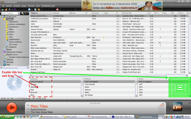
That's the starting situation: album art and track browser windows are docked in those areas and title bars are disabled for both.
Let's begin: enbale the title in the art window and drag it to the red squared zone. In that area, you won't be able to resize the width of the album art unless you do what I described above.
But you can resize height and width if you drag the album art in the green area.
Of course, before testing various positions and combinations, be sure to start with both the art and browser windows in the starting situation.
The same happens if you dock the browser on top of the tracks list.
I don't have no time for no MediaMonkey buisness...
Fraxav uses a Windows XP Home Edition SP2 on an Acer Aspire 5670 laptop with an Intel Core Duo T2300 (1.66 GHz) processor, ATI Mobility Radeon X1400 512 MB, 100 GB Hard Disc and 1 GB DDR2 Ram.
Ok, I finally could reproduce, but only with the track browser at the bottom. When you move the Album art panel over, you can't resize the album art until you hide the titlebar.
Here are some images (I had to double the size because it was hard to see at the original size, so the pics are fuzzy)
Before (notice no gap between the art and the selected track):
After (now theres a small gap between art and selected track that you can grab & use to resize):
Seems like a minor issue though, its pretty complicated to reproduce
MediaMonkey user since 2006
Need help? Got a suggestion? Can't find something?
Please no PMs in reply to a post. Just reply in the thread.
nohitter151 wrote:Ok, I finally could reproduce, but only with the track browser at the bottom.
Well, it's the same. However, make sure that both album art and browser have titlebars disabled after you drag the browser on top, if you wish to reproduce it.
nohitter151 wrote:...you can't resize the album art until you hide the titlebar.
Or enable the browser titlebar, or just resize the height of one of them.
nohitter151 wrote:Seems like a minor issue though, its pretty complicated to reproduce
Yes, no functionality loss, just something to fix someday. Hoping some developer can reproduce it
I don't have no time for no MediaMonkey buisness...
Fraxav uses a Windows XP Home Edition SP2 on an Acer Aspire 5670 laptop with an Intel Core Duo T2300 (1.66 GHz) processor, ATI Mobility Radeon X1400 512 MB, 100 GB Hard Disc and 1 GB DDR2 Ram.