Multimedia Keyboard Issue [2430]
Moderator: Gurus
Well, Multimedia Keys have passed several Revisions in each Windows Versions. And each revision make new solution, each Hardware developer decided which will be included in their driver, and there is also RAW Key Code which only Windows (Not All versions act same on same codes) recognize when using WHQL drivers for that windows/hardware version/revision and no specs what those Codes do and what codes are standard one.
Best regards,
Peke
MediaMonkey Team lead QA/Tech Support guru
Admin of Free MediaMonkey addon Site HappyMonkeying



How to attach PICTURE/SCREENSHOTS to forum posts
Peke
MediaMonkey Team lead QA/Tech Support guru
Admin of Free MediaMonkey addon Site HappyMonkeying
How to attach PICTURE/SCREENSHOTS to forum posts
-
Richard127
- Posts: 114
- Joined: Wed Dec 26, 2007 7:07 pm
Multimedia Keyboard Issue [2430]
You're absolutely right Fraxav - 3 media programs is 2 too many. Problem is... None of them do everything right, so I sometimes have them open for different reasons. Didn't mean to be dismissive to your post though... apologies for that. Just thought any info might help to fix the problem.
Re: Multimedia Keyboard Issue [2430]
Eheh, that's right!Richard127 wrote:None of them do everything right
Don't worry, you wasn't dismissive. And you can launch how many programs you want at a time! I just like to joke sometimesRichard127 wrote:Didn't mean to be dismissive to your post though... apologies for that. Just thought any info might help to fix the problem.
 .
.Of course ANY help is always useful!!
Seems a quite hard issue to solve, anyways
 .
.Have a good day.
I don't have no time for no MediaMonkey buisness...
Fraxav uses a Windows XP Home Edition SP2 on an Acer Aspire 5670 laptop with an Intel Core Duo T2300 (1.66 GHz) processor, ATI Mobility Radeon X1400 512 MB, 100 GB Hard Disc and 1 GB DDR2 Ram.
Fraxav uses a Windows XP Home Edition SP2 on an Acer Aspire 5670 laptop with an Intel Core Duo T2300 (1.66 GHz) processor, ATI Mobility Radeon X1400 512 MB, 100 GB Hard Disc and 1 GB DDR2 Ram.
But... in the case of the HP keyboards everything worked fine with MM 2.5, so it's not a matter of a driver change but rather a change in MM 3.0.Peke wrote:Well, Multimedia Keys have passed several Revisions in each Windows Versions. And each revision make new solution, each Hardware developer decided which will be included in their driver, and there is also RAW Key Code which only Windows (Not All versions act same on same codes) recognize when using WHQL drivers for that windows/hardware version/revision and no specs what those Codes do and what codes are standard one.
Yes, you are right. Global Hotkey setting customization, and not just letting Windows to handle hotkeys like he wants.
Best regards,
Peke
MediaMonkey Team lead QA/Tech Support guru
Admin of Free MediaMonkey addon Site HappyMonkeying
How to attach PICTURE/SCREENSHOTS to forum posts
Peke
MediaMonkey Team lead QA/Tech Support guru
Admin of Free MediaMonkey addon Site HappyMonkeying
How to attach PICTURE/SCREENSHOTS to forum posts
-
The BLION Corp.
Netropa Office Keyboard
Hello,
Disabling the software bundled with the keyboard allows me to use multimedia keys of my keyboard to manage MM...
But I don't have anymore OSD messages.
I use a Netropa Offce Keyboard MCK-1000
Disabling the software bundled with the keyboard allows me to use multimedia keys of my keyboard to manage MM...
But I don't have anymore OSD messages.
I use a Netropa Offce Keyboard MCK-1000
-
The BLION Corp.
Here is how is configurer MusikCube...
HTH
HTH
Code: Select all
[Hotkeys]
UseGlobalHotkeys=1
PlayPause=1637
Stop=1632
NextTrack=1638
PrevTrack=1636
VolumeUp=1640
VolumeDown=1634
NextArtist=1641
PrevArtist=1639
NextAlbum=1635
PrevAlbum=1633-
rocksolid99
Re: Multimedia Keyboard Issue [2430]
Found a quick hotfix. The HP multimedia software that does the OSD lets you configure the multimedia keys as "combination keys"
For instance, I set the "next" button to CTRL-N and now MM3 will work.
For instance, I set the "next" button to CTRL-N and now MM3 will work.
-
ronnie
Re: RC1 Multimedia Keyboard Issue
ee
turkey wrote:Oh, and when it opens the album node, it jumps straight down and highlights whichever album I am currently playing.
Re: Multimedia Keyboard Issue [2430]
Following the topic's previous discussion with Acer laptops, i have found a solution to my problem that may work for you.
After a few hour's graft with google, i came upon a topic related to WINAMP that touched upon the problem with the Acer system. Assuming your system STILL has the default installed Acer management programs (audio, gridvista, arcade..whatever else your copy might have) then you will still be running the included program Launch Manager.
When a shortcut/hotkey is hit, Launch Manager catches the entry and processes it as specified within one of it's config files. Included in the config is your multimedia Fn keys! The basic solution is to change the way Launch Manager handles the key, whether it manages the execution itself or sends it to the OS after executing it.
The related topic is here; http://forums.winamp.com/printthread.ph ... did=242041
Fix:
Browse to your Launch Manager directory (C:\Program Files\Launch Manager) and open MMKEYBD.CFG within notepad.
The structure of the file isn't highly important, but noted within the related topic. You should search for your multimedia keys, they'll be something like this;
Key 27 = 1,E0,24,E0,A4,F5F9,Stop
Key 28 = 1,E0,22,E0,A2,F5F8,Play/Pause
Key 29 = 1,E0,10,E0,90,F5F6,Previous
Key 30 = 1,E0,19,E0,99,F5F7,Next Track
-----------------------------------------------------
Key 27 = 1 <<The 1 is the crucial part of how Launch Manager identifies what to do with the keypress.
1 = Launch Manager does what it does (probably nothing much).
0 = Returns the key AFTER EXECUTING ITS FUNCTION.
Simply changing to 0 will fix this problem, but deleting the lines entirely may be a better fix due to WMP issues (such as opening and playing WMP when using the key for MM). You can also edit lines such as Key 35 = 1,E0,0E,E0,8E,F5E2,Play, which i think may be a factor in why WMP might open when i have a DVD in
Once you have either removed the lines or set the necessary keys to be sent to the OS, you can then manage your hotkeys within mediamonkey. Hotkeys Play/Pause, Stop, Next and Previous should be setup to their Multimedia action equivalents and set to global. This SHOULD fix your problem with the Acer software.
Let me know if this works for you or if you have any problems.
-Clownyboy
After a few hour's graft with google, i came upon a topic related to WINAMP that touched upon the problem with the Acer system. Assuming your system STILL has the default installed Acer management programs (audio, gridvista, arcade..whatever else your copy might have) then you will still be running the included program Launch Manager.
When a shortcut/hotkey is hit, Launch Manager catches the entry and processes it as specified within one of it's config files. Included in the config is your multimedia Fn keys! The basic solution is to change the way Launch Manager handles the key, whether it manages the execution itself or sends it to the OS after executing it.
The related topic is here; http://forums.winamp.com/printthread.ph ... did=242041
Fix:
Browse to your Launch Manager directory (C:\Program Files\Launch Manager) and open MMKEYBD.CFG within notepad.
The structure of the file isn't highly important, but noted within the related topic. You should search for your multimedia keys, they'll be something like this;
Key 27 = 1,E0,24,E0,A4,F5F9,Stop
Key 28 = 1,E0,22,E0,A2,F5F8,Play/Pause
Key 29 = 1,E0,10,E0,90,F5F6,Previous
Key 30 = 1,E0,19,E0,99,F5F7,Next Track
-----------------------------------------------------
Key 27 = 1 <<The 1 is the crucial part of how Launch Manager identifies what to do with the keypress.
1 = Launch Manager does what it does (probably nothing much).
0 = Returns the key AFTER EXECUTING ITS FUNCTION.
Simply changing to 0 will fix this problem, but deleting the lines entirely may be a better fix due to WMP issues (such as opening and playing WMP when using the key for MM). You can also edit lines such as Key 35 = 1,E0,0E,E0,8E,F5E2,Play, which i think may be a factor in why WMP might open when i have a DVD in
Once you have either removed the lines or set the necessary keys to be sent to the OS, you can then manage your hotkeys within mediamonkey. Hotkeys Play/Pause, Stop, Next and Previous should be setup to their Multimedia action equivalents and set to global. This SHOULD fix your problem with the Acer software.
Let me know if this works for you or if you have any problems.
-Clownyboy
-
nohitter151
- Posts: 23640
- Joined: Wed Aug 09, 2006 10:20 am
- Location: NJ, USA
- Contact:
Re: Multimedia Keyboard Issue [2430]
Hey, thanks for posting that! Now my Acer hotkeys work great from MM
MediaMonkey user since 2006
Need help? Got a suggestion? Can't find something?
Please no PMs in reply to a post. Just reply in the thread.
Need help? Got a suggestion? Can't find something?
Please no PMs in reply to a post. Just reply in the thread.
Re: Multimedia Keyboard Issue [2430]
Hey thanks for your effort. But...
I tried your solution, I deleted those lines (only from the Win9x 'paragraph' [the file got a WinNT paragraph with the same lines, which I didn't delete]), than configured MM and the keys worked. Than pasted back the lines (as a biologist, I like to make controls ) and the keys still worked!  . I don't know if this is because there's something saved in the memory or because I never tried to configure the keys in this release, or because deleting the lines allows you to configure MM properly so that the setting last after the lines are entered back... but my multimedia keys now work. I'm sorry I cannot confirm your fix...
I'll post updates if the keys stop working, but what is important is that they work now!
Thanks anyway, again.
I tried your solution, I deleted those lines (only from the Win9x 'paragraph' [the file got a WinNT paragraph with the same lines, which I didn't delete]), than configured MM and the keys worked. Than pasted back the lines (as a biologist, I like to make controls
) and the keys still worked! . I don't know if this is because there's something saved in the memory or because I never tried to configure the keys in this release, or because deleting the lines allows you to configure MM properly so that the setting last after the lines are entered back... but my multimedia keys now work. I'm sorry I cannot confirm your fix...I'll post updates if the keys stop working, but what is important is that they work now!
Thanks anyway, again.
I don't have no time for no MediaMonkey buisness...
Fraxav uses a Windows XP Home Edition SP2 on an Acer Aspire 5670 laptop with an Intel Core Duo T2300 (1.66 GHz) processor, ATI Mobility Radeon X1400 512 MB, 100 GB Hard Disc and 1 GB DDR2 Ram.
Fraxav uses a Windows XP Home Edition SP2 on an Acer Aspire 5670 laptop with an Intel Core Duo T2300 (1.66 GHz) processor, ATI Mobility Radeon X1400 512 MB, 100 GB Hard Disc and 1 GB DDR2 Ram.
Re: Multimedia Keyboard Issue [2430]
There seems to be slight issues with the fix for at least me. Sometimes it works and other times it doesn't. Yesterday i had no control with my multimedia keys and this morning they're working fine. I think the best way to keep them working would be to not close MM once working, just minimize to tray when not used, which i do anyway as i only pause my player for a few minutes as and when needed.
Also, my file only contained WinNT
Also, my file only contained WinNT
Re: Multimedia Keyboard Issue [2430]
Here's the update to my previous post:
I installed the latest release of MM (and added back the strings to the config. file) and used it to test a little further your solution. I discovered that my media keys work fine when the strings are not deleted, but I have to enter them 'two times' in the Hotkey dialog in MM. I said 'two times' because MM comes with media hotkeys already configured, but they won't work until I re-enter the hotkey (i.e. for Play/Pause I already had the hotkey 'Media Play/Pause' pre-set and I had to click on the box and press my media play/pause button and apply. Than it worked).
I don't know if this is what other Acer users mean for 'not working'.
Anyway, 'fixing' them in this way and not in your way would leave a little box popping up in the center of the screen when I hit my play/pause button.
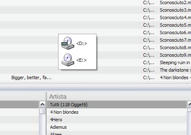
This is probably something related to CD or DVD playback.
Removing your strings from the file in launch manager prevents the little box from showing. Do you know a way to don't let it pop up without deleting the strings (maybe just editing them)?
As soon as I have to reinstall MM I'll test if media hotkeys work without my 'trick' when strings are deleted.
I don't care about deleting the strings, but since my hotkeys work I'd like to know if a fix is possible to have them working instantly without entering them again.
I installed the latest release of MM (and added back the strings to the config. file) and used it to test a little further your solution. I discovered that my media keys work fine when the strings are not deleted, but I have to enter them 'two times' in the Hotkey dialog in MM. I said 'two times' because MM comes with media hotkeys already configured, but they won't work until I re-enter the hotkey (i.e. for Play/Pause I already had the hotkey 'Media Play/Pause' pre-set and I had to click on the box and press my media play/pause button and apply. Than it worked).
I don't know if this is what other Acer users mean for 'not working'.
Anyway, 'fixing' them in this way and not in your way would leave a little box popping up in the center of the screen when I hit my play/pause button.
This is probably something related to CD or DVD playback.
Removing your strings from the file in launch manager prevents the little box from showing. Do you know a way to don't let it pop up without deleting the strings (maybe just editing them)?
As soon as I have to reinstall MM I'll test if media hotkeys work without my 'trick' when strings are deleted.
I don't care about deleting the strings, but since my hotkeys work I'd like to know if a fix is possible to have them working instantly without entering them again.
I don't have no time for no MediaMonkey buisness...
Fraxav uses a Windows XP Home Edition SP2 on an Acer Aspire 5670 laptop with an Intel Core Duo T2300 (1.66 GHz) processor, ATI Mobility Radeon X1400 512 MB, 100 GB Hard Disc and 1 GB DDR2 Ram.
Fraxav uses a Windows XP Home Edition SP2 on an Acer Aspire 5670 laptop with an Intel Core Duo T2300 (1.66 GHz) processor, ATI Mobility Radeon X1400 512 MB, 100 GB Hard Disc and 1 GB DDR2 Ram.
Re: Multimedia Keyboard Issue [2430]
The little box prevents you from assigning the hotkeys usually, so i wouldnt see why you'd want it back in. Removing the string seems to fix the launch manager problem, by removing the box and allowing the hotkeys through. Either way, it's good to see that you've had some success