SoftBlue - Small player skin (MM2 remake) [v2.2]

If you want to contribute MediaMonkey skins, themes, icons, etc...

Moderators: Morten, Gurus

rovingcowboy
Posts: 14163
Joined: Sat Oct 25, 2003 7:57 am
Location: (Texas)
Contact:

Post by rovingcowboy »

well s.....t you using window blinds is needed to know information that should have been said in the first place. :(

media monkey uses the windows explorer shell if you are skinning it with another program like window blinds you can expect to have trouble with the monkey skins. :-?

how about filling your signiture in with the information of the system you have and what other major tweak programs you use. :D

if you don't know where to set it, you fix your siginture in your profile area. :wink:


8)
roving cowboy / keith hall. My skins http://www.mediamonkey.com/forum/viewto ... =9&t=16724 for some help check on Monkey's helpful messages at http://www.mediamonkey.com/forum/viewto ... 4008#44008 MY SYSTEMS.1.Jukebox WinXp pro sp 3 version 3.5 gigabyte mb. 281 GHz amd athlon x2 240 built by me.) 2.WinXP pro sp3, vers 2.5.5 and vers 3.5 backup storage, shuttle 32a mb,734 MHz amd athlon put together by me.) 3.Dell demension, winxp pro sp3, mm3.5 spare jukebox.) 4.WinXp pro sp3, vers 3.5, dad's computer bought from computer store. )5. Samsung Galaxy A51 5G Android ) 6. amd a8-5600 apu 3.60ghz mm version 4 windows 7 pro bought from computer store.
Wargazm
Posts: 161
Joined: Thu Dec 06, 2007 10:52 am

Post by Wargazm »

I modified the windowblinds settings so that it ignores mediamonkey.exe and does not skin it...still looks like the 2nd pic.

I will update my sig, good idea.
rovingcowboy
Posts: 14163
Joined: Sat Oct 25, 2003 7:57 am
Location: (Texas)
Contact:

Post by rovingcowboy »

thanks for the sig update :D

okay so it still shows the blue fonts in the second with winblinds set to ignore mm. that tells me the fonts are being set directly from the windows desktop setup and that both window blinds and windows are the only two that can adjust them.
roving cowboy / keith hall. My skins http://www.mediamonkey.com/forum/viewto ... =9&t=16724 for some help check on Monkey's helpful messages at http://www.mediamonkey.com/forum/viewto ... 4008#44008 MY SYSTEMS.1.Jukebox WinXp pro sp 3 version 3.5 gigabyte mb. 281 GHz amd athlon x2 240 built by me.) 2.WinXP pro sp3, vers 2.5.5 and vers 3.5 backup storage, shuttle 32a mb,734 MHz amd athlon put together by me.) 3.Dell demension, winxp pro sp3, mm3.5 spare jukebox.) 4.WinXp pro sp3, vers 3.5, dad's computer bought from computer store. )5. Samsung Galaxy A51 5G Android ) 6. amd a8-5600 apu 3.60ghz mm version 4 windows 7 pro bought from computer store.
nohitter151
Posts: 23640
Joined: Wed Aug 09, 2006 10:20 am
Location: NJ, USA
Contact:

Post by nohitter151 »

Wargazm wrote:I modified the windowblinds settings so that it ignores mediamonkey.exe and does not skin it...still looks like the 2nd pic.

I will update my sig, good idea.
I know how to fix this.. a release will be forthcoming in a week or so.
MediaMonkey user since 2006
Need help? Got a suggestion? Can't find something?

Please no PMs in reply to a post. Just reply in the thread.
Wargazm
Posts: 161
Joined: Thu Dec 06, 2007 10:52 am

Post by Wargazm »

awesome! thanks a lot.
Macarena
Posts: 642
Joined: Mon Oct 15, 2007 5:39 am
Location: Prague, Czech republic

vertical overlapping

Post by Macarena »

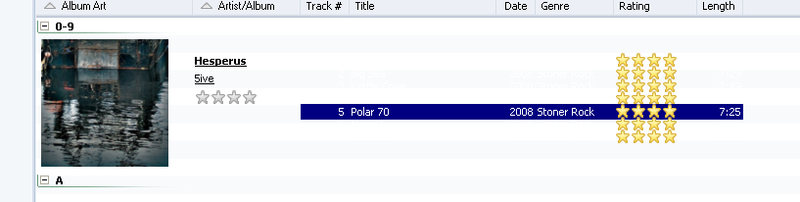
In the arrangement like on the picture, there is a weird overlapping. Is this the skin itself, or is this a bug?

Image
nohitter151
Posts: 23640
Joined: Wed Aug 09, 2006 10:20 am
Location: NJ, USA
Contact:

Re: vertical overlapping

Post by nohitter151 »

Macarena wrote:In the arrangement like on the picture, there is a weird overlapping. Is this the skin itself, or is this a bug?

Image
If it doesn't happen with other skins than it is the skin itself... thanks for pointing it out, I'll check on it when I have some time.
MediaMonkey user since 2006
Need help? Got a suggestion? Can't find something?

Please no PMs in reply to a post. Just reply in the thread.
nohitter151
Posts: 23640
Joined: Wed Aug 09, 2006 10:20 am
Location: NJ, USA
Contact:

Post by nohitter151 »

v2.2
-Album Art views made more viewable
-Float Player made more consistent with theme
-Toolbar fix

(see 1st post for download link)
MediaMonkey user since 2006
Need help? Got a suggestion? Can't find something?

Please no PMs in reply to a post. Just reply in the thread.
Wargazm
Posts: 161
Joined: Thu Dec 06, 2007 10:52 am

Post by Wargazm »

man, this just went from bad to worse! :-)

Image

Now the font blends in to the background UNLESS the track is selected.

I think I liked my old problem better. hahaha.... :)
nohitter151
Posts: 23640
Joined: Wed Aug 09, 2006 10:20 am
Location: NJ, USA
Contact:

Post by nohitter151 »

Wargazm wrote:man, this just went from bad to worse! :-)

Image

Now the font blends in to the background UNLESS the track is selected.

I think I liked my old problem better. hahaha.... :)
Oops! I'll get on that.. :lol:
MediaMonkey user since 2006
Need help? Got a suggestion? Can't find something?

Please no PMs in reply to a post. Just reply in the thread.
nohitter151
Posts: 23640
Joined: Wed Aug 09, 2006 10:20 am
Location: NJ, USA
Contact:

Post by nohitter151 »

v2.2.1
-Album art view fixed

Sorry about that! I double checked, everything should be good now! :D
MediaMonkey user since 2006
Need help? Got a suggestion? Can't find something?

Please no PMs in reply to a post. Just reply in the thread.
Wargazm
Posts: 161
Joined: Thu Dec 06, 2007 10:52 am

Post by Wargazm »

awesome, everything's fixed. Thanks!
Macarena
Posts: 642
Joined: Mon Oct 15, 2007 5:39 am
Location: Prague, Czech republic

Post by Macarena »

The right upper corner at the function buttons has different visage when in maximized and when in normal window mode (windows terminology):

Normal window mode:
Image
Maximized window:
Image
nohitter151
Posts: 23640
Joined: Wed Aug 09, 2006 10:20 am
Location: NJ, USA
Contact:

Post by nohitter151 »

Macarena wrote:The right upper corner at the function buttons has different visage when in maximized and when in normal window mode (windows terminology):

Normal window mode:
Image
Maximized window:
Image
Yes, I already know about this. Is it a problem?
MediaMonkey user since 2006
Need help? Got a suggestion? Can't find something?

Please no PMs in reply to a post. Just reply in the thread.
Macarena
Posts: 642
Joined: Mon Oct 15, 2007 5:39 am
Location: Prague, Czech republic

Post by Macarena »

nohitter151 wrote:Yes, I already know about this. Is it a problem?
Well, of course, it's not a functional problem, because we are talking about a skin. But IMHO it would improve the visage.
Post Reply