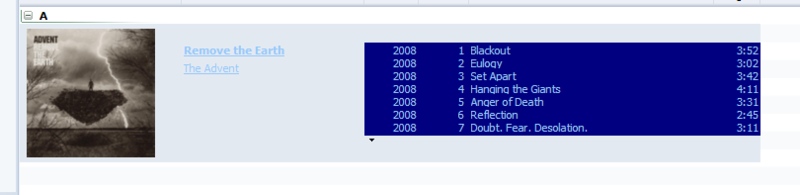
Skin Preview
This is a remake of Steegy's SoftBlue MM2 skin, which I've made MM3 compatible with his permission. Original skin info can be found here.
Installation instructions:
1. Download SoftBlue v2.2.1
2. Run the mmip file, the skin will install automatically.
3. Change your skin in Tools --> Options --> Skins
Soft Blue 2.0
-MM3 Release
SoftBlue 2.1
-Pop up info panel added
v2.2
-Album Art views made more viewable
-Float Player made more consistent with theme
-Toolbar fix
v2.2.1
-Album art view fixed
Troubleshooting:
I downloaded the file from the link above, but it is a .zip file, not a .mmip file!
--This is a result of using Internet Explorer to download the file, which automatically renames the .mmip extension to .zip. Try downloading the file with another browser such as Firefox or Opera, or rename the downloaded .zip file to SoftBlue.mmip .
SoftBlue - Small player skin (MM2 remake) [v2.2]
-
nohitter151
- Posts: 23640
- Joined: Wed Aug 09, 2006 10:20 am
- Location: NJ, USA
- Contact:
SoftBlue - Small player skin (MM2 remake) [v2.2]
Last edited by nohitter151 on Thu May 29, 2008 8:05 pm, edited 7 times in total.
MediaMonkey user since 2006
Need help? Got a suggestion? Can't find something?
Please no PMs in reply to a post. Just reply in the thread.
Need help? Got a suggestion? Can't find something?
Please no PMs in reply to a post. Just reply in the thread.
Re: SoftBlue - Small player skin (MM2 remake) [v2.0]
It's perfect. I was just looking for sth like this.nohitter151 wrote:This is a remake of Steegy's SoftBlue MM2 skin, which I've made MM3 compatible with his permission.
I have a small cosmetic question: Is this wanted? The thin black line at the side of the player part:

Re: SoftBlue - Small player skin (MM2 remake) [v2.0]
And another two: albumart is missing in the pop-up and the frame colour should be lighter to my understanding.


-
nohitter151
- Posts: 23640
- Joined: Wed Aug 09, 2006 10:20 am
- Location: NJ, USA
- Contact:
Re: SoftBlue - Small player skin (MM2 remake) [v2.0]
Thats weird, I don't get that black line with the skin, and I can't reproduce it. I'll keep looking...Macarena wrote:It's perfect. I was just looking for sth like this.nohitter151 wrote:This is a remake of Steegy's SoftBlue MM2 skin, which I've made MM3 compatible with his permission.
I have a small cosmetic question: Is this wanted? The thin black line at the side of the player part:

I didn't skin the pop-up info panel yet, that is the default. I'll work on an update with this improved soon.Macarena wrote:And another two: albumart is missing in the pop-up and the frame colour should be lighter to my understanding.
MediaMonkey user since 2006
Need help? Got a suggestion? Can't find something?
Please no PMs in reply to a post. Just reply in the thread.
Need help? Got a suggestion? Can't find something?
Please no PMs in reply to a post. Just reply in the thread.
-
nohitter151
- Posts: 23640
- Joined: Wed Aug 09, 2006 10:20 am
- Location: NJ, USA
- Contact:
SoftBlue 2.1
-Pop up info panel added
I still can't reproduce that black line, but let me know if this release changes anything.
-Pop up info panel added
I still can't reproduce that black line, but let me know if this release changes anything.
MediaMonkey user since 2006
Need help? Got a suggestion? Can't find something?
Please no PMs in reply to a post. Just reply in the thread.
Need help? Got a suggestion? Can't find something?
Please no PMs in reply to a post. Just reply in the thread.
-
drjboulder
- Posts: 1119
- Joined: Mon Apr 09, 2007 12:03 am
- Location: Boulder, Colorado, USA
Hey NoHitter,
Nice work, as usual!
I get the black line also:

I think that it is related to the gray area that I get next to the player with ZuneSP:

I have to resize the track browser each time to achieve aesthetics.
Nice work, as usual!
I get the black line also:

I think that it is related to the gray area that I get next to the player with ZuneSP:

I have to resize the track browser each time to achieve aesthetics.
D Rock

MediaMonkeyGoldv3.0.3.1183
Vista Home Basic|4thGen 20GPod
Zune Small Player Skin w/ Aqua 4 Player Mod
Backup | Last FM Node | Scrobbler DJ | TopTracks | StayInSameStyleDJ
RadioDJ | RadioFreeMonkey | PrettyPictures | MiniLyricsEmbedder
LyricsViewer | Lyricator | LyricsPlugin | VisualizationEmbedder | MonkeyRok
RightClickForWeb | WebSearchPanels | WebNodes | MagicNodes | FavoritesNodes
NowPlayingArtNode |AutoRateAccurate | TaggingInconsistencies
AdvancedDuplicateFind&Fix | CaseModify | PlayHistory&Stats | Etc...
MediaMonkeyGoldv3.0.3.1183
Vista Home Basic|4thGen 20GPod
Zune Small Player Skin w/ Aqua 4 Player Mod
Backup | Last FM Node | Scrobbler DJ | TopTracks | StayInSameStyleDJ
RadioDJ | RadioFreeMonkey | PrettyPictures | MiniLyricsEmbedder
LyricsViewer | Lyricator | LyricsPlugin | VisualizationEmbedder | MonkeyRok
RightClickForWeb | WebSearchPanels | WebNodes | MagicNodes | FavoritesNodes
NowPlayingArtNode |AutoRateAccurate | TaggingInconsistencies
AdvancedDuplicateFind&Fix | CaseModify | PlayHistory&Stats | Etc...
-
nohitter151
- Posts: 23640
- Joined: Wed Aug 09, 2006 10:20 am
- Location: NJ, USA
- Contact:
Ok, I think I've figured out what's going on, although unfortunately I don't believe I can fix it. The black line and the gray area only show up when the player is put into the tree area. It seems like MM has some trouble sizing the player in there for some reason, because putting the player anywhere else resolves those issues.drjboulder wrote:Hey NoHitter,
Nice work, as usual!
I get the black line also:
I think that it is related to the gray area that I get next to the player with ZuneSP:
I have to resize the track browser each time to achieve aesthetics.
MediaMonkey user since 2006
Need help? Got a suggestion? Can't find something?
Please no PMs in reply to a post. Just reply in the thread.
Need help? Got a suggestion? Can't find something?
Please no PMs in reply to a post. Just reply in the thread.
-
drjboulder
- Posts: 1119
- Joined: Mon Apr 09, 2007 12:03 am
- Location: Boulder, Colorado, USA
Glad I helped you figure it out.nohitter151 wrote: Ok, I think I've figured out what's going on, although unfortunately I don't believe I can fix it. The black line and the gray area only show up when the player is put into the tree area. It seems like MM has some trouble sizing the player in there for some reason, because putting the player anywhere else resolves those issues.
Bummer that it can not be changed.

But, I do not really mind the two second tweak to make it look right.
Would rather resize the window, than change player position.
This is essentially the same set up that I've used since starting with MM2.
Do not think that I could get used to the player elsewhere.
A tad OCD.

D Rock
MediaMonkeyGoldv3.0.3.1183
Vista Home Basic|4thGen 20GPod
Zune Small Player Skin w/ Aqua 4 Player Mod
Backup | Last FM Node | Scrobbler DJ | TopTracks | StayInSameStyleDJ
RadioDJ | RadioFreeMonkey | PrettyPictures | MiniLyricsEmbedder
LyricsViewer | Lyricator | LyricsPlugin | VisualizationEmbedder | MonkeyRok
RightClickForWeb | WebSearchPanels | WebNodes | MagicNodes | FavoritesNodes
NowPlayingArtNode |AutoRateAccurate | TaggingInconsistencies
AdvancedDuplicateFind&Fix | CaseModify | PlayHistory&Stats | Etc...
MediaMonkeyGoldv3.0.3.1183
Vista Home Basic|4thGen 20GPod
Zune Small Player Skin w/ Aqua 4 Player Mod
Backup | Last FM Node | Scrobbler DJ | TopTracks | StayInSameStyleDJ
RadioDJ | RadioFreeMonkey | PrettyPictures | MiniLyricsEmbedder
LyricsViewer | Lyricator | LyricsPlugin | VisualizationEmbedder | MonkeyRok
RightClickForWeb | WebSearchPanels | WebNodes | MagicNodes | FavoritesNodes
NowPlayingArtNode |AutoRateAccurate | TaggingInconsistencies
AdvancedDuplicateFind&Fix | CaseModify | PlayHistory&Stats | Etc...
-
nohitter151
- Posts: 23640
- Joined: Wed Aug 09, 2006 10:20 am
- Location: NJ, USA
- Contact:
For now we'll just have to hope I can catch the attention of the devsdrjboulder wrote:Glad I helped you figure it out.nohitter151 wrote: Ok, I think I've figured out what's going on, although unfortunately I don't believe I can fix it. The black line and the gray area only show up when the player is put into the tree area. It seems like MM has some trouble sizing the player in there for some reason, because putting the player anywhere else resolves those issues.
Bummer that it can not be changed.
But, I do not really mind the two second tweak to make it look right.
Would rather resize the window, than change player position.
This is essentially the same set up that I've used since starting with MM2.
Do not think that I could get used to the player elsewhere.
A tad OCD.
 .
.MediaMonkey user since 2006
Need help? Got a suggestion? Can't find something?
Please no PMs in reply to a post. Just reply in the thread.
Need help? Got a suggestion? Can't find something?
Please no PMs in reply to a post. Just reply in the thread.
-
onkel_enno
- Posts: 2158
- Joined: Fri Jan 14, 2005 1:45 am
- Location: Germany
- Contact:
-
nohitter151
- Posts: 23640
- Joined: Wed Aug 09, 2006 10:20 am
- Location: NJ, USA
- Contact:
My pleasure. Eventually I will try to make the Miniplayer the same as the main player, and perhaps make a custom Microplayer as well. If in the meantime you catch any visual errors, let me know and I will try to fix them.onkel_enno wrote:Thanks nohitter151.
I waited a long time for such a design.
MediaMonkey user since 2006
Need help? Got a suggestion? Can't find something?
Please no PMs in reply to a post. Just reply in the thread.
Need help? Got a suggestion? Can't find something?
Please no PMs in reply to a post. Just reply in the thread.
-
rovingcowboy
- Posts: 14163
- Joined: Sat Oct 25, 2003 7:57 am
- Location: (Texas)
- Contact:
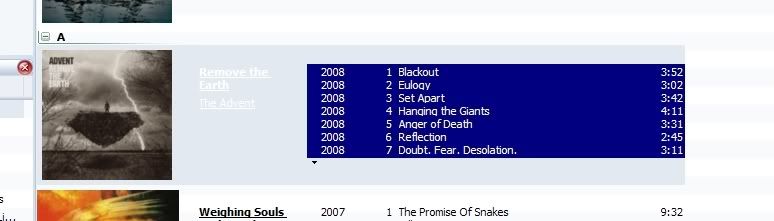
nothing can be changed there only thing to do is change the background image for that list. which is the aaview.png ? or .bmp to a color that lets the different text colors both show.


roving cowboy / keith hall. My skins http://www.mediamonkey.com/forum/viewto ... =9&t=16724 for some help check on Monkey's helpful messages at http://www.mediamonkey.com/forum/viewto ... 4008#44008 MY SYSTEMS.1.Jukebox WinXp pro sp 3 version 3.5 gigabyte mb. 281 GHz amd athlon x2 240 built by me.) 2.WinXP pro sp3, vers 2.5.5 and vers 3.5 backup storage, shuttle 32a mb,734 MHz amd athlon put together by me.) 3.Dell demension, winxp pro sp3, mm3.5 spare jukebox.) 4.WinXp pro sp3, vers 3.5, dad's computer bought from computer store. )5. Samsung Galaxy A51 5G Android ) 6. amd a8-5600 apu 3.60ghz mm version 4 windows 7 pro bought from computer store.