Latest Addons
Queue Album(s) after Current Album
Overview
This add-on enhances MediaMonkey 5 by adding a context menu option to queue entire albums directly after the currently playing album in your "Now Playing" list—rather than appending them at the very end of your queue.
Key Features & How It Works
-
Smart Insertion Point:
Selected albums are inserted immediately after the final track of the currently playing album, keeping your immediate listening order intact without pushing new additions to the bottom of a long queue.
-
Full Album Queuing:
Simply select a single track (or multiple tracks from different albums), right-click, and select "Queue Album(s) after Current Album". The extension automatically fetches and inserts all tracks for each selected album in proper track and disc order.
-
Duplicate Protection:
Albums that are already present in your current "Now Playing" list are automatically skipped to prevent duplicate playback.
-
Large Queue Warning:
To prevent accidental additions, a confirmation prompt appears if your selection exceeds 200 tracks.
-
Feedback Notifications:
A brief pop-up notification (toast) confirms how many albums were added and lists any skipped duplicates.
By
AI (Inspired by Fetznschaedl)
Submitted by fetzenschaedl
Updated 18/08/2026
Version History / Details
- Version:
- 1.0
- Updated:
- 18/08/2026
- Size:
- 5.27 KB
- Works with:
- Media Monkey 2024 - 2024
Top List Monitor
Top List Monitor turns your MediaMonkey 5 listening history into dynamic, interactive ranking lists (Top Albums, Top Songs, and Top Artists) with detailed metrics to help you analyze and boost your rankings efficiently.
Key Features & Functionality
-
3 Dedicated Ranking Views: Tracks top items by cumulative play counts (Albums/Artists) or single track plays (Songs).
-
Smart Ranking Logic: Uses standard competition ranking (1-2-2-4) with fair tie handling (tied items are never omitted).
-
Motivational Listening Metrics:
-
To Next Rank / Milestone: Shows exact play counts needed to reach the next position, multiple of 50, or top milestone (Top 100, Top 50, etc.).
-
Efficiency & Time-Efficiency: Calculates "rank places gained per play" and "places gained per hour of listening time".
-
Lead & Hot Zone Indicators: Highlights close gaps (yellow "Hot Zone") and visualizes leads over lower ranks with color-coded alerts (Red/Yellow/Green).
-
Saturation & Averages: Displays how concentrated your listening habits are (e.g., % of total plays in your Top 10/100).
-
-
Powerful Filtering & Navigation:
-
Filter by Genre, Release Year, or Play Year (e.g., analyze 1990s releases played in a specific year).
-
Click any entry to jump directly to that album, track, or artist in your MediaMonkey library.
-
-
1-Click Playlist Export: Export Top $N$ albums, songs, or top tracks per artist as static playlists grouped in a dedicated folder.
-
Fully Customizable: Set individual list lengths, minimum play thresholds, and playlist export sizes per category.
By
AI (Inspired by Fetznschaedl)
Submitted by fetzenschaedl
Updated 02/09/2026
Version History / Details
- Version:
- 0.5
- Updated:
- 02/09/2026
- Size:
- 188.46 KB
- Works with:
- Media Monkey 2024 - 2024
- Changes:
What’s New in v0.4.6 – v0.5.0
-
CSV Export (v0.5.0): Added an "Export as CSV" button to all lists (Albums, Songs, Artists, Genres). It exports whatever data is currently visible in the grid (respecting active filters/sorting) using UTF-8 with BOM for proper Excel compatibility.
-
"Rank by" Metric Switching (v0.4.7): You can now switch the ranking basis between Plays and Listening time for Albums, Songs, and Artists. Choosing "Listening time" recalculates all metrics (Rank, Rank gain, Hot Zone, Efficiency, etc.) based on estimated total listening time instead of pure play counts.
-
"Listening time" Column (v0.4.6): Introduced a dedicated column in Albums, Songs, and Artists lists showing estimated cumulative listening time ({plays} x {track length}).
-
- Version:
- 0.4.5
- Updated:
- 29/08/2026
- Size:
- 167.62 KB
- Works with:
- Media Monkey 2024 - 2024
- Changes:
? What's New in Version 0.4.5 ? Enhanced Rank Trend Analysis
-
Dynamic Period Support: Rank Trend now works dynamically with short-term Period filters (e.g., Last 7/30/90/180/365 days) by comparing current performance against the equivalent previous timeframe.
-
Year Trend Indicators: Track how entries move over time compared to their status at the start of the year, including gain/loss indicators, new entries, and a dedicated "Fell out of Top N" section.
-
Improved UI & Tooltips: Renamed to "Rank trend" with automatically updating headers, hints, and context tooltips.
⚙️ Unified Step Logic & Custom Thresholds
-
Flexible "Rank gain at +" Field: Replaced fixed dropdowns with a customizable input field (1–100) that defaults directly to your list’s Hot Zone threshold.
-
Consistent Calculations: Unified time efficiency (rank/h), rank gain, and efficiency metrics to share the exact same step size across all calculations.
?️ Bug Fixes & Performance
-
Promise Handling Fix: Fixed an issue where dialogs would get stuck on "Loading..." when trend data was fetched.
-
Accurate Filtering & Headers: Fixed bugs where minimum play requirements were bypassed for baseline rankings and where custom "Max entries" limits were ignored in tooltips.
-
- Version:
- 0.3.1
- Updated:
- 21/08/2026
- Size:
- 141.31 KB
- Works with:
- Media Monkey 2024 - 2024
- Changes:
v.01.1 - v0.3.1
-
New Top Genres List: Added to Tools → Top List Monitor → Top Genres, showing total plays, library share, and distinct counts for songs, artists, and albums per genre (with multi-genre track support). Configurable via Settings.
-
Performance & UI Fixes: Optimized Top Genres loading on large libraries via SQL pre-grouping, and added a visual gap between columns and scrollbars across all list windows.
-
Configurable Hot Zones & Rank Gain Expansion: Hot zone thresholds are now individually adjustable per list (defaulting to 2 for Songs, 10 for Albums/Artists). Expanded "Rank gain at" dropdown options up to +50, and added an explanatory hover tooltip to the Efficiency header.
-
Header & Footer Quick Controls: Added session-overriding header inputs for "Max entries" and "Min plays" with custom stepper controls, alongside an inline playlist entry count field in list footers for live updates.
-
Playlist & Filtering Improvements: Standardized playlist naming patterns to encode active filters, switched playlist export dates to ISO 8601 format ([YYYY-MM-DD]), and introduced a "Period (Plays)" filter (7 to 365 days / All time).
-
System & Code Maintenance: Added optional keyboard hotkeys for main lists, expanded the Settings dialog layout, and consolidated shared dialog helper logic internally.
-
- Version:
- 0.1
- Updated:
- 18/08/2026
- Size:
- 106.62 KB
- Works with:
- Media Monkey 2024 - 2024
Inserts a configurable pause of x seconds between tracks.
Notes:
- Silence duration is configurable via the addons list
- It can be toggled on/off via the Play menu
By
Jiri & Rusty
Submitted by jiri
Updated 10/08/2026
Version History / Details
- Version:
- 1.0
- Updated:
- 10/08/2026
- Size:
- 7.65 KB
- License:
- Ventis Reciprocal License
- Works with:
- Media Monkey 5.0 - 2024.9
- Changes:
Initial version. Created based on user's request.
Manage Play Stats for MediaMonkey 5
Manage Play Stats is a MediaMonkey 5 add-on (based on the Add/Remove Playstat MM4 script by Bex) designed for precise manual management of playback statistics—including play history (the Played table), PlayCounter, and LastPlayedDate. It provides built-in tools for scenarios that standard MM5 UI does not cover, such as importing play history from third-party players, correcting invalid timestamps, undoing accidental plays, or performing bulk statistics cleanups.
Key Features
-
Add
-
Add one Play, Timestamp Now: Instantly logs a single playback entry with the current timestamp and increments the play counter for a selected track with a single click.
-
Add one Play, Timestamp X...: Assigns a custom timestamp across one or multiple tracks. Supports both Start (forward) and End (backward) calculation anchors to sequence tracks sequentially based on their durations.
-
Add Plays...: Distributes multiple play history entries for a single track across a defined date/time range. Includes preview capabilities, intelligent anchoring, and capacity checks to prevent unrealistic spacing between plays.
-
-
Remove
-
Remove Plays...: Displays every playback record for a single track in a checkable list for targeted removal, with optional automatic re-alignment of PlayCounter and LastPlayedDate.
-
Remove all Plays in Period...: Bulk-deletes playback entries within a specified timeframe for selected tracks or the entire library. Features live preview feedback and a two-step confirmation dialog to prevent accidental data loss.
-
-
Adjust
-
Adjust Only PlayCounter...: Modifies PlayCounter values (set, increment, decrement, or resync to match actual history counts) without altering LastPlayedDate or inserting extra history records.
-
Set LastPlayedDate...: Directly updates the last played timestamp for a track. Moves the newest existing play entry to the chosen date or creates a single matching entry if no prior history exists.
-
Add LastPlayedDate as HistoryPlay...: Backfills an existing LastTimePlayed summary tag as a proper record in the Played table (useful after device syncs that updated song metadata without creating history entries).
-
By
fetzenschaedl
Submitted by fetzenschaedl
Updated 02/08/2026
Version History / Details
- Version:
- 0.1.4
- Updated:
- 02/08/2026
- Size:
- 64 KB
- Works with:
- Media Monkey 2024 - 2024
- Changes:
v0.1.4 (July 2026) Summary:
-
Bugfix (Duplicate Tooltips): Removed redundant title attributes on date/time number fields across various dialogs. This eliminates dual overlapping tooltips in MediaMonkey 5 / Chromium, as the fields (YYYY-MM-DD, HH:MM:SS) are self-explanatory.
-
New Feature ("View PlayHistory"): Added a read-only viewer directly under Manage Play Stats. It features a split layout (selected tracks on the left, PlayCounter and full play history on the right) with zero-padded row numbers for clean alignment. It makes no database changes and allows safe inspection of stored data.
-
Documentation Fix: Moved "Add LastPlayedDate as HistoryPlay" in the README to the correct Add submenu section.
-
- Version:
- 0.1.3
- Updated:
- 26/07/2026
- Size:
- 57.72 KB
- Works with:
- Media Monkey 2024 - 2024
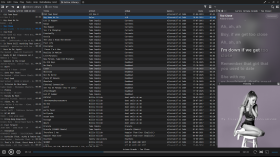
Syllable Lyrics for MediaMonkey
Syllable Lyrics adds synchronized word-by-word karaoke highlighting to MediaMonkey 5 and MediaMonkey 2024.
Features
- Word and syllable highlighting synchronized with playback
- Clickable timed lines for seeking
- Smooth automatic centering of the active lyric line
- Embedded enhanced LRC and TTML word timing
- Ordinary LRC line timing and plain-text fallback
- Background vocals and alternating singer alignment when supplied by the provider
- Lyrics+ compatible KPOE, Unison, and LRCLIB online lookup
- Optional provider or Google-powered romanization
- Blurred current-album-art backgrounds in normal and fullscreen modes
- Configurable timing offset, online lookup, and smooth scrolling
By
GhosT
Submitted by ghost.specialgrade
Updated 08/08/2026
Version History / Details
- Version:
- 0.1.21
- Updated:
- 08/08/2026
- Size:
- 27.51 KB
- License:
- MIT License
- Works with:
- Media Monkey 5.0 - 2024
- Changes:
Syllable Lyrics v0.1.21
This release improves synchronized lyric discovery, dual-script romanization, karaoke animation, scrolling, and fullscreen presentation for MediaMonkey 5 and MediaMonkey 2024.
What’s New
- Added synchronized dual-script lyrics that preserve both original and romanized text
- Added word-by-word karaoke wipes for both scripts when aligned syllable timing is available
- Added an option to display romanized lyrics as the primary text
- Added BiniLyrics lookup with TTML word-timing support
- Improved Lyrics+, Unison, and LRCLIB parsing and provider prioritization
- Word-timed lyrics now consistently outrank line-timed and plain-text results
- Provider-supplied transliteration is preferred, with optional Google-powered romanization as a fallback
- Added background-vocal and alternating-singer presentation
- Added manual lyric scrolling with a five-second pause before automatic centering resumes
- Improved active-line depth, glow, shadows, karaoke wipes, and character animation
- Improved normal and fullscreen album-art backgrounds
- Fixed inherited fullscreen text-shadow artifacts
- Added additional parsing, provider-priority, romanization, and timing regression tests
Romanization
The original and romanized lyrics remain visible together. You can choose which script appears as the primary text.
For word-timed lyrics with aligned transliteration, both scripts share the same timestamps and receive synchronized karaoke wipes. Line-only transliteration remains visible but cannot provide a true word-by-word wipe without aligned timing.
- Version:
- 0.1.20
- Updated:
- 19/07/2026
- Size:
- 25.15 KB
- License:
- MIT License
- Works with:
- Media Monkey 5.0.0 - 5.0.0