Hi all,
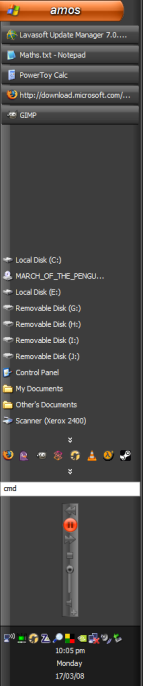
I'm very happy with MediaMonkey, bar one thing. When using the MicroPlayer in the task bar, it decides it should be vertical rather than horizontal (I have my task bar on the left, and quite wide, rather than the bottom). Can I force the MicroPlayer to use horizontal and not vertical layout?
Thanks,
- Amos
See this screenshot for example
Taskbar Microplayer wrong orientation
Moderator: Gurus
-
nohitter151
- Posts: 23640
- Joined: Wed Aug 09, 2006 10:20 am
- Location: NJ, USA
- Contact:
Sorry, I don't think theres any way to make it horizontal other than having the taskbar horizontal.
MediaMonkey user since 2006
Need help? Got a suggestion? Can't find something?
Please no PMs in reply to a post. Just reply in the thread.
Need help? Got a suggestion? Can't find something?
Please no PMs in reply to a post. Just reply in the thread.
-
MoDementia
- Posts: 1321
- Joined: Thu Jun 15, 2006 3:26 pm
- Location: Geelong, Victoria, Australia

-
nohitter151
- Posts: 23640
- Joined: Wed Aug 09, 2006 10:20 am
- Location: NJ, USA
- Contact:
No, it will just use the default MicroPlayerV instead.MoDementia wrote:Dunno if this will work but you can try if you like
rename Glided.msz to Glided.zip
Delete/cut/move MicroPlayerV.ini and MicroPlayerV.mskn
rename back to Glided.msz
Logic is that if there is no Vertical player it will use the horizontal maybe
MediaMonkey user since 2006
Need help? Got a suggestion? Can't find something?
Please no PMs in reply to a post. Just reply in the thread.
Need help? Got a suggestion? Can't find something?
Please no PMs in reply to a post. Just reply in the thread.
-
MoDementia
- Posts: 1321
- Joined: Thu Jun 15, 2006 3:26 pm
- Location: Geelong, Victoria, Australia

-
rovingcowboy
- Posts: 14163
- Joined: Sat Oct 25, 2003 7:57 am
- Location: (Texas)
- Contact:
Re: Taskbar Microplayer wrong orientation
amosharper wrote:Hi all,
I'm very happy with MediaMonkey, bar one thing. When using the MicroPlayer in the task bar, it decides it should be vertical rather than horizontal (I have my task bar on the left, and quite wide, rather than the bottom). Can I force the MicroPlayer to use horizontal and not vertical layout?
Thanks,
- Amos
See this screenshot for example
you need to tell us what skin your using.
and ask if the skin creator will make a wider vertical player.
i have made one in all my skins but it is only twice as wide as the horz one is high.
but the vert. does scrol the names so you can read them.
roving cowboy / keith hall. My skins http://www.mediamonkey.com/forum/viewto ... =9&t=16724 for some help check on Monkey's helpful messages at http://www.mediamonkey.com/forum/viewto ... 4008#44008 MY SYSTEMS.1.Jukebox WinXp pro sp 3 version 3.5 gigabyte mb. 281 GHz amd athlon x2 240 built by me.) 2.WinXP pro sp3, vers 2.5.5 and vers 3.5 backup storage, shuttle 32a mb,734 MHz amd athlon put together by me.) 3.Dell demension, winxp pro sp3, mm3.5 spare jukebox.) 4.WinXp pro sp3, vers 3.5, dad's computer bought from computer store. )5. Samsung Galaxy A51 5G Android ) 6. amd a8-5600 apu 3.60ghz mm version 4 windows 7 pro bought from computer store.
-
Guest
Re: Taskbar Microplayer wrong orientation
Thanks for your replies, all, and your suggestion, MoDementia.
- Amos
I'm using the default (Gilded) skin.rovingcowboy wrote:you need to tell us what skin you're using.
- Amos
Re: Taskbar Microplayer wrong orientation
Try to rename Glided.msz to Glided.zip. Extract MicroPlayerH.ini and mskn from archive to any temp folder. Then rename to MicroPlayerV.ini and mskn and put it back to zip (replace original MicroPlayerV files).
For sure you should backup your original Glided.msz archive.
For sure you should backup your original Glided.msz archive.
-
rovingcowboy
- Posts: 14163
- Joined: Sat Oct 25, 2003 7:57 am
- Location: (Texas)
- Contact:
didn't see the link for the screenshot?
Just looked at that screenshot. wholely cr....ap you can put the whole media player in that size of taskbar. well not really but there is no need to use that skinny of micro player with that wide of place to put it. you might want to look at the zune players micro player and see if nohitter151 can make it for your wide vertical taskbar.

but unless the default microplayerH skin has been made to keep the buttons in the postion no matter what the shape of the player skin then all the buttons and text areas need to be changed to vertical when you rename the microplayerH to V
and all those have to be changed in the ini file. and the seek thumb for v. has to be included in the microplayerV mskn file.
but if as said all the stuff will stay in the same locations and the skin's background is allowed to stretch then you will get the vert player with the horz.. controls.
just as simple to make it that way or make its own skin.

Just looked at that screenshot. wholely cr....ap you can put the whole media player in that size of taskbar. well not really but there is no need to use that skinny of micro player with that wide of place to put it. you might want to look at the zune players micro player and see if nohitter151 can make it for your wide vertical taskbar.
but unless the default microplayerH skin has been made to keep the buttons in the postion no matter what the shape of the player skin then all the buttons and text areas need to be changed to vertical when you rename the microplayerH to V
and all those have to be changed in the ini file. and the seek thumb for v. has to be included in the microplayerV mskn file.
but if as said all the stuff will stay in the same locations and the skin's background is allowed to stretch then you will get the vert player with the horz.. controls.
just as simple to make it that way or make its own skin.
roving cowboy / keith hall. My skins http://www.mediamonkey.com/forum/viewto ... =9&t=16724 for some help check on Monkey's helpful messages at http://www.mediamonkey.com/forum/viewto ... 4008#44008 MY SYSTEMS.1.Jukebox WinXp pro sp 3 version 3.5 gigabyte mb. 281 GHz amd athlon x2 240 built by me.) 2.WinXP pro sp3, vers 2.5.5 and vers 3.5 backup storage, shuttle 32a mb,734 MHz amd athlon put together by me.) 3.Dell demension, winxp pro sp3, mm3.5 spare jukebox.) 4.WinXp pro sp3, vers 3.5, dad's computer bought from computer store. )5. Samsung Galaxy A51 5G Android ) 6. amd a8-5600 apu 3.60ghz mm version 4 windows 7 pro bought from computer store.
-
MoDementia
- Posts: 1321
- Joined: Thu Jun 15, 2006 3:26 pm
- Location: Geelong, Victoria, Australia
Re: Taskbar Microplayer wrong orientation
I tried this and it didnt work, displayed correctly when resizing the task bar but only showed the next button and then nothing when i released the resize.PetrCBR wrote:Try to rename Glided.msz to Glided.zip. Extract MicroPlayerH.ini and mskn from archive to any temp folder. Then rename to MicroPlayerV.ini and mskn and put it back to zip (replace original MicroPlayerV files).
For sure you should backup your original Glided.msz archive.
-
amosharper
Re: Taskbar Microplayer wrong orientation
Thanks for your suggestion, PetrCBR, and checking this for me, MoDementia. Any other ideas?MoDementia wrote:I tried this and it didnt work, displayed correctly when resizing the task bar but only showed the next button and then nothing when i released the resize.
Thanks again,
- Amos
Vertical taskbar blues
Same problem here (I use a wide vertical taskbar). What I would really like is for the microplayer to be a floating toolbar: that way I could put it wherever I liked. But when I try dragging it away from the taskbar, it crashes: I get a completely blank toolbar palette.
Daniel U. Thibault
a.k.a. Urhixidur
a.k.a. Seigneur Bohémond de Nicée
a.k.a. Urhixidur
a.k.a. Seigneur Bohémond de Nicée
-
rovingcowboy
- Posts: 14163
- Joined: Sat Oct 25, 2003 7:57 am
- Location: (Texas)
- Contact:
Re: Vertical taskbar blues
urhixidur wrote:Same problem here (I use a wide vertical taskbar). What I would really like is for the microplayer to be a floating toolbar: that way I could put it wherever I liked. But when I try dragging it away from the taskbar, it crashes: I get a completely blank toolbar palette.
thats what the floating player is for.
roving cowboy / keith hall. My skins http://www.mediamonkey.com/forum/viewto ... =9&t=16724 for some help check on Monkey's helpful messages at http://www.mediamonkey.com/forum/viewto ... 4008#44008 MY SYSTEMS.1.Jukebox WinXp pro sp 3 version 3.5 gigabyte mb. 281 GHz amd athlon x2 240 built by me.) 2.WinXP pro sp3, vers 2.5.5 and vers 3.5 backup storage, shuttle 32a mb,734 MHz amd athlon put together by me.) 3.Dell demension, winxp pro sp3, mm3.5 spare jukebox.) 4.WinXp pro sp3, vers 3.5, dad's computer bought from computer store. )5. Samsung Galaxy A51 5G Android ) 6. amd a8-5600 apu 3.60ghz mm version 4 windows 7 pro bought from computer store.
-
Guest
Re: Vertical taskbar blues
What floating player? The menu (the one beside the minimise/close buttons) offers only a choice between mini and micro, and scanning the Help for "floating player" turned up precisely zero hits. If there is a floating player, it is well hidden --which is a different kind of bug (a design flaw!).rovingcowboy wrote:thats what the floating player is for.urhixidur wrote:Same problem here (I use a wide vertical taskbar). What I would really like is for the microplayer to be a floating toolbar: that way I could put it wherever I liked. But when I try dragging it away from the taskbar, it crashes: I get a completely blank toolbar palette.