
I create a custom view e.g. based on the "List (by Album)" type, e.g. as follows:
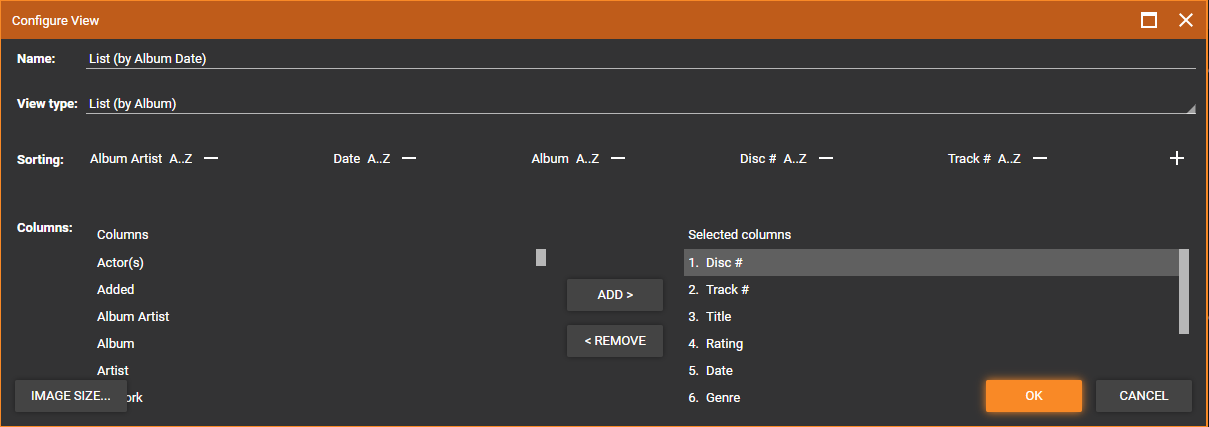
(also note that the default size of the dialog box seems to be too small and the buttons overlap the content and the "Sub views" option is hidden off the bottom of the dialog - have to resize to see it).
When I click save, the list view briefly sorts as I've just defined, but then a second or so later reverts to the default sort order which is by Album.
I then go to View->Main Panel View and see my "List (by Album Date)" is already highlighted, but if I click on this again, sometimes the view does sort according to my order but sometimes it does not. Regardless, the next time I hit F5, it switches back to the default sort order of the "List (by Album)" view. I just cannot get my custom view sort order to "stick" reliably.
The next issue is that if I edit the view I created (View->Manage Views->Edit), it seems to have lost the custom sort order I created completely:
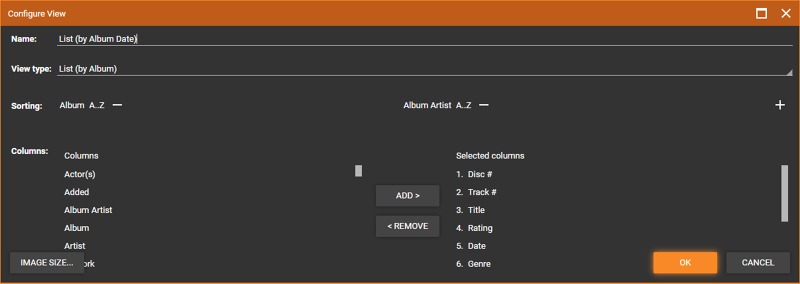
The I intermittently see really weird behaviour where what the view shows seems to reflect the last-but-one configuration I had in the custom view. For example, if I change the columns once, then edit the view and change the columns again, then re-select the view, it is showing the columns as I edited them the first time, not the most recent time. It's really hard to describe this because the behaviour seems to be completely random and inconsistent.
Basically, I just can't get the custom views to work!


