Album Rating Node adds an "Album Rating" sub-node to your collections. It groups the albums of a collection by their album rating (5 stars down to 0.5 stars, bomb and Unknown), so you can browse your best and worst rated albums at a glance, similar to the existing Rating node for tracks, but based on albums.
IMPORTANT: Enabling the node requires a MediaMonkey Gold license. The sub-node is switched on in the collection settings, and editing or creating collections is a Gold feature (the free version shows the Gold registration dialog instead).
By
AI (inspired by Fetzenschaedl)
Submitted by fetzenschaedl
Updated 11/10/2026
Version History / Details
- Version:
- 0.1
- Updated:
- 11/10/2026
- Size:
- 19.83 KB
- Works with:
- Media Monkey 2024 - 2027
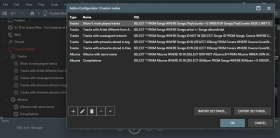
Allows you to create custom nodes within MediaMonkey. 7 sample nodes are included, but you can create whatever nodes you want assuming you familiarize yourself with the MediaMonkey database structure.
By
Ludek
Submitted by rusty
Updated 30/12/2025
Version History / Details
- Version:
- 1.1.5
- Updated:
- 30/12/2025
- Size:
- 6.36 KB
- Works with:
- Media Monkey 5
- Changes:
Version 1.1.5 adds a UI to save custom queries
Manage Play Stats for MediaMonkey 5
Manage Play Stats is a MediaMonkey 5 add-on (based on the Add/Remove Playstat MM4 script by Bex) designed for precise manual management of playback statistics—including play history (the Played table), PlayCounter, and LastPlayedDate. It provides built-in tools for scenarios that standard MM5 UI does not cover, such as importing play history from third-party players, correcting invalid timestamps, undoing accidental plays, or performing bulk statistics cleanups.
Key Features
-
Add
-
Add one Play, Timestamp Now: Instantly logs a single playback entry with the current timestamp and increments the play counter for a selected track with a single click.
-
Add one Play, Timestamp X...: Assigns a custom timestamp across one or multiple tracks. Supports both Start (forward) and End (backward) calculation anchors to sequence tracks sequentially based on their durations.
-
Add Plays...: Distributes multiple play history entries for a single track across a defined date/time range. Includes preview capabilities, intelligent anchoring, and capacity checks to prevent unrealistic spacing between plays.
-
-
Remove
-
Remove Plays...: Displays every playback record for a single track in a checkable list for targeted removal, with optional automatic re-alignment of PlayCounter and LastPlayedDate.
-
Remove all Plays in Period...: Bulk-deletes playback entries within a specified timeframe for selected tracks or the entire library. Features live preview feedback and a two-step confirmation dialog to prevent accidental data loss.
-
-
Adjust
-
Adjust Only PlayCounter...: Modifies PlayCounter values (set, increment, decrement, or resync to match actual history counts) without altering LastPlayedDate or inserting extra history records.
-
Set LastPlayedDate...: Directly updates the last played timestamp for a track. Moves the newest existing play entry to the chosen date or creates a single matching entry if no prior history exists.
-
Add LastPlayedDate as HistoryPlay...: Backfills an existing LastTimePlayed summary tag as a proper record in the Played table (useful after device syncs that updated song metadata without creating history entries).
-
By
fetzenschaedl
Submitted by fetzenschaedl
Updated 17/09/2026
Version History / Details
- Version:
- 0.1.5
- Updated:
- 17/09/2026
- Size:
- 64.43 KB
- Works with:
- Media Monkey 2024 - 2024
- Changes:
### v0.1.5 - "View PlayHistory" pane widths fixed
- Version:
- 0.1.4
- Updated:
- 02/08/2026
- Size:
- 64 KB
- Works with:
- Media Monkey 2024 - 2024
- Changes:
v0.1.4 (July 2026) Summary:
-
Bugfix (Duplicate Tooltips): Removed redundant title attributes on date/time number fields across various dialogs. This eliminates dual overlapping tooltips in MediaMonkey 5 / Chromium, as the fields (YYYY-MM-DD, HH:MM:SS) are self-explanatory.
-
New Feature ("View PlayHistory"): Added a read-only viewer directly under Manage Play Stats. It features a split layout (selected tracks on the left, PlayCounter and full play history on the right) with zero-padded row numbers for clean alignment. It makes no database changes and allows safe inspection of stored data.
-
Documentation Fix: Moved "Add LastPlayedDate as HistoryPlay" in the README to the correct Add submenu section.
-
- Version:
- 0.1.3
- Updated:
- 26/07/2026
- Size:
- 57.72 KB
- Works with:
- Media Monkey 2024 - 2024
Track History Transfer 1.1.5
Track History Transfer is a focused MediaMonkey 5 add-on built to solve one recurring problem: replacing a track with a better version shouldn't mean losing years of listening history. Whether you're upgrading an MP3 to FLAC, swapping in a remastered edition, or cleaning up duplicate albums, Track History Transfer moves play counts, ratings, tags, and full play history from the old file to the new one — accurately and safely.
With intelligent score-based matching, Track History Transfer automatically pairs source and target tracks by duration, track number, and title similarity, even across mixed selections. A confirmation dialog with drag-and-drop pair editing gives you full control before anything is written, while a dedicated Lossy → Lossless mode and a library-wide Find Duplicate Albums scanner make batch cleanups fast and reliable.
Track History Transfer also handles the details that matter: merging play counts instead of overwriting them, transferring external artwork and playlist memberships, and optional source cleanup — clear stats, remove from database, or delete the file entirely — once a transfer is confirmed.
Built for anyone who upgrades their library over time and refuses to start their listening history from zero, Track History Transfer combines precise matching with a transparent, reviewable workflow for every transfer.
For setup and usage details, see the bundled readme.md.
⚠️ Please use this add-on with care. Track History Transfer can permanently modify or delete track data, statistics, and files — incorrect usage (wrong source/target pairing, unintended delete options, etc.) can result in data loss. This add-on has only been tested on a limited scale. Always create a backup of your MediaMonkey database before using it, especially before batch operations like Find Duplicate Albums or any transfer involving the source cleanup options.
Key Features
- Smart Score Matching: Automatically pairs source and target tracks by duration, track number, and title similarity
- Statistics Transfer: Play Count, Last Played, Skip Count, Date Added, and Rating
- Play History Transfer: Preserves individual play timestamps, not just the total count
- Merge Play Count: Adds source and target play counts together instead of overwriting
- Full Tag & Field Support: Title, Artist, Album, Genre, Composer, Classification fields, and 10 Custom Fields — all individually selectable
- Lossy → Lossless Mode: Automatically separates old and new format tracks from a mixed album selection
- Find Duplicate Albums: Scans your entire library for albums with both lossy and lossless versions
- Confirmation Dialog: Side-by-side preview with drag-and-drop pair reassignment before any transfer
- Playlist & Artwork Transfer: Keeps playlist memberships and external cover art intact
- Source Cleanup Options: Clear statistics, remove from database, or delete the source file — entirely optional
By
AI (Inspired by Fetznschaedl)
Submitted by fetzenschaedl
Updated 29/07/2026
Version History / Details
- Version:
- 1.4.1
- Updated:
- 29/07/2026
- Size:
- 98.81 KB
- Works with:
- Media Monkey 2024 - 2024
- Changes:
- Changelog Summary (v1.2.0 – v1.4.1)
-
Analyze Volume Options & Fixes (v1.3.0 – v1.4.1)
-
v1.4.1: Fixed a bug where forcing re-analysis failed because the addon reset values to null instead of MediaMonkey’s actual "unknown" sentinel (-999999). Target tracks now reliably re-analyze regardless of global settings.
-
v1.4.0: Added an optional sub-setting to "Force re-analysis" for target tracks by temporarily setting their volume values to "unknown" before calling analyzeVolume(), bypassing MM5's global "Only analyze unknown" setting.
-
v1.3.1: Resolved a race condition where running Analyze Volume alongside transfers could falsely report deleted source files as inaccessible background errors. It now executes strictly after all source cleanup tasks complete.
-
v1.3.0: Added an option (in settings and the transfer dialog) to automatically run a batched, background Analyze Volume pass on target tracks after a transfer completes across all transfer paths.
-
-
Experimental Feature: Find Duplicate Albums (v1.2.0 – v1.2.1)
Note: The Find Duplicate Albums additions detailed below are currently experimental.
-
v1.2.1: Enhanced Stage 3 ("Fuzzy") detection to tolerate minor typos in album titles (using $ge 85%$ edit-distance similarity), catching small spelling differences like "Live in London" vs. "Live in Londons".
-
v1.2.0: Extended detection beyond single album entries to identify cross-folder duplicates across separate lossy/lossless entries. Introduced three confidence tiers in the UI: ● Exact, ◆ Tag match, and ◇ Fuzzy (which prompts a confirmation dialog before initiating transfers).
-
-
- Version:
- 1.1.8
- Updated:
- 07/07/2026
- Size:
- 82.53 KB
- Works with:
- Media Monkey 2024
- Changes:
-
-
v1.1.6 (New Feature): Added a "Remove source from playlist(s)" option to prevent duplicate tracks in playlists post-transfer. Automatically disables if playlist transfer is off or a delete task is active.
-
v1.1.7 (Bugfix): Fixed direct transfer mode (actions_add.js), where the new playlist removal feature was being bypassed.
-
v1.1.8 (Bugfix): Fixed a UI bug in dlgTransferConfirm.js where the removal checkbox incorrectly stayed greyed out on open due to initialization timing.
-
-
- Version:
- 1.1.5
- Updated:
- 21/06/2026
- Size:
- 78.31 KB
- Works with:
- Media Monkey 2024 - 2024
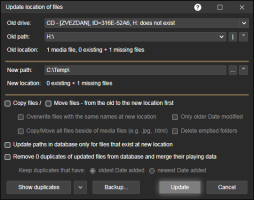
Its purpose is to update serial number of a drive and/or paths of files stored in the database, for example after upgrading hard disk or moving files from/to some network drive with UNC paths.
There is no direct download, the add-on will be send by e-mail after received donation. The free version for MM4 is available for download at its web site.
By
Zvezdan Dimitrijević
Submitted by ZvezdanD
Updated 20/06/2022
Version History / Details
- Version:
- 3.0
- Updated:
- 20/06/2022
- Works with:
- Media Monkey 5
- Changes:
Added: version of the add-on for MediaMonkey v5.