Addons in this category provide features to fix tracks' metadata.
Replace all the different types of unicode apostrophes with the standard one in all of the main metadata fields.
i.e., `´‘’ all convert to '
(Technically, U+0060, U+00B4, U+2018, and U+2019 all are replaced with U+0027.)
(Fields checked/affected are: Album, Album Artist, Artist, Composer, Conductor, Involved People, Lyricist, Original Artist, Original Title, Producer, Publisher, Quality, Summary, Tempo, and Title)
By
Keeps
Submitted by Keeps
Updated 02/04/2022
Populate custom fields to generate clean filenames. Then use e.g. this pattern with Auto-organize files: [Path]<Genre><Custom 2> - <Custom 3><Track #:2> - <Custom 4>
By
Stefan Raffeiner
Submitted by sraffeiner
Updated 11/12/2021
Version History / Details
- Version:
- 1.1.3
- Updated:
- 11/12/2021
- Size:
- 4.91 KB
- Works with:
- Media Monkey 5.0.1 - 5.0.1

This utility will remove metadata from all fields except:
- Title
- Artist
- Album
- Genre
- Track #
- Date
- Start Time and Stop Time
- Play Counter and Skip Counter
- Track Volume and Album Volume
Please use with caution!
By
MPG IT Consulting
Submitted by MPG
Updated 23/12/2022

Allows you to:
- Copy tracks' fields from one to another, for example copying Artist to Composer or Title to Album
- Swap two of the tracks' fields, for example swapping Album Artist and Artist.
Access via Tools > Edit tags > Copy field to field... and Tools > Edit tags > Swap fields...
By
Ventis Media, Inc.
Submitted by drakinite
Updated 06/10/2023
Version History / Details
- Version:
- 1.1.3
- Updated:
- 06/10/2023
- Size:
- 11.08 KB
- License:
- Ventis Limited Reciprocal License
- Works with:
- Media Monkey 5.1
- Changes:
Removed Author field (https://www.ventismedia.com/mantis/view.php?id=20250)
- Version:
- 1.1.2
- Updated:
- 29/08/2023
- Size:
- 11.27 KB
- License:
- Ventis Limited Reciprocal License
- Works with:
- Media Monkey 5.0
- Changes:
Added support for:
- Lyricist
- Genre
Additionally, now it doesn't let you swap a field with itself (e.g. swapping Lyrics with Lyrics).
- Version:
- 1.1.1
- Updated:
- 29/08/2023
- Size:
- 11.25 KB
- License:
- Ventis Limited Reciprocal License
- Works with:
- Media Monkey 5.0
- Changes:
Added support for:
- Date
- Original Date
- Comment
- Lyrics
- Tempo
- Mood
- Occasion
- Quality
- Initial Key
- Version:
- 1.0.1
- Updated:
- 13/03/2022
- Size:
- 10.53 KB
- License:
- Ventis Limited Reciprocal License
- Works with:
- Media Monkey 5.0.0
- Changes:
Added support for custom fields!
- Version:
- 1.0
- Updated:
- 13/03/2022
- Size:
- 10.36 KB
- License:
- Ventis Limited Reciprocal License
- Works with:
- Media Monkey 5.0.0
Removes the month and day from the Date tag, leaving just the year.
By
Keeps
Submitted by Keeps
Updated 10/09/2021
Version History / Details
- Version:
- 0.9
- Updated:
- 10/09/2021
- Size:
- 785 B
- License:
- Free
- Works with:
- Media Monkey 5 - 5

This utility will iterate through all selected songs and keep the first image identified as the front cover or the first image identified as being embedded. All other covers are removed.
By
MPG
Submitted by MPG
Updated 23/12/2022

Tag Utility does the following updates on TrackNo, Song Title, Artist, Album, AlbumArtist and Genre:
- Puts spaces before and after a forward slash
- Removes double spaces
- Changes @ to At
- Changes all brackets types to (
- Fixes contracted words
- Replaces Accented words
This utility is based of a MM4 utility originally made by Steegy aka RC (Ruben Castelein)
By
MPG
Submitted by MPG
Updated 24/12/2021
Version History / Details
- Version:
- 1.0.3
- Updated:
- 24/12/2021
- Size:
- 8.77 KB
- Works with:
- Media Monkey 5.0 - 5.x
- Changes:
Added Vertical Scroll Bar.Â
- Version:
- 1.0.2
- Updated:
- 23/12/2021
- Size:
- 8.73 KB
- Works with:
- Media Monkey 5.0 - 5.x
- Changes:
Fixed major bug where words were being updated incorrectly.
- Version:
- 1.0.1
- Updated:
- 09/12/2021
- Size:
- 42.03 KB
- Works with:
- Media Monkey 5.0 - 5.x
- Changes:
Now added to context menu
Should also mention this utility is for English language only.
- Version:
- 1.0
- Updated:
- 08/12/2021
- Size:
- 8.36 KB
- Works with:
- Media Monkey 5.0 - 5.x

Marks selected files as played (increases Played #) and sets 'Last Time Played' to now. Adds Mark selected files as played... to Edit tags. The action can additionally be set as a hotkey.
By
Ventis Media, Inc
Submitted by drakinite
Updated 06/03/2024
Version History / Details
- Version:
- 1.0.2
- Updated:
- 06/03/2024
- Size:
- 860 B
- Works with:
- Media Monkey 5.1.0
- Changes:
- Fixes adjusted to write the Played table too
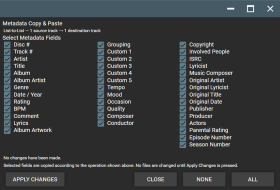
Metadata Copy & Paste brings flexible metadata copying and pasting to MediaMonkey 5 Mobile.
Copy selected metadata from one or more source tracks and paste it to one or more destination tracks using four transfer modes:
• One-to-One
• List-to-List
• One-to-Many
• Many-to-One
The detailed field-selection screen lets you choose exactly which metadata fields to transfer, including Artist, Title, Album, Album Artist, Genre, Date/Year, Rating, BPM, Comment, Lyrics, Composer, Conductor, Publisher, Producer, custom fields, and other supported track metadata.
Album Artwork can also be selected for transfer, either together with metadata or independently.
The addon is designed to provide functionality similar to the Copy Metadata / Paste Metadata features found in MediaMonkey 4's Advanced Duplicate Find & Fix, adapted for MediaMonkey 5 Mobile.
By
Project 37
Submitted by Project37
Updated 21/09/2026
Version History / Details
- Version:
- 3.3.3
- Updated:
- 21/09/2026
- Size:
- 4.68 KB
- License:
- None
- Works with:
- Media Monkey V2024.2.2 - V2024.2.2.3222
- Changes:
Version 3.3.3
Right click on a file and scroll down to "Edit tags" and then the popup screen will list "Copy Metadata" & "Paste Metadata" options.
• Added Album Artwork as a selectable transfer option.
• Album Artwork can be copied together with selected metadata or transferred independently.
• Album Artwork works with One-to-One, List-to-List, One-to-Many, and Many-to-One operations.
• Added support for transferring artwork across multiple source and destination tracks.
• Preserved the detailed metadata field-selection interface and existing transfer functionality.
• Tested on MediaMonkey 5 Mobile.

Adds basic support for the ITUNESADVISORY field to indicate explicit content.
By
Patrick Delancy
Submitted by patrickde
Updated 05/05/2023
Version History / Details
- Version:
- 1.0.25
- Updated:
- 05/05/2023
- Size:
- 32.87 KB
- License:
- MIT
- Works with:
- Media Monkey 5.0.2
- Changes:
- Add mobile device support by optionally embedding advisory indicator in track title
- Add action menu to sync advisory tag to track title
- Add hotkey support for setting or clearing explicit flag for current playing track
- Fix performance issue when updating multiple tracks at once
- Fix bug when trying to set advisory rating from playing list
- Version:
- 0.3.23
- Updated:
- 01/05/2023
- Size:
- 30.97 KB
- License:
- MIT
- Works with:
- Media Monkey 5.0.2
- Changes:
- Set ITUNESADVISORY extended tag from context menu
- Displays explicit content "E" on track summary when playing

A simple script that replaces a specified string in Song Title, Artist, Album and Album Artist
By
MPG IT Consulting
Submitted by MPG
Updated 10/12/2021
Version History / Details
- Version:
- 1.1.2
- Updated:
- 10/12/2021
- Size:
- 5.01 KB
- License:
- Public
- Works with:
- Media Monkey 5.0 - 5.x
- Changes:
Following updates in 1.1.2
- Added replaceAll to all replaces
- adjusted style to window
- Version:
- 1.1.1
- Updated:
- 09/12/2021
- Size:
- 5.03 KB
- License:
- Public
- Works with:
- Media Monkey 5.0 - 5.x
- Changes:
Now added to the context menu.
Also made the window resizeable.
- Version:
- 1.1
- Updated:
- 08/12/2021
- Size:
- 5.04 KB
- License:
- Public
- Works with:
- Media Monkey 5.0 - 5.x
- Changes:
Updated to do a replace all instead of a single replace.
- Version:
- 1.0
- Updated:
- 09/11/2021
- Size:
- 5.02 KB
- License:
- Public
- Works with:
- Media Monkey 5.0.0 - 5.0.1
- Changes:
Icon is now in two places.
- Version:
- 1.0
- Updated:
- 09/11/2021
- Size:
- 3.92 KB
- License:
- Public
- Works with:
- Media Monkey 5.0.0 - 5.0.1
Sets Tempo tag based on BPM tag, according to these breakpoints:
- Largo <= 60
- Larghetto <= 66
- Adagio <= 76
- Andante <= 108
- Moderato <= 120
- Allegro <= 168
- Presto <= 200
- Prestissimo > 200
By
Thomas F Goodwin
Submitted by thomasfgoodwin
Updated 17/03/2023
Version History / Details
- Version:
- 1.0
- Updated:
- 17/03/2023
- Size:
- 1.11 KB
- License:
- MIT
- Works with:
- Media Monkey 5.0

Spell Check song title
By
MPG IT Consulting
Submitted by MPG
Updated 08/12/2021
Version History / Details
- Version:
- 1.0
- Updated:
- 08/12/2021
- Size:
- 8.58 KB
- License:
- Public
- Works with:
- Media Monkey 5.0 - 5.x
- Changes:
Performs a spell check on song title.
Allows you to convert "featured" artists from a track's Title or Artist fields and add it to the list of Artist(s).
For example:
Title:Â Despacito ft. Daddy Yankee
Artist: Luis Fonsi
converts to:
Title: Despacito
Artist: Luis Fonsi; Daddy Yankee
By
Ventis Media, Inc.
Submitted by drakinite
Updated 24/11/2021

Allows you to quickly fix the separator for fields with multiple values, such as genre and artist, to the correct separator which is used by MediaMonkey (configured in Options > Library > Fields).
For example:
Artist: "Artist1, Artist2" -> "Artist1; Artist2"
By
Ventis Media, Inc.
Submitted by drakinite
Updated 11/12/2021
Version History / Details
- Version:
- 1.0.3
- Updated:
- 11/12/2021
- Size:
- 5.27 KB
- Works with:
- Media Monkey 5.0
- Changes:
Added an icon.
- Version:
- 1.0.2
- Updated:
- 04/11/2021
- Size:
- 3.67 KB
- Works with:
- Media Monkey 5.0.0 - 5.0.2
- Changes:
Renamed addon, changed descriptions & visuals
- Version:
- 1.0.1
- Updated:
- 28/06/2021
- Size:
- 3.45 KB
- Works with:
- Media Monkey 5.0.0 - 5.0.1
Sync&Edit DateAdded
This MediaMonkey addon updates DateAdded for all tracks in an album based on the album's first play date.
Version
Current version: 1.2.0
Features
opens a dialog to review and adjust the target value before saving
uses the album's first play date as the initial and maximum value for played albums
supports unplayed albums by using the current date and time as the allowed upper limit
provides a button to set the current date and time for unplayed albums
opens with compact or wide layout depending on required content width
writes DateAdded for all tracks in the album to the database and then triggers MediaMonkey tag syncing
processes only the first album in a mixed multi-selection and shows a notice
Behavior
if the first selected track has no album, the action is canceled
for played albums, the editor opens with the first play date preselected
for unplayed albums, the editor opens with the current DateAdded value or the current date and time
invalid values such as future dates or values after the allowed limit are blocked
Menu Entry
The menu entry is available under Edit Tags.
By
AI (inspired by Fetzenschaedl)
Submitted by fetzenschaedl
Updated 13/10/2026
Version History / Details
- Version:
- 1.2.2
- Updated:
- 13/10/2026
- Size:
- 9.47 KB
- Works with:
- Media Monkey 2024 - 2027
- Changes:
NEW IN 1.2.2 (documentation only)
README now contains a short guide for the "Custom nodes" addon: a ready-to-use SQL query (LIMIT 50) that lists albums whose DateAdded day differs from the day of the first play (time of day is ignored). Variants: use ">" for DateAdded after first play (invalid state) or "<" for DateAdded before first play.
- Version:
- 1.2.1
- Updated:
- 18/04/2026
- Size:
- 8.31 KB
- Works with:
- Media Monkey 2024
- Changes:
## 1.2.1
- fixed DST/local timezone bug in DateAdded writes so manually selected local times are preserved after saving
- Version:
- 1.2
- Updated:
- 25/03/2026
- Size:
- 8.08 KB
- Works with:
- Media Monkey 2024

An addon for removing (or even adding) leading zeroes from (or to) numerical tags.
By
Samuel Bruce
Submitted by samuelbruce
Updated 06/04/2025
Version History / Details
- Version:
- 1.0
- Updated:
- 06/04/2025
- Size:
- 43.14 KB
- Works with:
- Media Monkey 5 - 2024
- Changes:
Initial release