Addons in this category provide features to fix tracks' metadata.
Replace all the different types of unicode apostrophes with the standard one in all of the main metadata fields.
i.e., `´‘’ all convert to '
(Technically, U+0060, U+00B4, U+2018, and U+2019 all are replaced with U+0027.)
(Fields checked/affected are: Album, Album Artist, Artist, Composer, Conductor, Involved People, Lyricist, Original Artist, Original Title, Producer, Publisher, Quality, Summary, Tempo, and Title)
By
Keeps
Submitted by Keeps
Updated 02/04/2022
Populate custom fields to generate clean filenames. Then use e.g. this pattern with Auto-organize files: [Path]<Genre><Custom 2> - <Custom 3><Track #:2> - <Custom 4>
By
Stefan Raffeiner
Submitted by sraffeiner
Updated 11/12/2021
Version History / Details
- Version:
- 1.1.3
- Updated:
- 11/12/2021
- Size:
- 4.91 KB
- Works with:
- Media Monkey 5.0.1 - 5.0.1

This utility will remove metadata from all fields except:
- Title
- Artist
- Album
- Genre
- Track #
- Date
- Start Time and Stop Time
- Play Counter and Skip Counter
- Track Volume and Album Volume
Please use with caution!
By
MPG IT Consulting
Submitted by MPG
Updated 23/12/2022

Allows you to:
- Copy tracks' fields from one to another, for example copying Artist to Composer or Title to Album
- Swap two of the tracks' fields, for example swapping Album Artist and Artist.
Access via Tools > Edit tags > Copy field to field... and Tools > Edit tags > Swap fields...
By
Ventis Media, Inc.
Submitted by drakinite
Updated 06/10/2023
Version History / Details
- Version:
- 1.1.3
- Updated:
- 06/10/2023
- Size:
- 11.08 KB
- License:
- Ventis Limited Reciprocal License
- Works with:
- Media Monkey 5.1
- Changes:
Removed Author field (https://www.ventismedia.com/mantis/view.php?id=20250)
- Version:
- 1.1.2
- Updated:
- 29/08/2023
- Size:
- 11.27 KB
- License:
- Ventis Limited Reciprocal License
- Works with:
- Media Monkey 5.0
- Changes:
Added support for:
- Lyricist
- Genre
Additionally, now it doesn't let you swap a field with itself (e.g. swapping Lyrics with Lyrics).
- Version:
- 1.1.1
- Updated:
- 29/08/2023
- Size:
- 11.25 KB
- License:
- Ventis Limited Reciprocal License
- Works with:
- Media Monkey 5.0
- Changes:
Added support for:
- Date
- Original Date
- Comment
- Lyrics
- Tempo
- Mood
- Occasion
- Quality
- Initial Key
- Version:
- 1.0.1
- Updated:
- 13/03/2022
- Size:
- 10.53 KB
- License:
- Ventis Limited Reciprocal License
- Works with:
- Media Monkey 5.0.0
- Changes:
Added support for custom fields!
- Version:
- 1.0
- Updated:
- 13/03/2022
- Size:
- 10.36 KB
- License:
- Ventis Limited Reciprocal License
- Works with:
- Media Monkey 5.0.0
Removes the month and day from the Date tag, leaving just the year.
By
Keeps
Submitted by Keeps
Updated 10/09/2021
Version History / Details
- Version:
- 0.9
- Updated:
- 10/09/2021
- Size:
- 785 B
- License:
- Free
- Works with:
- Media Monkey 5 - 5

This utility will iterate through all selected songs and keep the first image identified as the front cover or the first image identified as being embedded. All other covers are removed.
By
MPG
Submitted by MPG
Updated 23/12/2022

Tag Utility does the following updates on TrackNo, Song Title, Artist, Album, AlbumArtist and Genre:
- Puts spaces before and after a forward slash
- Removes double spaces
- Changes @ to At
- Changes all brackets types to (
- Fixes contracted words
- Replaces Accented words
This utility is based of a MM4 utility originally made by Steegy aka RC (Ruben Castelein)
By
MPG
Submitted by MPG
Updated 24/12/2021
Version History / Details
- Version:
- 1.0.3
- Updated:
- 24/12/2021
- Size:
- 8.77 KB
- Works with:
- Media Monkey 5.0 - 5.x
- Changes:
Added Vertical Scroll Bar.Â
- Version:
- 1.0.2
- Updated:
- 23/12/2021
- Size:
- 8.73 KB
- Works with:
- Media Monkey 5.0 - 5.x
- Changes:
Fixed major bug where words were being updated incorrectly.
- Version:
- 1.0.1
- Updated:
- 09/12/2021
- Size:
- 42.03 KB
- Works with:
- Media Monkey 5.0 - 5.x
- Changes:
Now added to context menu
Should also mention this utility is for English language only.
- Version:
- 1.0
- Updated:
- 08/12/2021
- Size:
- 8.36 KB
- Works with:
- Media Monkey 5.0 - 5.x

a MediaMonkey addon for total control over your semi automated tagging thanks to the MusicBrainz API
By
djnizzi, NiZDesign
Submitted by djnizzi
Updated 20/11/2026
Version History / Details
- Version:
- 0.5.3
- Updated:
- 20/11/2026
- Size:
- 71.55 KB
- License:
- MIT
- Works with:
- Media Monkey 2024.x - 2024.x
- Changes:
0.5.3 "Responsive" Responsive: the window says when it is working
0.5.3 is a pass over Tag from MusicBrainz…: the window now shows that it is busy, and it stops drawing cards it has nothing to put in. The release-ID lookup, the disc/track matching and the one-write-path engine are unchanged.
- The window shows that it is working. Saving a release ID starts a release lookup in the background, and the reload after Apply reads the selection again; until now the only sign of either was a sentence, and Save ID stayed clickable. A small ring now turns beside the header sentence for as long as anything is being read or written, Save ID is greyed for the duration, and the window's cursor becomes the system's progress cursor. The ring is counted, not flagged, so it stays up until the last overlapping lookup or write has finished.
- No release, no comparison cards. An album without a release ID shows only the release lookup and its existing MusicBrainz tags. Fields to write and Selected tracks are not drawn at all until a release is loaded — including right after Save ID succeeds — instead of standing there empty. The cards are cleared on every reload, so a failed or replaced lookup cannot leave an old table behind.
- Guidance reads as guidance. The explanatory notes, the search and save statuses, the pending-work line, warnings and Apply's report are italic, so a sentence is not mistaken for a value. A release title in the header stays upright.
- More air between the cards. The gap is now 1rem instead of 10px.
- The feedback survives the host's skin. MediaMonkey applies its skin sheet after the window's own, so the ring's size, border and colour are pinned inline and it is also rotated from script; the italics, the card gap and the hidden cards are pinned the same way. This is the fix for the release candidate in which the ring was in the page but drew nothing on screen.
Install
Download LovesMBz.mmip below, then in MediaMonkey use Tools → Addons → Add and restart. Requires MediaMonkey 5.0.0 or later.
Upgrading from 0.5.2 replaces the add-on in place: no tags or library rows are migrated, and the write path is unchanged. Restart MediaMonkey fully after installing — the host keeps the dialog page it loaded at start-up, so the new window only appears after a restart.
- Version:
- 0.5.2
- Updated:
- 15/11/2026
- Size:
- 68.81 KB
- License:
- MIT
- Works with:
- Media Monkey 2024.x - 2024.x
- Changes:
Prettier: the tag window, cleaned up
0.5.2 is a polish pass on Tag from MusicBrainz…. The release-ID lookup, the disc/track matching and the one-write-path engine are unchanged; what changes is what the window shows and when it lets you write.
- Four cards instead of one long sheet. Release, Fields to write, Selected tracks and MusicBrainz tags are now drawn as the rounded, titled boxes MediaMonkey's own settings panels use — a fieldset and its legend, like ParaDeeJay's settings page. The release overview and Album release ID share one card; an empty card is not drawn, and a release that disappears no longer leaves the old overview behind.
- A preview about the music. Selected tracks pairs Library title / Library artist with Release title / Release artist, and the ISRC and Recording ID columns are gone. Both IDs are still fetched and still written to the tags.
- Apply waits for a plan. The button stays greyed out, with a tooltip that says why, until the comparison has produced a plan and while the selection is being re-read after an apply or a Save ID. It can no longer report Updated 0 of 0 tracks because it was pressed mid-load.
- A write locks the window. While Apply runs, the field checkboxes, tag values, Add row, Save ID, library suggestions and disagreement-strip buttons are disabled, so an edit typed during the run cannot be silently discarded by the reload that follows. The lock clears even when a track fails; Party Mode stays read-only.
- The footer says what Apply will write. Beside the button: Will write 9 field changes on 5 tracks · 2 tag edits, counted per track and updated as fields are ticked and tags typed or cleared.
- Retry a failed lookup. MusicBrainz being busy, silent or unreachable now offers Retry in place, keeping any tag edits already made. A release ID MusicBrainz does not have gets a "check the release ID" note instead, because retrying that cannot help.
Install
Download LovesMBz.mmip below, then in MediaMonkey use Tools → Addons → Add and restart. Requires MediaMonkey 5.0.0 or later.
Upgrading from 0.5.1 replaces the add-on in place: no tags or library rows are migrated, and nothing about the write path changes.
- Version:
- 0.5.1
- Updated:
- 12/11/2026
- Size:
- 66.02 KB
- License:
- MIT
- Works with:
- Media Monkey 2024.x - 2024.x
- Changes:
Tag from MusicBrainz: one window for the whole job
0.5 replaces the old Track Properties → MusicBrainz tab and the separate Fill/Preview steps with a single window, opened from Edit → Tag Tools → Tag from MusicBrainz…, the track-list context menu, or the toolbar button. It reads the release behind the selected album's release ID, compares it with the library, and writes only what you tick when you press Apply.
- Selection-scoped. Lists the tracks you selected with the release row each one matched; a track with no counterpart is marked no match and skipped. Only the selection is shown — the window does not preview the release in full.
- Field table. Only the fields that differ, one checkbox each, with the current value, the MusicBrainz value and changes / total. A value that differs per track reads per track instead of listing every value.
- MusicBrainz extended tags. View, edit, add and delete tags, musicbrainz.org links, From the library suggestions, and the tag-vs-library disagreement strip with Update library where that already existed.
- Album release ID in the window. Validates the value, confirms before replacing an existing ID, writes Albums.MBGID and reloads on the new release; an empty value clears it. Library writes never go through the apply path.
- Open in MusicBrainz links for the release, its release group and the album artist, also built from the album and artist rows when the album has no release ID.
- One album at a time, with a confirmation prompt naming the albums for a multi-album selection; multi-disc releases match by disc and track number.
- One write path. Per track: the ticked native fields, one read and one merged ExtendedTags write (fill and tag changes together), then one commitAsync(). Nothing is written before Apply, closing the window writes nothing, and the Track Properties tab is gone.
- Toolbar button on the right-hand tool strip, also available under Options → Layout → Toolbar and hotkeyable.
New in 0.5.1
- Native-sized controls. The window uses MediaMonkey's own skinned Edit and Dropdown controls, so the text fields and the tag picker match the rest of the application, and the Album release ID field spans the row.
- Table headers sit flush left over their data and disappear when a table has no rows (an album without a release ID, for example).
- Original year is no longer written. It landed in the same library field as the original date and overwrote it.
- Apply can no longer hang. Reading the extended tags, writing them and the commit each have a 30-second deadline: a stalled track is reported as failed and the rest still commit. The status line counts Writing 3 of 8…, and the report names every failed track with its error.
- The toolbar button works immediately after start-up when tracks are already selected, without needing a selection change first.
- Release-block links use the host's link style, and the content column scrolls and fills the window.
Upgrading from 0.4.x
Fill/Preview and the Properties tab are replaced by Tag from MusicBrainz…. The release ID is still the only lookup key, SCRIPT and originalyear are still never written, and Disc # is still written as discNumberInt.
- Version:
- 0.4.1
- Updated:
- 09/11/2026
- Size:
- 61.25 KB
- License:
- MIT
- Works with:
- Media Monkey 2024.x - 2024.x
- Changes:
Loves MBz 0.4.1 is the first release of the addon we are submitting to MediaMonkey.
https://github.com/djnizzi/Loves-MBz/releases

Marks selected files as played (increases Played #) and sets 'Last Time Played' to now. Adds Mark selected files as played... to Edit tags. The action can additionally be set as a hotkey.
By
Ventis Media, Inc
Submitted by drakinite
Updated 06/03/2024
Version History / Details
- Version:
- 1.0.2
- Updated:
- 06/03/2024
- Size:
- 860 B
- Works with:
- Media Monkey 5.1.0
- Changes:
- Fixes adjusted to write the Played table too
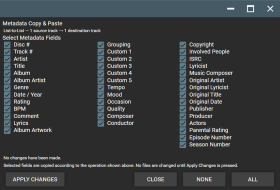
Metadata Copy & Paste brings flexible metadata copying and pasting to MediaMonkey 5 Mobile.
Copy selected metadata from one or more source tracks and paste it to one or more destination tracks using four transfer modes:
• One-to-One
• List-to-List
• One-to-Many
• Many-to-One
The detailed field-selection screen lets you choose exactly which metadata fields to transfer, including Artist, Title, Album, Album Artist, Genre, Date/Year, Rating, BPM, Comment, Lyrics, Composer, Conductor, Publisher, Producer, custom fields, and other supported track metadata.
Album Artwork can also be selected for transfer, either together with metadata or independently.
The addon is designed to provide functionality similar to the Copy Metadata / Paste Metadata features found in MediaMonkey 4's Advanced Duplicate Find & Fix, adapted for MediaMonkey 5 Mobile.
By
Project 37
Submitted by Project37
Updated 21/09/2026
Version History / Details
- Version:
- 3.3.3
- Updated:
- 21/09/2026
- Size:
- 4.68 KB
- License:
- None
- Works with:
- Media Monkey V2024.2.2 - V2024.2.2.3222
- Changes:
Version 3.3.3
Right click on a file and scroll down to "Edit tags" and then the popup screen will list "Copy Metadata" & "Paste Metadata" options.
• Added Album Artwork as a selectable transfer option.
• Album Artwork can be copied together with selected metadata or transferred independently.
• Album Artwork works with One-to-One, List-to-List, One-to-Many, and Many-to-One operations.
• Added support for transferring artwork across multiple source and destination tracks.
• Preserved the detailed metadata field-selection interface and existing transfer functionality.
• Tested on MediaMonkey 5 Mobile.

Adds basic support for the ITUNESADVISORY field to indicate explicit content.
By
Patrick Delancy
Submitted by patrickde
Updated 05/05/2023
Version History / Details
- Version:
- 1.0.25
- Updated:
- 05/05/2023
- Size:
- 32.87 KB
- License:
- MIT
- Works with:
- Media Monkey 5.0.2
- Changes:
- Add mobile device support by optionally embedding advisory indicator in track title
- Add action menu to sync advisory tag to track title
- Add hotkey support for setting or clearing explicit flag for current playing track
- Fix performance issue when updating multiple tracks at once
- Fix bug when trying to set advisory rating from playing list
- Version:
- 0.3.23
- Updated:
- 01/05/2023
- Size:
- 30.97 KB
- License:
- MIT
- Works with:
- Media Monkey 5.0.2
- Changes:
- Set ITUNESADVISORY extended tag from context menu
- Displays explicit content "E" on track summary when playing

A simple script that replaces a specified string in Song Title, Artist, Album and Album Artist
By
MPG IT Consulting
Submitted by MPG
Updated 10/12/2021
Version History / Details
- Version:
- 1.1.2
- Updated:
- 10/12/2021
- Size:
- 5.01 KB
- License:
- Public
- Works with:
- Media Monkey 5.0 - 5.x
- Changes:
Following updates in 1.1.2
- Added replaceAll to all replaces
- adjusted style to window
- Version:
- 1.1.1
- Updated:
- 09/12/2021
- Size:
- 5.03 KB
- License:
- Public
- Works with:
- Media Monkey 5.0 - 5.x
- Changes:
Now added to the context menu.
Also made the window resizeable.
- Version:
- 1.1
- Updated:
- 08/12/2021
- Size:
- 5.04 KB
- License:
- Public
- Works with:
- Media Monkey 5.0 - 5.x
- Changes:
Updated to do a replace all instead of a single replace.
- Version:
- 1.0
- Updated:
- 09/11/2021
- Size:
- 5.02 KB
- License:
- Public
- Works with:
- Media Monkey 5.0.0 - 5.0.1
- Changes:
Icon is now in two places.
- Version:
- 1.0
- Updated:
- 09/11/2021
- Size:
- 3.92 KB
- License:
- Public
- Works with:
- Media Monkey 5.0.0 - 5.0.1
Sets Tempo tag based on BPM tag, according to these breakpoints:
- Largo <= 60
- Larghetto <= 66
- Adagio <= 76
- Andante <= 108
- Moderato <= 120
- Allegro <= 168
- Presto <= 200
- Prestissimo > 200
By
Thomas F Goodwin
Submitted by thomasfgoodwin
Updated 17/03/2023
Version History / Details
- Version:
- 1.0
- Updated:
- 17/03/2023
- Size:
- 1.11 KB
- License:
- MIT
- Works with:
- Media Monkey 5.0

Spell Check song title
By
MPG IT Consulting
Submitted by MPG
Updated 08/12/2021
Version History / Details
- Version:
- 1.0
- Updated:
- 08/12/2021
- Size:
- 8.58 KB
- License:
- Public
- Works with:
- Media Monkey 5.0 - 5.x
- Changes:
Performs a spell check on song title.
Allows you to convert "featured" artists from a track's Title or Artist fields and add it to the list of Artist(s).
For example:
Title:Â Despacito ft. Daddy Yankee
Artist: Luis Fonsi
converts to:
Title: Despacito
Artist: Luis Fonsi; Daddy Yankee
By
Ventis Media, Inc.
Submitted by drakinite
Updated 24/11/2021

Allows you to quickly fix the separator for fields with multiple values, such as genre and artist, to the correct separator which is used by MediaMonkey (configured in Options > Library > Fields).
For example:
Artist: "Artist1, Artist2" -> "Artist1; Artist2"
By
Ventis Media, Inc.
Submitted by drakinite
Updated 11/12/2021
Version History / Details
- Version:
- 1.0.3
- Updated:
- 11/12/2021
- Size:
- 5.27 KB
- Works with:
- Media Monkey 5.0
- Changes:
Added an icon.
- Version:
- 1.0.2
- Updated:
- 04/11/2021
- Size:
- 3.67 KB
- Works with:
- Media Monkey 5.0.0 - 5.0.2
- Changes:
Renamed addon, changed descriptions & visuals
- Version:
- 1.0.1
- Updated:
- 28/06/2021
- Size:
- 3.45 KB
- Works with:
- Media Monkey 5.0.0 - 5.0.1
Sync&Edit DateAdded
This MediaMonkey addon updates DateAdded for all tracks in an album based on the album's first play date.
Version
Current version: 1.2.0
Features
opens a dialog to review and adjust the target value before saving
uses the album's first play date as the initial and maximum value for played albums
supports unplayed albums by using the current date and time as the allowed upper limit
provides a button to set the current date and time for unplayed albums
opens with compact or wide layout depending on required content width
writes DateAdded for all tracks in the album to the database and then triggers MediaMonkey tag syncing
processes only the first album in a mixed multi-selection and shows a notice
Behavior
if the first selected track has no album, the action is canceled
for played albums, the editor opens with the first play date preselected
for unplayed albums, the editor opens with the current DateAdded value or the current date and time
invalid values such as future dates or values after the allowed limit are blocked
Menu Entry
The menu entry is available under Edit Tags.
By
AI (inspired by Fetzenschaedl)
Submitted by fetzenschaedl
Updated 01/11/2026
Version History / Details
- Version:
- 1.3.1
- Updated:
- 01/11/2026
- Size:
- 38.17 KB
- Works with:
- Media Monkey 2024 - 2027
- Changes:
## 1.3.1
- new: click on album artist / album in the batch results opens it in the main window (Entire Library); click elsewhere in a row ticks it
- menus bundled: Edit Tags > Sync&Edit DateAdded (batch) > Find albums... / Undo last DateAdded sync; Tools menu entry removed## 1.3.0
- new: batch mode (search albums by DateAdded vs first play difference, review table with tick boxes, one-commit sync)
- new: undo of the last sync (batch or single), Tools > Sync&Edit DateAdded menu
- Version:
- 1.2.2
- Updated:
- 13/10/2026
- Size:
- 9.47 KB
- Works with:
- Media Monkey 2024 - 2027
- Changes:
NEW IN 1.2.2 (documentation only)
README now contains a short guide for the "Custom nodes" addon: a ready-to-use SQL query (LIMIT 50) that lists albums whose DateAdded day differs from the day of the first play (time of day is ignored). Variants: use ">" for DateAdded after first play (invalid state) or "<" for DateAdded before first play.
- Version:
- 1.2.1
- Updated:
- 18/04/2026
- Size:
- 8.31 KB
- Works with:
- Media Monkey 2024
- Changes:
## 1.2.1
- fixed DST/local timezone bug in DateAdded writes so manually selected local times are preserved after saving
- Version:
- 1.2
- Updated:
- 25/03/2026
- Size:
- 8.08 KB
- Works with:
- Media Monkey 2024

An addon for removing (or even adding) leading zeroes from (or to) numerical tags.
By
Samuel Bruce
Submitted by samuelbruce
Updated 06/04/2025
Version History / Details
- Version:
- 1.0
- Updated:
- 06/04/2025
- Size:
- 43.14 KB
- Works with:
- Media Monkey 5 - 2024
- Changes:
Initial release